EasyManua.ls Logo

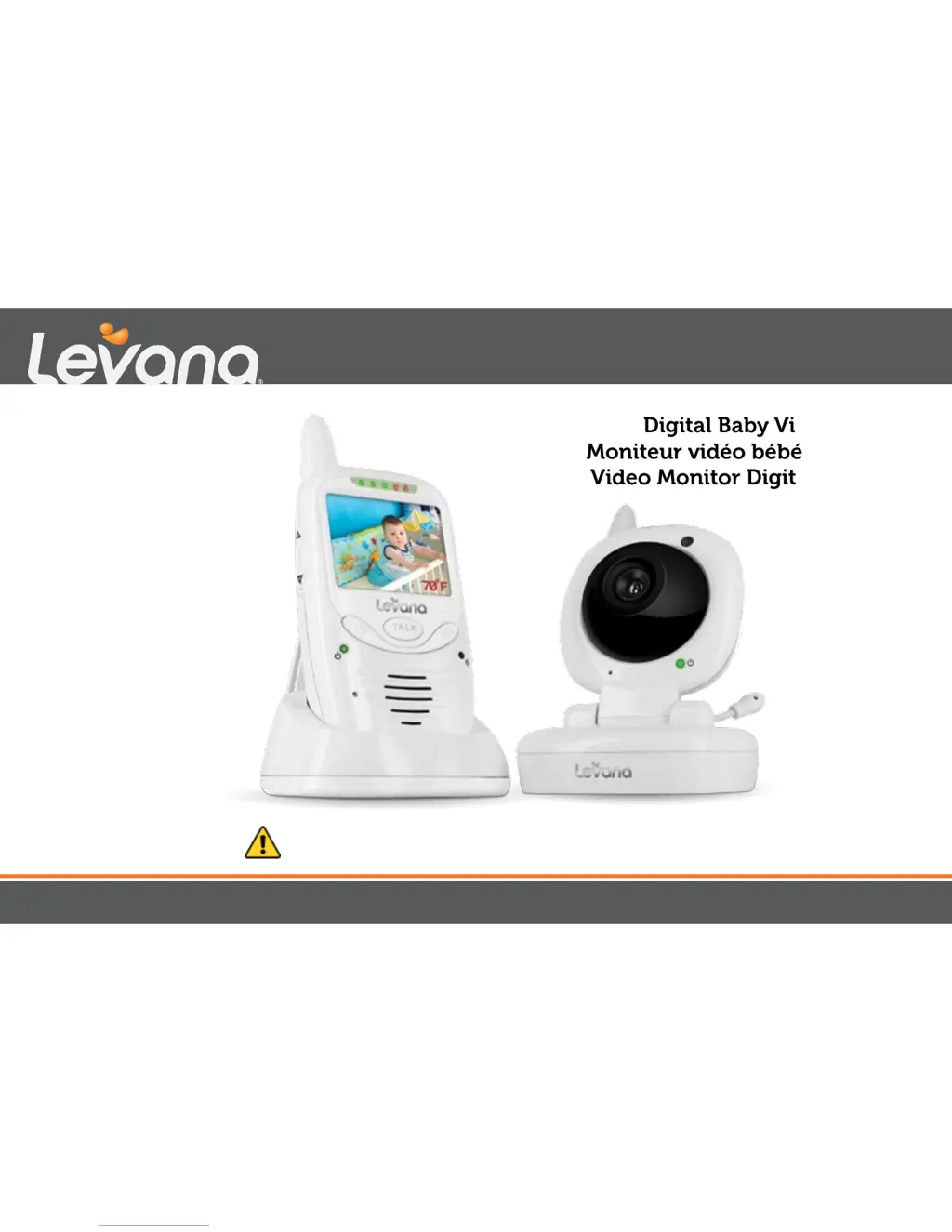
Levana jena - User Manual

Levana jena
67 pages
Print Icon
To Next Page IconTo Next Page
Loading...
Jena
mylevana.com
Digital Baby Video Monitor
Moniteur vidéo bébé numérique
Video Monitor Digital para Bebé
MANUAL
MANUEL
MANUAL
CAUTION: Keep small parts away from children.
ATTENTION: Gardez les petites pièces hors de la portée des enfants.
PRECAUCIÓN: Mantenga las piezas pequeñas fuera del alcance de los niños.

Table of Contents

Other manuals for Levana jena

Questions and Answers

  • M
    Matthew AndersonAug 12, 2025
    What to do if Levana Baby Monitor rechargeable battery will not charge?
    • H
      Heather ConwayAug 12, 2025
      If the rechargeable battery of your Levana Baby Monitor won't charge, check that the power adapters are properly connected. Also, make sure the battery pack is correctly connected inside the battery compartment.
  • J
    John SilvaAug 16, 2025
    Why is there feedback (screeching, static) on Levana jena?
    • S
      Sandra WalkerAug 16, 2025
      Static or screeching on your Levana Baby Monitor can occur when the camera and monitor are too close together. Try moving them further apart. Also, check that the volume on the monitor isn't set too high and lower it if necessary.
  • K
    Kristina GonzalezAug 19, 2025
    How to fix reception interference (static) on Levana jena?
    • M
      Mark MartinAug 19, 2025
      If you are experiencing reception interference (static) with your Levana Baby Monitor, try these steps: reduce the distance between the camera and monitor. Ensure the battery is fully charged. Remove any nearby electronic devices that could be interfering with the signal. Also, relocate the camera or monitor away from metal objects.
  • J
    John RamirezAug 25, 2025
    Why is there no reception on my Levana jena Baby Monitor?
    • M
      Matthew ContrerasAug 25, 2025
      If you're not getting any reception on your Levana Baby Monitor, the camera and monitor might not be correctly paired. Follow the pairing instructions to ensure they are properly connected. Also, the camera may be too far from the monitor, so try moving the camera closer.
  • D
    dgutierrezAug 27, 2025
    What to do if Levana Baby Monitor equipment does not function?
    • Z
      zburtonAug 27, 2025
      If your Levana Baby Monitor isn't functioning, first, check that both the camera and monitor are turned ON. If they are on, the battery might be low, so try charging it. Also, make sure the power adapters are correctly connected.
  • S
    shawmariaAug 31, 2025
    Why is the picture black and white on my Levana jena?
    • A
      abrowningAug 31, 2025
      If your Levana Baby Monitor picture is black and white, the night vision LEDs may be on. Try increasing the amount of light in the room you're monitoring.
  • C
    Colleen CoxSep 4, 2025
    How to fix Levana Baby Monitor when picture works but there is no sound?
    • K
      Kristen RobertsSep 4, 2025
      If you see a picture on your Levana Baby Monitor but there is no sound, the volume setting may be too low. Try increasing the volume setting.
  • J
    Jonathan WheelerSep 8, 2025
    Why is the day/night vision whitewashed on Levana jena?
    • C
      Charles TaylorSep 8, 2025
      If the day/night vision on your Levana Baby Monitor is whitewashed, ensure that the night vision light sensor is pointed away from a wall and is not covered.

Summary

FCC and Compliance Information

FCC Warning and Compliance

Details FCC regulations, warnings, and interference guidelines.

IC Statement and Compliance

Outlines Industry Canada compliance and operational conditions.

Product Setup and Power

Battery Installation Procedures

Step-by-step guide for installing batteries in the monitor and camera.

Maximizing Battery Performance

Tips to enhance the longevity and efficiency of the rechargeable battery.

Connecting Power Adapters

Instructions for connecting power to both the monitor and camera units.

Screen Icons and Display

Understanding Display Icons

Explanation of various icons for signal, battery, temperature, and modes on the monitor.

Operating the Baby Monitor

Initial Power On and Pairing

Guide to turning on the monitor and pairing cameras for first use.

Camera and Monitor Placement

Recommendations for optimal positioning of the camera and monitor units.

Night Vision, Pan;Tilt, and Zoom

How to use advanced camera view features like night vision, panning, tilting, and zooming.

Two-Way Talk and Nightlight

Instructions for using the intercom feature and controlling the nightlight.

Sound Activation and Screen Settings

Details on lullabies, screen timeout, camera switching, and brightness adjustment.

Temperature Monitoring Setup

Guide to setting temperature units and configuring temperature range alarms.

Troubleshooting and Maintenance

Resolving Common Issues

Solutions for problems like equipment malfunction, reception loss, and feedback.

Unit Care and Cleaning

Guidelines for maintaining the monitor and camera's condition.

Technical Specifications

Monitor Technical Details

Comprehensive specifications for the monitor unit.

Camera Technical Details

Comprehensive specifications for the camera unit.

Levana jena Specifications

General IconGeneral
Display TypeLCD
Night VisionYes
Two-Way AudioYes
WirelessYes
Number of Cameras1
Talk-Back FunctionYes
Temperature MonitoringYes
LullabiesYes
Battery TypeRechargeable
Sound ActivationYes
Power SourceBattery and AC adapter

Related product manuals