EasyManua.ls Logo

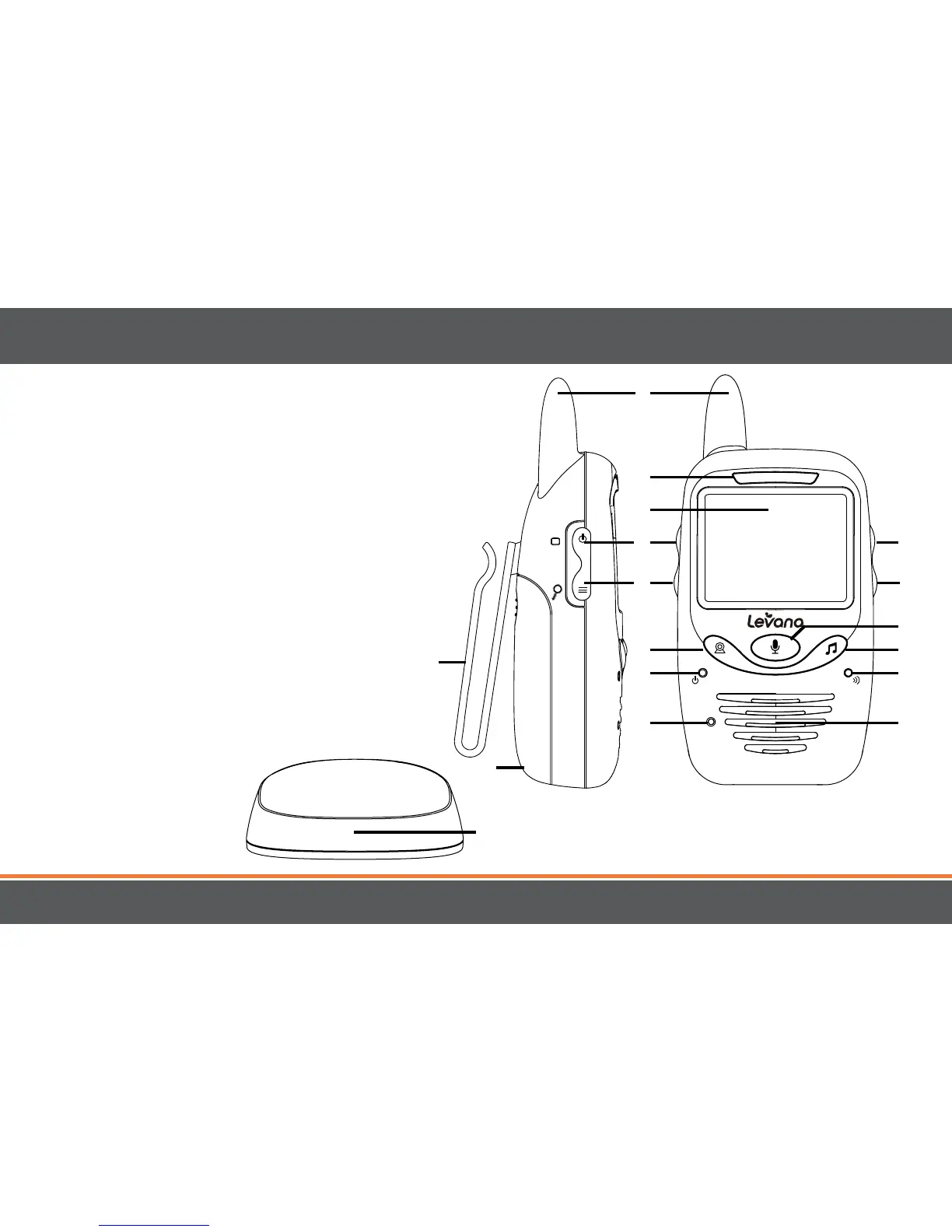
Levana jena - Buttons and Connections - Monitor

Levana jena
67 pages
Print Icon
To Next Page IconTo Next Page
To Previous Page IconTo Previous Page
Loading...
7
MONITOR
1. ANTENNA
Transmits and receives
signals
2. VOLUME LEDS
Indicates the amount of
sound being heard by
the camera
3. 2.4" SCREEN
4. POWER/SCREEN ON-OFF
5. MENU/ZOOM BUTTON
6. BELT CLIP/TABLE STAND
7. PAIRING BUTTON
8. Power LED
Green when monitor has
power
9. MICROPHONE
Captures the sound of
your voice when using
Talk to Baby™
10. BATTERY COMPARTMENT
11. VOLUME +
Increases the volume
through the speaker
12. VOLUME 
Decreases the volume
through the speaker
13. TALK TO BABY™
Press and hold to talk,
release to listen
14. LULLABIES
5 Remote-controlled
lullabies to choose from
15. PAIRING LED
Flashes red quickly when
pairing
16. SPEAKER
17. CHARGING BASE
4
5
7
8
9
11
12
14
15
13
16
1
2
3
6
10
17

Table of Contents

Other manuals for Levana jena

Related product manuals