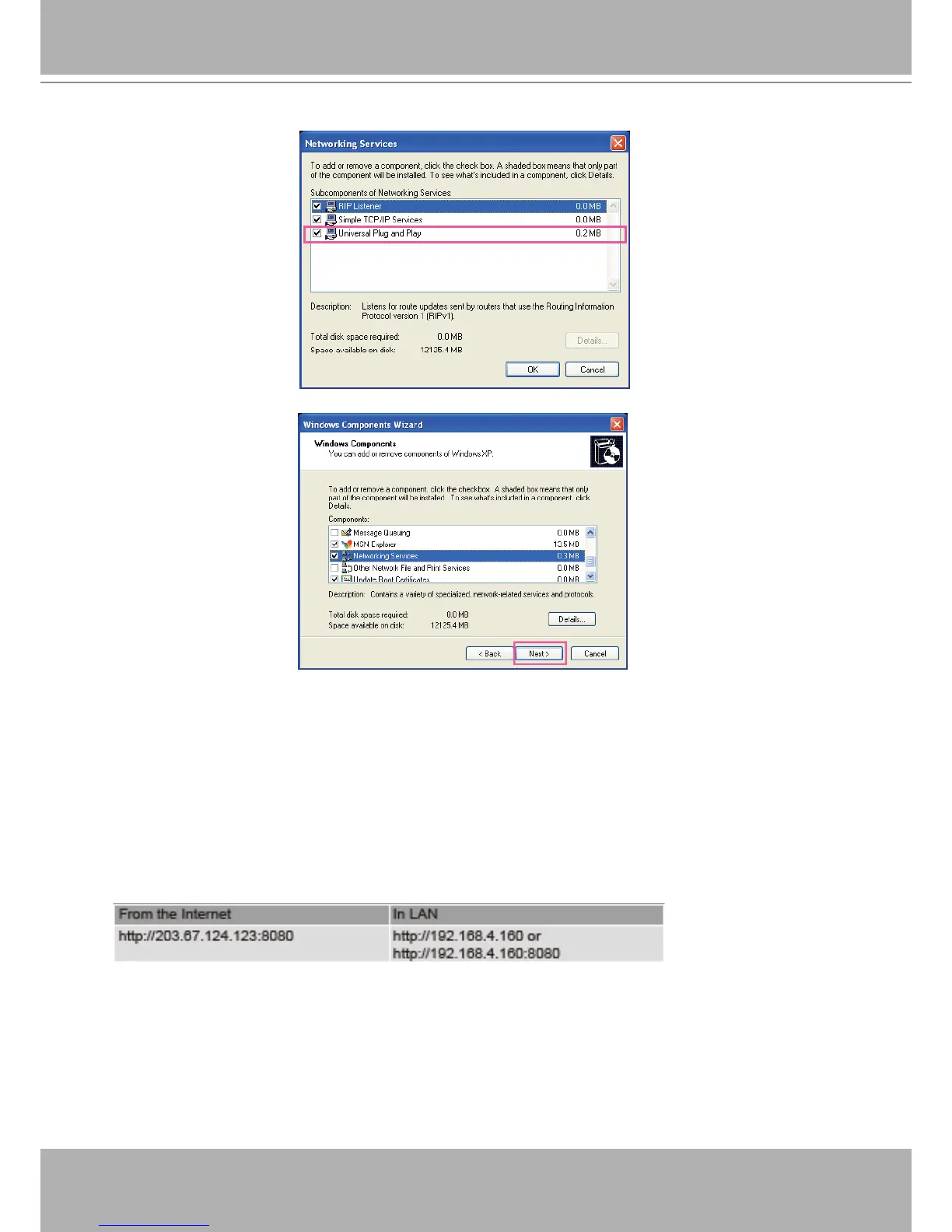
4. In the Networking Services dialog box, select Universal Plug and Play and click OK.
5. Click Next in the following window.
6. Click Finish. UPnP
TM
is enabled.
► How does UPnP
TM
work?
UPnP
TM
networking technology provides automatic IP conguration and dynamic discovery of devices
added to a network. Services and capabilities offered by networked devices, such as printing and le
sharing, are available among each other without the need for cumbersome network conguration. In
the case of Network Cameras, you will see Network Camera shortcuts under My Network Places.
► Enabling UPnP port forwarding allows the Network Camera to open a secondary HTTP port on the
router-not HTTP port-meaning that you have to add the secondary HTTP port number to the Network
Camera’s public address in order to access the Network Camera from the Internet. For example,
when the HTTP port is set to 80 and the secondary HTTP port is set to 8080, refer to the list below for
the Network Camera’s IP address.
► If the PPPoE settings are incorrectly configured or the Internet access is not working, restore the
Network Camera to factory default; please refer to Restore on page 102 for details. After the Network
Camera is reset to factory default, it will be accessible on the LAN.















 To Next Page