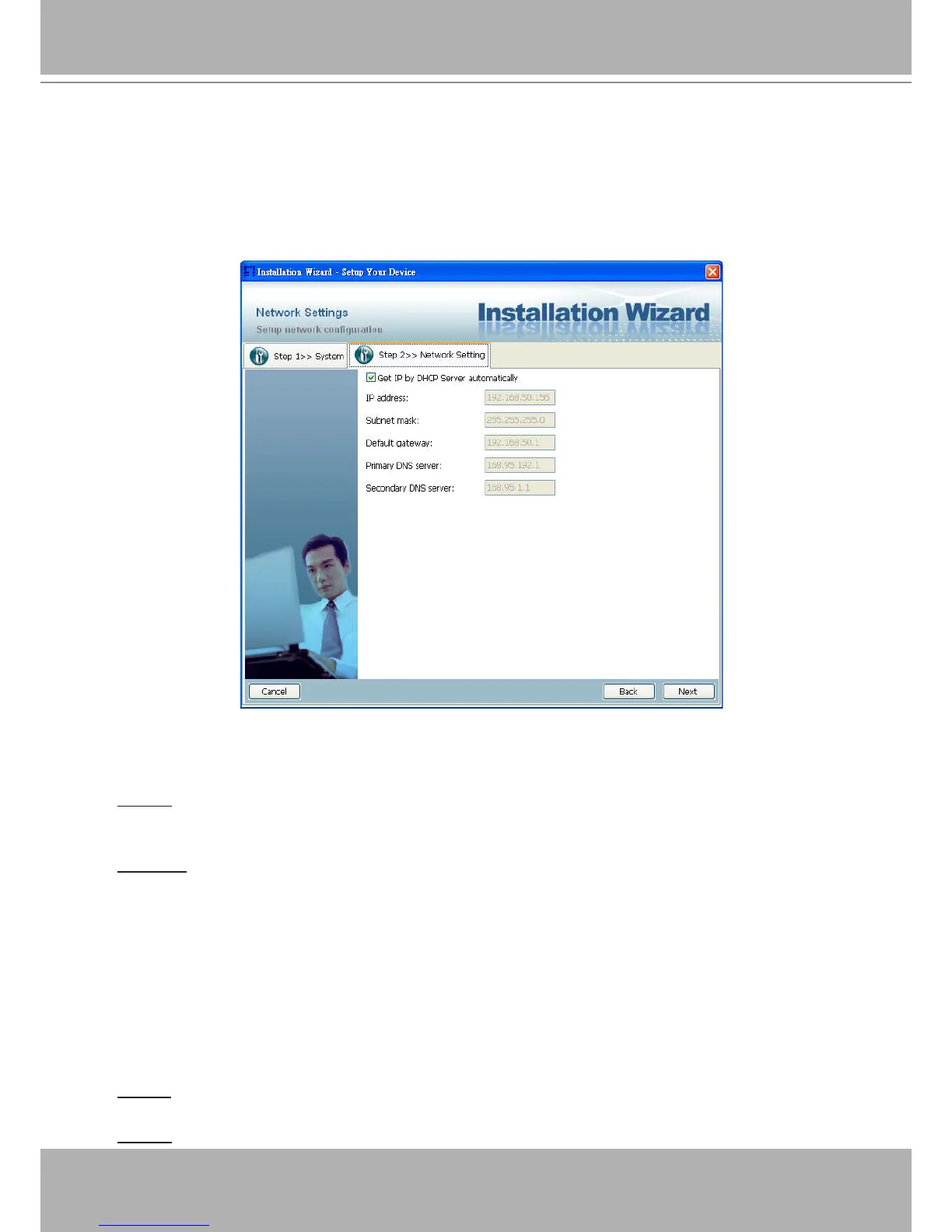
LAN Setting
If you click on “No” in the “Network Type” dialog window, you will be led to the Network setting
page. In this page, you can change the server’s IP address, subnet mask, default gateway,
primary DNS server, secondary DNS and DHCP server. Please refer to the below page.
Network Setting for LAN
You could set up the network with DHCP or xed IP:
1.DHCP: Check the “Get IP by DHCP Server automatically” will force the device to renew its
IP address whenever it reboots, and the related network conguration is provided by the DHCP
server.
2.Fixed IP: If you want the device to use a xed IP, please uncheck the “Get IP by DHCP Serv-
er automatically” checkbox and assign a valid IP address, subnet mask, default gateway and
DNS server for the device.
Mobile Access
After nished the DDNS setting and click on the Next button. If your device supports mobile
viewer and you want to access the device by mobile phone, you can enable the “Mobile Access”
by clicking on the Yes button. The Installation Wizard will do some setting for mobile viewing
toward the device:
1.Video: The video codec will be set to MPEG-4, and the resolution will be set to 176x144 pix-
els.
2.Audio: The audio codec will be set to AAC.















 To Next Page