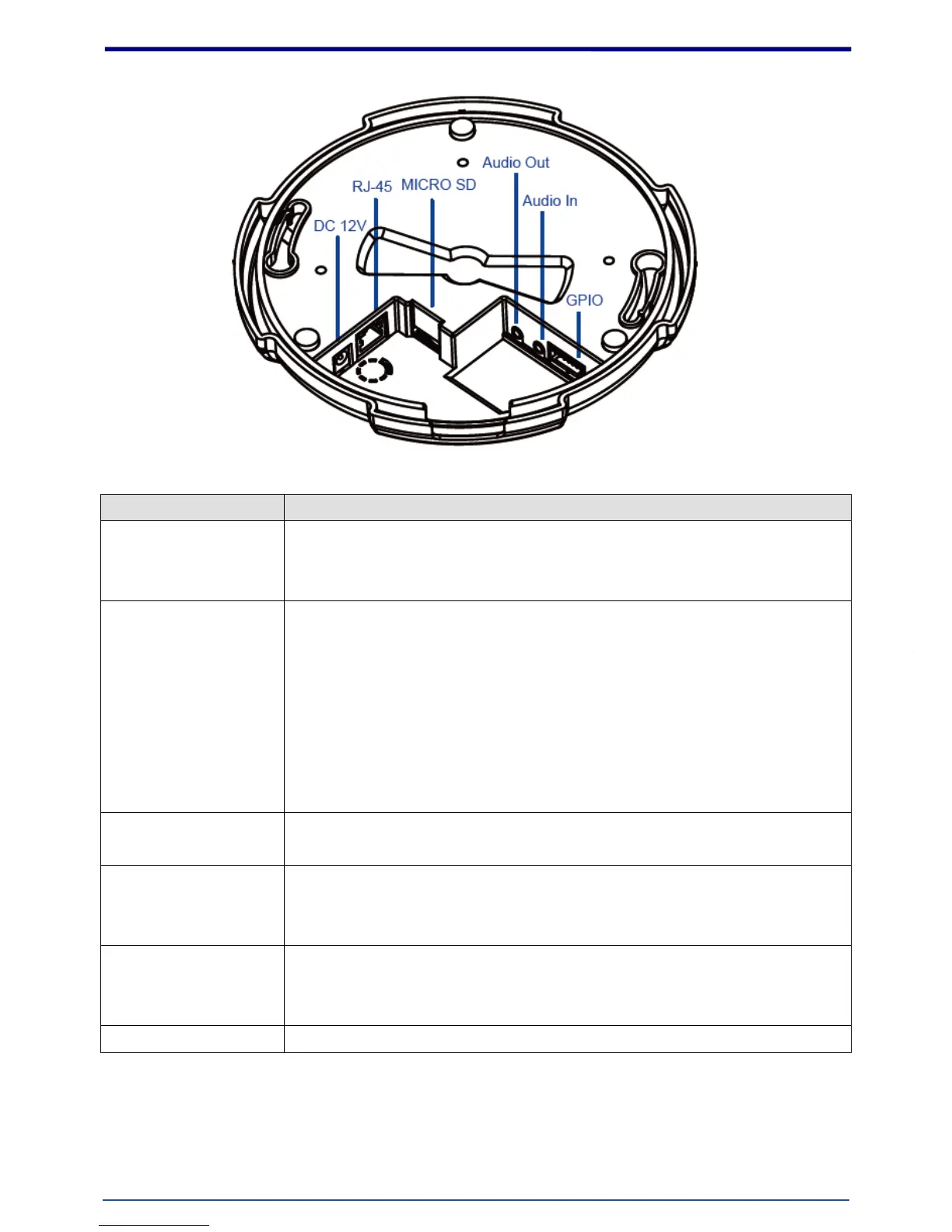
The input power is DC 12V, 2A.
Note: ONLY use package power adapter supplied with the internet.
Otherwise, the product may be damaged.
Connect to PC or Hub / Switch.
For connect to 10Base-T Ethernet or 100Base-TX Fast Ethernet Cabling.
This Ethernet port built audio-negotiation protocol which can detect or
negotiate the transmission speed of the network automatically.
Please use CAT-5 cable to connect the Network Camera to a 100Mbps Fast
Ethernet network switch or hub.
Note: ONLY use one power source, either from DC or from 802.3af Power
over Ethernet.
The IP Camera has built-in a MicroSD card slot which can accepts MicroSD
memory card for image / video event recording.
Connect a microphone to the IP Camera, be noted to use actively
microphone (normally with power supplier on microphone) for this
application.
Connect a loud speaker to the IP Camera.
This is for voice alerting and two-way audio. Be noted to use actively
speaker (normally with power supplier on speaker) for this application.
The 7 pin terminal block includes 4 input ports and 1 output ports.















 To Next Page