4.5 Gateway
4.5.1 WAN Setting
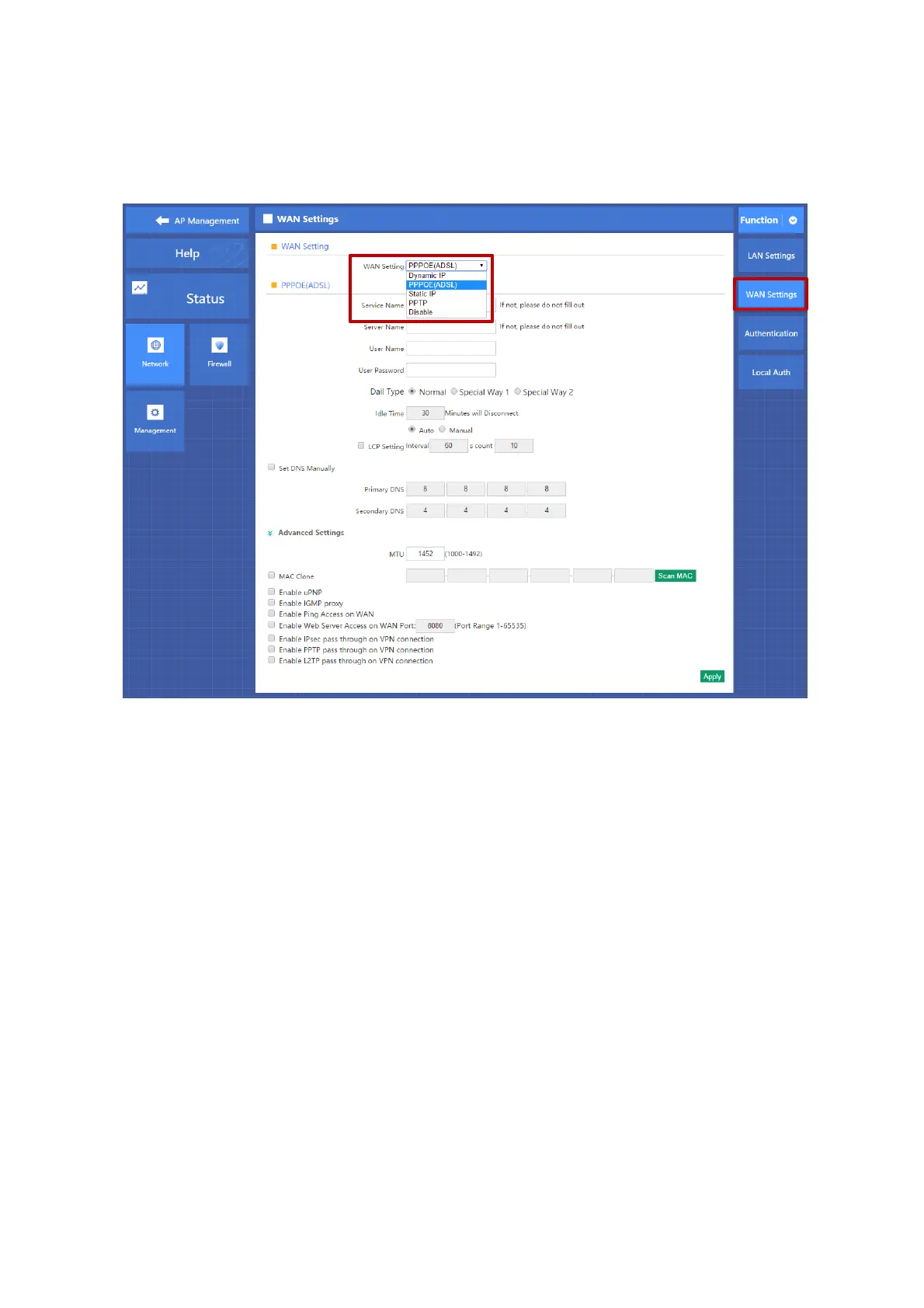
Click Gateway in the home page, then will pop up following page, click Network will automatically jump to the WAN settings
as P4-5-1.
P4-5-1 WAN Setting
When select to intelligent gateway, AC Controller will have a router function, can work as a main router with Gigabit
WAN/LAN port. It supports Dynamic IP, Static IP; PPPOE; PPTP.
Dynamic IP:
WAN interface obtains IP and DNS information through DHCP mode.
PPPOE(ADSL):
WAN interface obtains IP and DNS information via PPPOE dial-up mode.
Static IP:
Set IP and DNS information for WAN interface manual
PPTP:
WAN interface obtains IP and DNS information via PPTP mode
MAC Clone:
Specifies the WAN interface MAC, by clicking [Search MAC Address] button, and then will pop up a connected device's MAC,
select the MAC desired to clone. You can manually specify the MAC
Enable IGMP Proxy:
Enables IGMP proxy, this feature can be forwarded IGMP data from WAN to the LAN
Enable Ping Address on WAN:
This feature allows outer net to ping WAN
Enable Web Server Address on WAN port
Enable this feature, allows to manage AC Controller from outer net via a specified remote management port



 To Next Page