Chapter 3 Configuration Guide
3.1 Login Web Interface
AC Controller has normal power up, one port has been connected to the management host.
1) The management host has been properly installed IE 7.0 or higher browser version
2) AC Controller’s default IP address is 192.168.1.1, the management host IP address has been set the same network segment
with WAC-2000, namely 192.168.1.X (X is between 2-254 arbitrary integer Number), a subnet mask of 255.255.255.0.
3) In order to ensure a better effect of Web interface displays, it is recommended to adjust the display resolution to 1024 × 768
or more pixels.
Operation Steps:
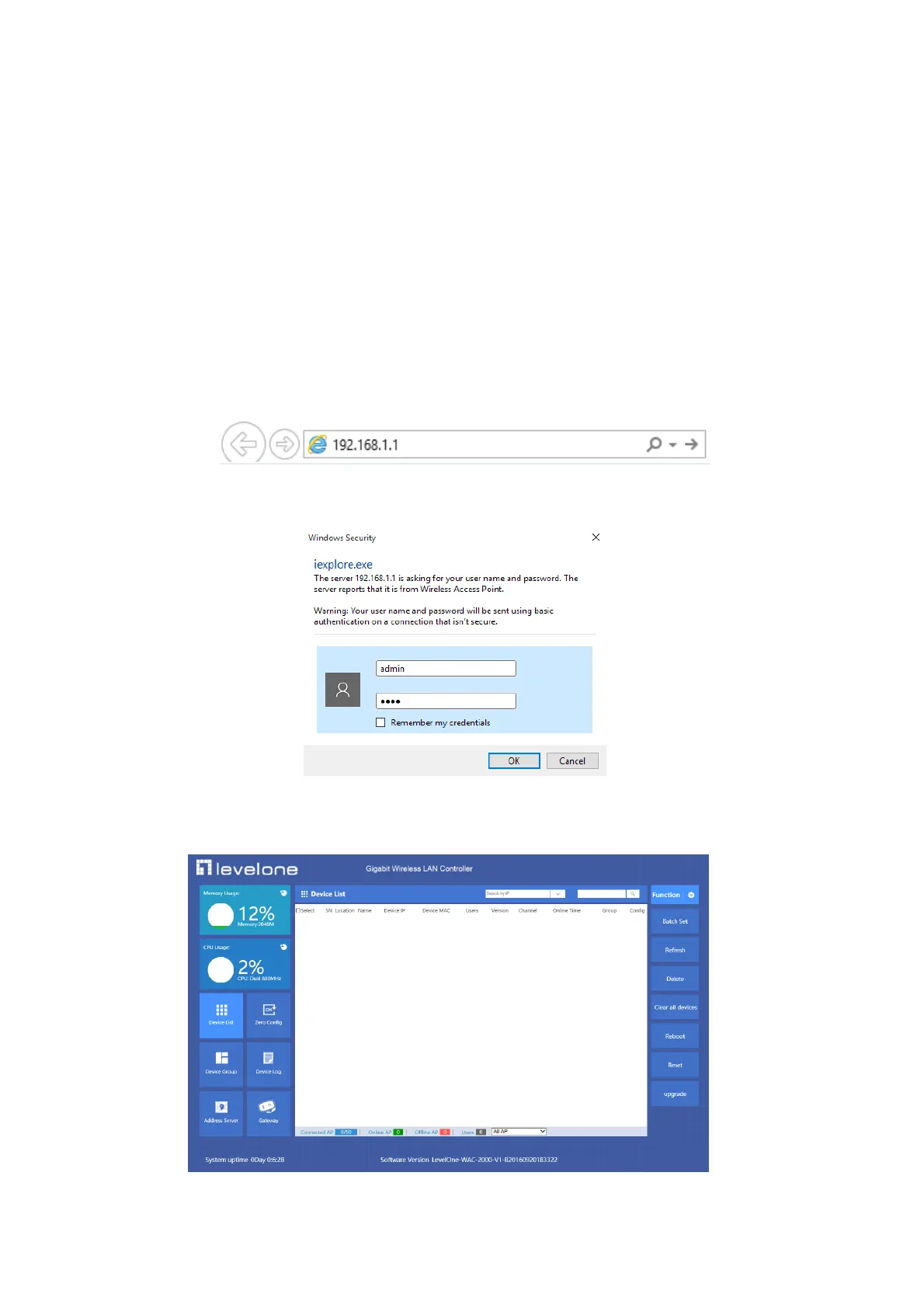
A. Open IE browser,Input http://192.168.1.1/ in the address bar to login AC Controller Web management interface.
B. AC Controller login screen shown in Figure 3-1. In this screen enter the AC Controller for user name and password, the
factory default is admin / admin, click <OK>.
P 3-1 Web Login page
C. After a successful login, then see AC 1000 Web interface page, shown in Figure 3-2.
3-2 AC Controller’s Web Interface page



 To Next Page