C
C
C
h
h
h
a
a
a
p
p
p
t
t
t
e
e
e
r
r
r
3
3
3
M
M
M
a
a
a
k
k
k
i
i
i
n
n
n
g
g
g
C
C
C
o
o
o
n
n
n
f
f
f
i
i
i
g
g
g
u
u
u
r
r
r
a
a
a
t
t
t
i
i
i
o
o
o
n
n
n
This product provides Web based configuration scheme, that is, configuring by your Web
browser, such as Mozilla Firefox or or Internet Explorer. This approach can be adopted in any
MS Windows, Macintosh or UNIX based platforms.
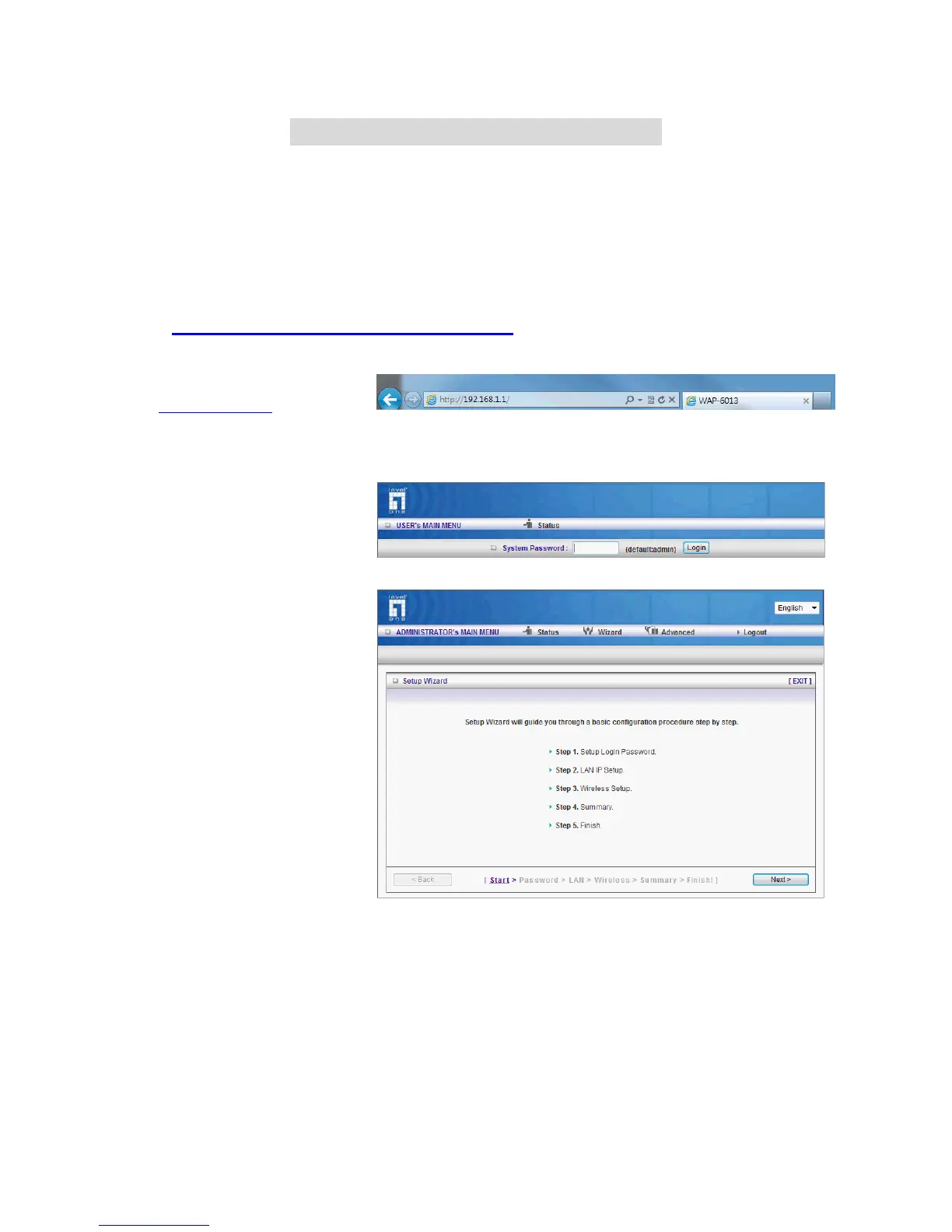
3.1 Login to Configure from Wizard
Type in the IP Address
(
http://192.168.1.1)
Type password, the default is
“admin” and click ‘login’ button.
Press “Wizard” for basic
settings with simple way,
Press “Next” to start wizard.















 To Next Page