EasyManua.ls Logo

Levitronix PuraLev 2000SU - 4.5 System Operation LPC-2000.1 (Stand-Alone); 4.5.1 State Diagram LPC-2000.1

Levitronix PuraLev 2000SU
42 pages
Print Icon
To Next Page IconTo Next Page
To Previous Page IconTo Previous Page
Loading...
User Manual for PuraLev
®
2000SU
www.levitronix.com
PL-4034-00, Rev02, DCO# 20-144
30
4.5 System Operation with LPC-2000.1 (Stand-Alone Version)
4.5.1 State Diagram of LPC-2000.1
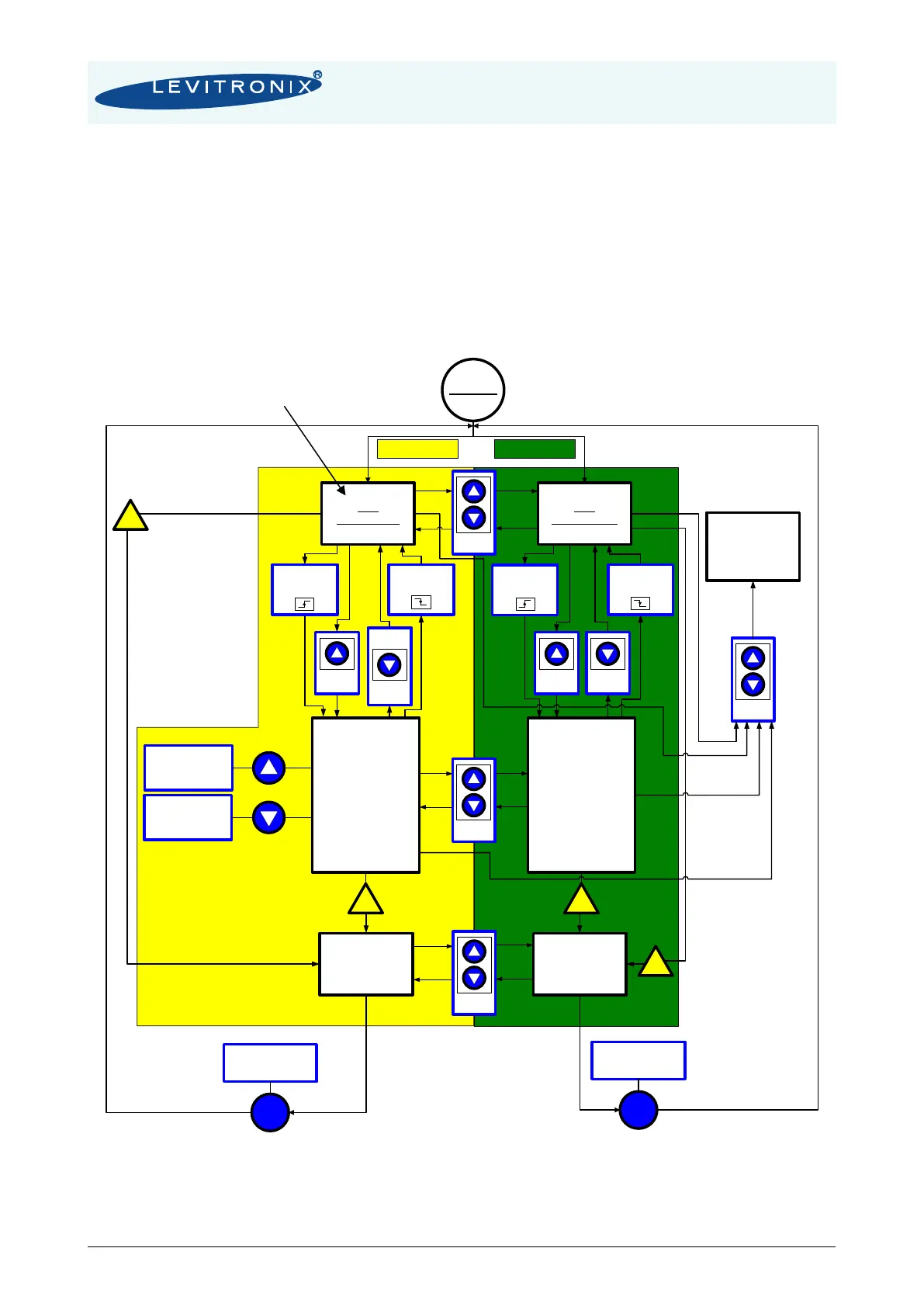
The controller LPC-2000.1 allows stand-alone operation with manual speed setting (“Button Control Mode”)
as well as extended operation with analog speed setting (Analog Control Mode). Figure 34 shows the state
diagram which can be controlled with the manual buttons and the signals on the “USER INTERFACE”
connector. The operation mode can be chosen by pressing the “UP” and “DOWN” buttons simultaneously
during 5 seconds. For the standard firmware default setting ex factory is “Button Control Mode”.
Figure 34: State diagram for operation with LPC-2000.1 controller
(Description is for firmware. For other configurations refer to alternate firmware documentation.)

Button Control Mode Analog Control Mode
Power On
OFF
ButtonControl
ON
(Speed Mode)
ButtonControl
Ref.-Speed set
to stored value*
OFF
AnalogControl
ON
(Speed Mode)
AnalogControl
Ref.-Speed set by
analog input
R
Reset Button
Ref. Speed
UP
Ref. Speed
DOWN
ButtonControl saved
in EEPROM
AnalogControl saved
in EEPROM
!
Error
!
Error
Enable
input = 0V
Enable
input = 0V
Enable
input = 24V
Press up
for 2 sec
Press down
for 2 sec
Press up
for 1 sec
Press down
for 1 sec
If Speed
@ 0 RPM
Press both
for 5 sec
Enable
input = 24V
!
Error
!
Error
Press both
for 5 sec
Press both
for 1 sec
Motor
Temperature
Returns to previously
active mode after
displaying temperature
twice
System Error
ButtonControl
System Error
AnalogControl
R
Reset Button
Press both
for 5 sec
Factory default setting