What to do if my Levoit Humidifier doesn’t turn on?
- MMichelle HamiltonAug 20, 2025
First, ensure the Levoit Humidifier is plugged into a working outlet and turned on. If it still doesn't turn on, try adding purified water to the water tank.
What to do if my Levoit Humidifier doesn’t turn on?
First, ensure the Levoit Humidifier is plugged into a working outlet and turned on. If it still doesn't turn on, try adding purified water to the water tank.
How to fix a Levoit LUH-A602S Humidifier with no mist?
If your Levoit Humidifier is producing little to no mist, try the following: * Increase the mist level setting. * Refill the water tank. * Empty the base chamber if it has too much water, then refill the water tank and place it properly on the base. * Check that the air inlets are not blocked and that the humidifier is on a level surface. * Clean the humidifier, ensuring the nozzles are clear. * If you washed the tank or base with detergent, rinse thoroughly. Also, clean or replace the water filter.
Why is my Levoit LUH-A602S making a noise?
If your Levoit Humidifier is making loud or unusual noises, ensure that the water tank is properly in place. Try setting the mist level to a lower setting. Also, empty the base chamber and refill the water tank, placing it correctly onto the base. If you're using the warm mist function, add more water to the tank if the water level is low.
Why is the light on my Levoit LUH-A602S red?
If the light on your Levoit Humidifier lights up red, you should fill the water tank and ensure it is placed properly on the base. Also, clean or replace the water filter.
Why does white dust appear around my Levoit LUH-A602S Humidifier?
The appearance of white dust around your Levoit Humidifier indicates that you may be using water with high mineral content. It is recommended to only use purified water. Also, ensure you regularly clean the humidifier.
What to do if the area around my Levoit Humidifier is wet?
If you notice dampness or condensation around your Levoit Humidifier, it could be due to high humidity. Try lowering the mist level, turning off the humidifier, or improving the room's ventilation by opening a door or window. Ensure the water tank is correctly placed, and wipe off any excess water when replacing it. Proper airflow is essential, so consider moving the humidifier to a more ventilated space.
Why does my Levoit Humidifier use water so fast?
A Levoit Humidifier may use water more quickly if the environment is cold or dry. Also, using the warm mist function will cause the humidifier to use water at a faster rate.
Why does my Levoit LUH-A602S Humidifier smell?
If your Levoit Humidifier is producing an unusual smell, and it is new, unplug it, rinse all parts, and let them air dry in a cool, dry place for 12 hours. If you used essential oils, rinse the aroma pad under clean water and let it dry.
How to stop water from leaking from my Levoit LUH-A602S Humidifier?
If water is leaking from your Levoit Humidifier, avoid running it in a room with over 60% relative humidity and make sure the humidifier is placed on a flat, level surface. Wipe any excess water off the top and bottom of the base, and do not shake the humidifier.
Why is mist leaking from the base of my Levoit LUH-A602S?
If mist is leaking from the base of your Levoit Humidifier, ensure the water tank is properly in place.
| Model Number | LUH-A602S |
|---|---|
| Water Tank Capacity | 6 liters |
| Coverage Area | 753 sq. ft. |
| Mist Output | 500 mL/h |
| Run Time | Up to 60 hours |
| Mist Levels | 3 |
| Humidistat | Yes |
| Auto Shut-off | Yes |
| Color | White |
| Humidity Sensor | Yes |
| Type | Ultrasonic |
| Smart Features | Voice Control, App Control |
| Noise Level | <30 dB |
| Weight | 5.5 lbs |
Provides essential safety precautions for operating the humidifier to prevent injury or damage.
Details safety measures related to the power cord, plug, and electrical hazards.
Highlights specific warnings regarding water, essential oils, and potential risks like leaks and electric shock.
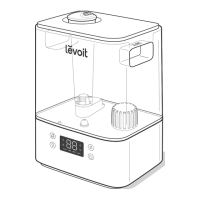
Illustrates and labels all parts and components of the humidifier for user identification.
Explains the function and meaning of all indicators and buttons on the humidifier's control panel.
Details the functionality of the On/Off, Warm Mist, and Sleep Mode buttons for device control.
Explains how to use the Mist Level, Humidity Level, Timer, and Wi-Fi indicator controls.
Guides on unboxing, cleaning, and proper placement of the humidifier for optimal operation.
Provides instructions and cautions on how to safely fill the humidifier's water tank.
Step-by-step guide to download, install, and connect the humidifier to the VeSync app.
Instructions for disconnecting and reconnecting the humidifier's Wi-Fi connection.
Explains how to turn on/off, adjust mist levels, and direct mist for everyday use.
Details how to activate and use the warm mist feature, including cautions.
Guides on customizing target humidity levels and automatic mist adjustment.
Instructions for setting the auto-shutoff timer and activating Sleep Mode for quiet operation.
Explains how to turn off the display manually or how it dims automatically.
Guides on using the aroma box with essential oils for aromatherapy, with usage notes.
Outlines general maintenance practices, cleaning frequency, and precautions.
Step-by-step instructions for disassembling the water tank, mist tube, and other components.
Provides instructions for descaling the humidifier using vinegar and cleaning all parts.
Instructions for cleaning and replacing the aroma and absorption pads for optimal performance.
Guides on correctly reassembling the humidifier after cleaning and proper storage procedures.
Solutions for problems related to the humidifier failing to power on or shutting off randomly.
Troubleshooting steps for when the humidifier produces little or no mist.
Addresses common problems like unusual noises, base leaks, and white dust formation.
Solutions for water visibly leaking from the unit or condensation buildup around it.
Resolves issues related to mist temperature, unusual smells, and mould growth.
Guides on incorrect humidity readings, sensor issues, and interpreting error codes.
Helps resolve problems with connecting the humidifier to the VeSync app via Bluetooth/Wi-Fi.
Solutions for when the humidifier is offline or the app shows incorrect humidity.
Contains FCC/IC notices, radiation exposure statements, and device compliance information.
Lists trademarks and registered names used within the user manual.
Details the 2-year limited warranty, terms, conditions, and exclusions for the product.
Provides contact details, email, phone number, and operating hours for customer assistance.