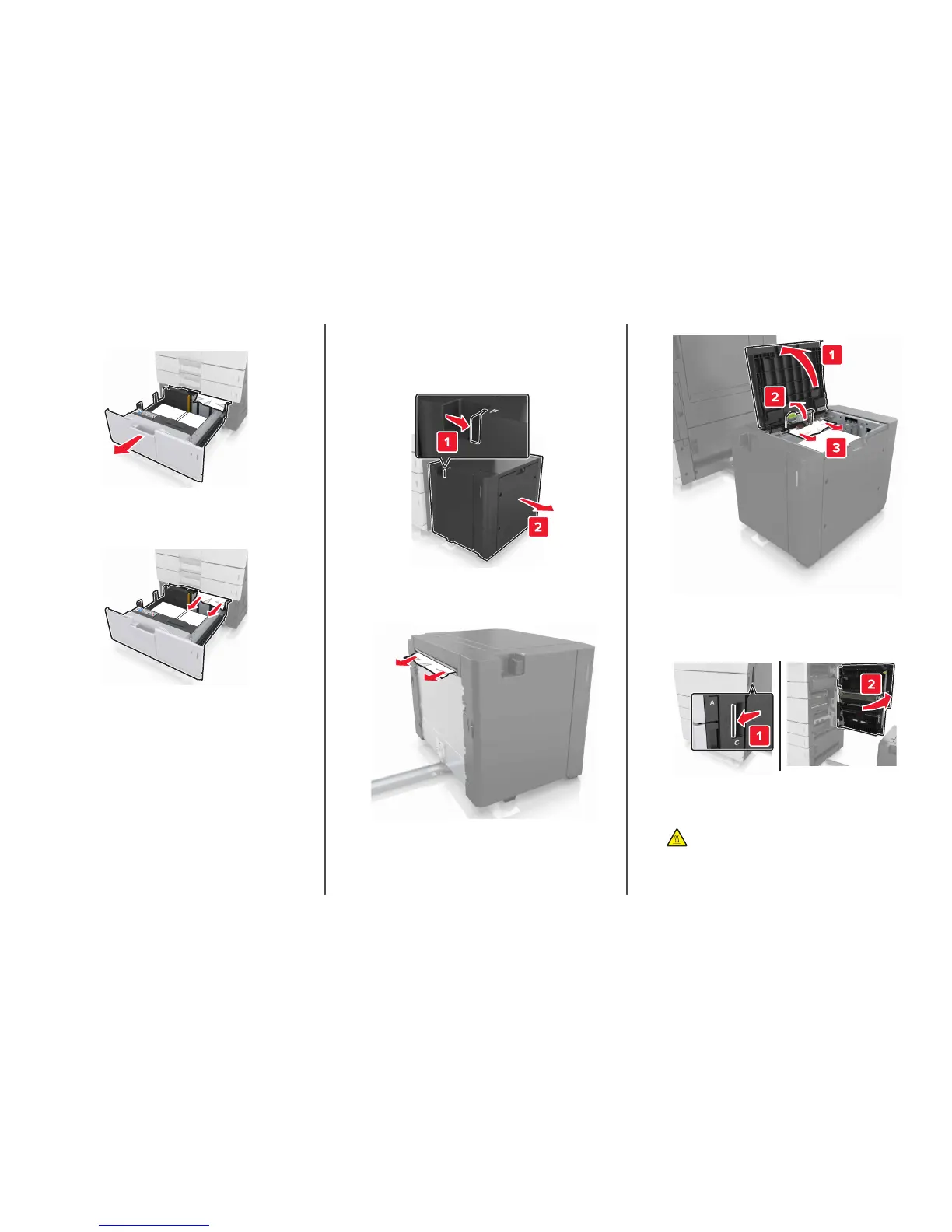
3 Open the optional tray, and then locate the jammed paper.
4 Remove the jammed paper.
Note: Make sure that all paper fragments are removed.
5 Close the tray and door D.
6 Slide the 3000‑sheet tray back into place.
[x]‑page jam, slide the 3000‑sheet tray
and open door F. [24y.xx]
1 Slide the 3000‑sheet tray.
2 Remove the jammed paper.
Note: Make sure that all paper fragments are removed.
3 Open door F, and then remove the jammed paper.
Note: Make sure that all paper fragments are removed.
4 Close door F.
5 Open door C. Make sure that it does not hit any cable attached to
the printer.
6 Remove the jammed paper from any of the following locations:
Note: Make sure that all paper fragments are removed.
CAUTION—HOT SURFACE: The inside of the printer might
be hot. To reduce the risk of injury from a hot component,
allow the surface to cool before touching it.
10


 To Next Page