AUDIO
246
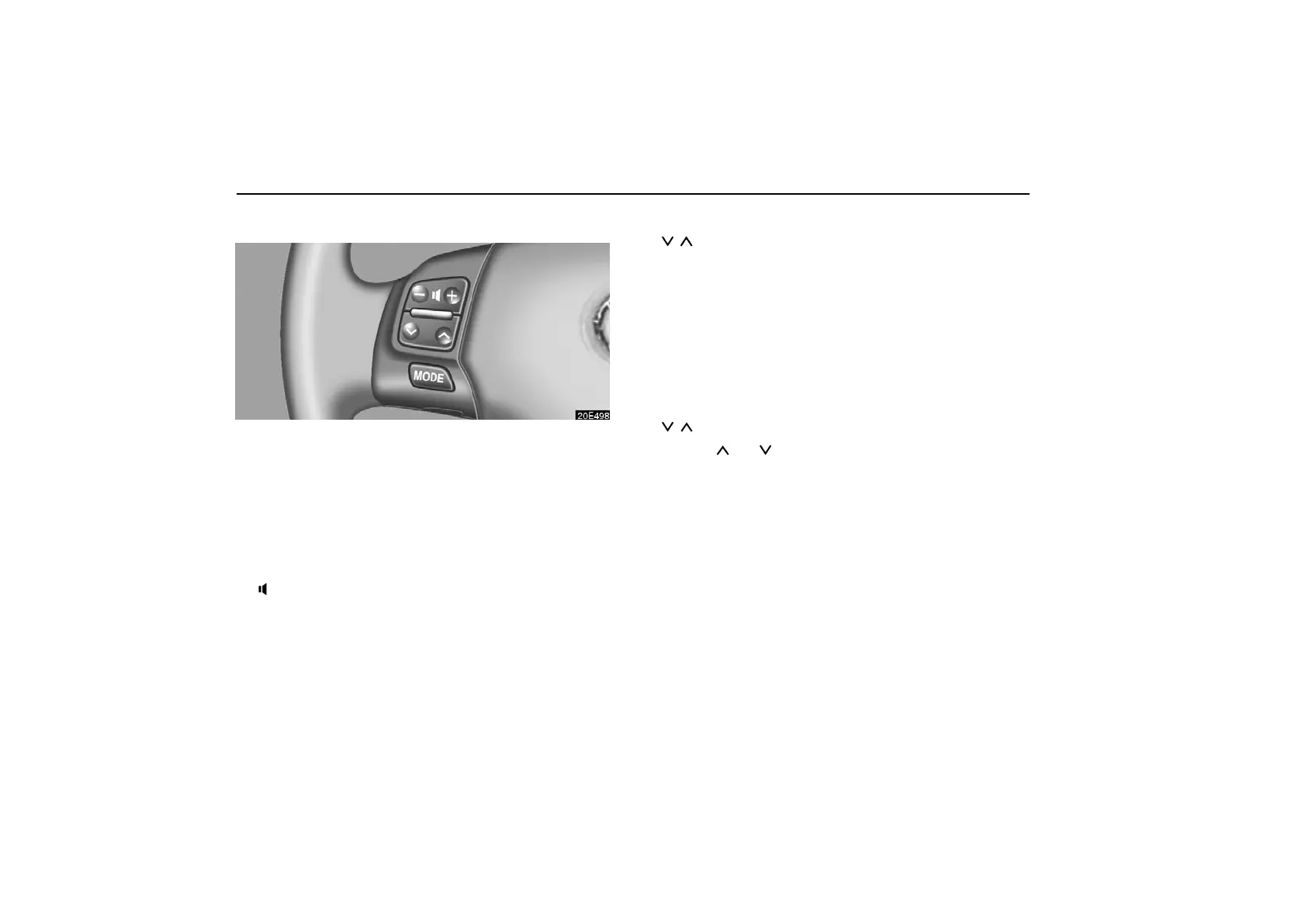
Audio remote controls
The switches are installed on the left side of the steering wheel.
“MODE” switch: Use this switch to turn on or off the audio
system, or change the audio mode.
To turn on the system, push the switch briefly. To turn off the
system, push and hold the switch until you hear a beep.
To change the audio mode, turn on the system and push the
switch briefly. If a tape or CD is not inserted, the “TAPE” or
“CD” mode is skipped.
“−
+” switch: Use this switch to adjust the volume.
To increase the volume, push the “+” side. To decrease the
volume, push the “–” side. The volume continues to increase
or decrease while the switch is being pressed.
(a) When the radio mode is selected
“
” switch: Use this switch for seek tuning or to select a
preset station.
To select a preset station, push this switch briefly. The
station you assigned to a switch on the audio system will be
selected.
To seek a station, push and hold this switch until you hear
a beep. The radio will begin seeking up or down for a station,
and will stop on reception.
(b) When the radio mode is selected (XM satellite radio
broadcast)
“
” switch: Use this switch to select a preset channel.
Push the “
” or “ ” side of the switch. Repeat until a desired
channel is found.



 To Next Page