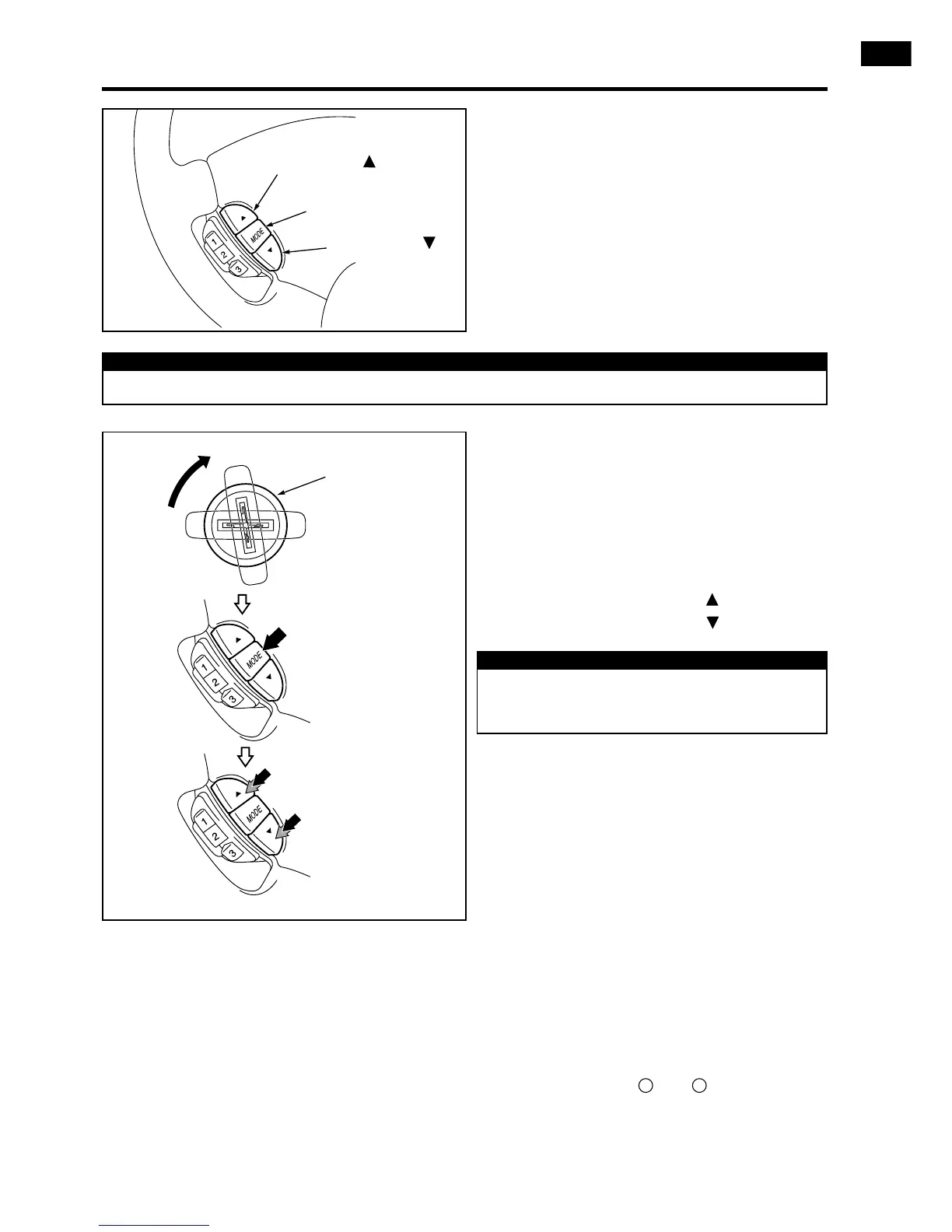
6.2 SELECTION PROCEDURE
1) Insert the key in the ignition switch and
turn it from OFF to IG. Within 30 seconds
thereafter, perform steps (2) and (3).
2) Hold down the MODE switch for more
than 10 seconds.
3) Within 5 seconds
a) Press the channel switch twice or more.
b) Press the channel switch twice or more.
6.1 After the installation has been complet-
ed, the handsfree mode must be select-
ed by the steering switches.
This procedure is necessary to be able
to use the handsfree mode. Perform the
following steps.
NOTE
Before performing this procedure, check whether all vehicle functions are fully operational.
Channel switch
Mode switch
Channel switch
Key cylinder
Hold down the switch
in ON position for more
than 10 seconds.
Press twice or more.
Press twice or more.
NOTE
If the procedures have not been performed
correctly, repeat steps (1) through (3) AFTER
a delay of 30 seconds.
The same procedure must be performed
when the switch case is to be removed.
(E.g. When the Dual-Mode Mobile Phone
system is removed from the vehicle and
the audio switch is reinstalled).
6.3 Verify whether the steering wheel switch-
es are operating.
1) Switch the ignition ON.
2) Verify whether the phone is in its cradle
and switched ON.
3) Enter the PIN-code.
4) Push any of the 4 buttons on the switch
case: a confirmation tone should be heard.
5) During a handsfree communication: the
speaker volume can be raised and low-
ered by buttons and
.
6) If neither of the steps 4 and 5 operates
please perform the “selection procedure”
6.2 again.











 To Next Page