36
1. BASIC INFORMATION BEFORE OPERATION
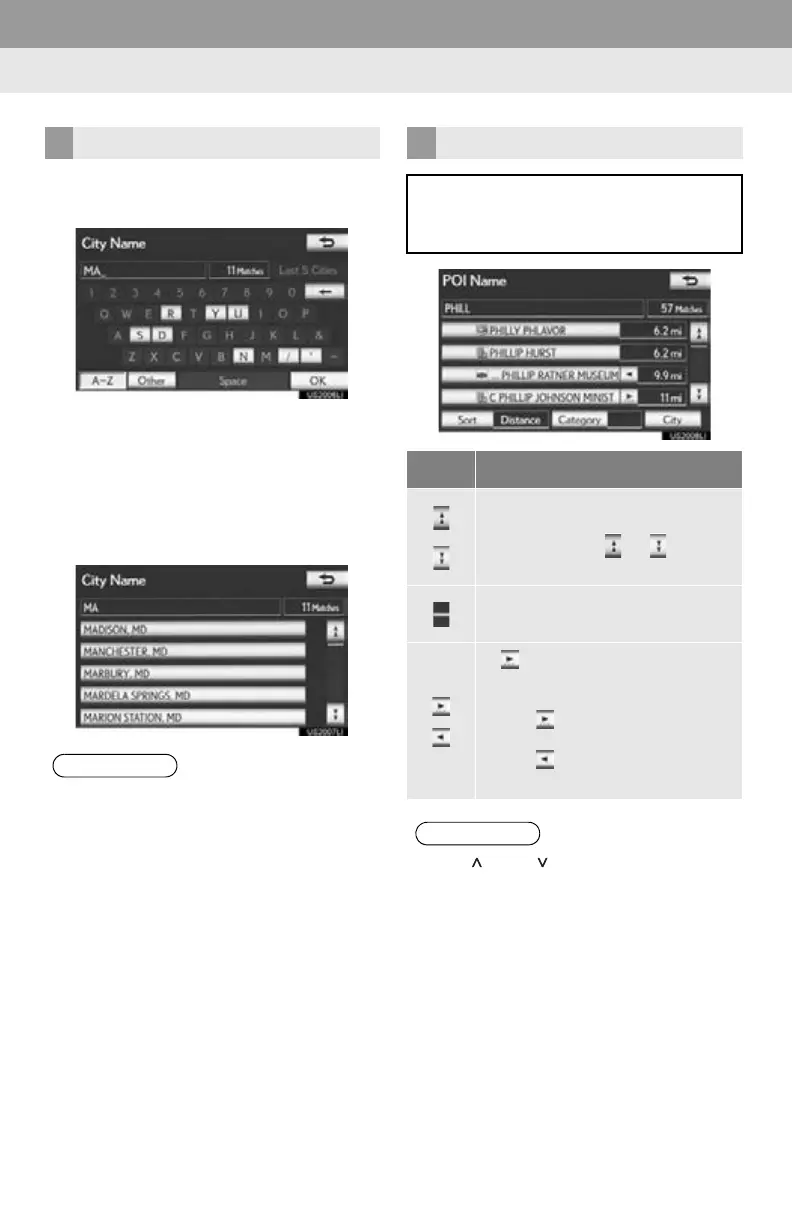
1 Select “OK” to search for an address or
a name.
Matching items from the database are
listed even if the entered address or name
is incomplete.
The list will be displayed automatically if the
maximum number of characters is entered
or the number of matching items is 5 or
less.
TO DISPLAY THE LIST
●The number of matching items is shown
on the right side of the screen. If the num-
ber of matching items is more than 999,
the system displays “” on the screen.
LIST SCREEN OPERATION
When a list is displayed, use the appro-
priate screen button to scroll through
the list.
Icon Function
Select to skip to the next or previ-
ous page.
Select and hold or to scroll
through the displayed list.
This indicates the displayed
screen’s position.
If appears to the right of an item
name, the complete name is too
long to display.
Select to scroll to the end of the
name.
Select to move to the beginning
of the name.
●The “” and “” buttons on the Remote
Touch can be used to scroll up and down
on list screens.





 To Next Page