10
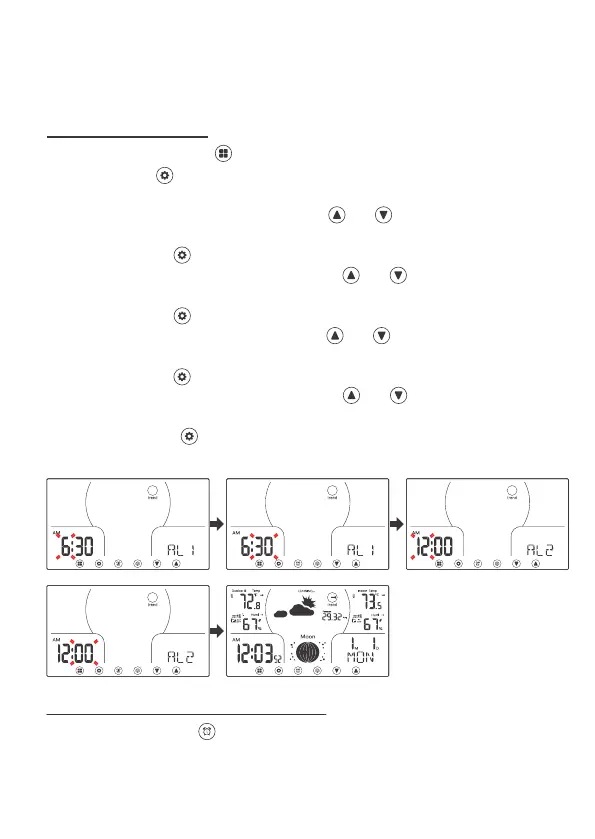
9 SET ALARM TIME
1. In Normal display, press twice switching to the alarm time display.
2. Press and hold over 2s to enter alarm time set mode, alarm 1 is starting
to set.
3. Alarm 1 hour is flashing, press and release and to adjust the values.
Hold to adjust quickly.
4. Press and release to confirm and move to set alarm 1 minute.
5. Alarm 1 minute is flashing, press and release and to adjust the
values. Hold to adjust quickly.
6. Press and release to confirm and move to set alarm 2 hour.
7. Alarm 2 hour is flashing, press and release and to adjust the values.
Hold to adjust quickly.
8. Press and release to confirm and move to set alarm 2 minute.
9. Alarm 2 minute is flashing, press and release and to adjust the
values. Hold to adjust quickly.
10. Press and release to confirm and exit the alarm setting and return to
normal display.
In Normal display, press to deactivate or activate the alarm.
The alam icon (bell) will show when active.
9.1 DEACTIVATE/ACTIVATE ALARM
For the Time Zone Setting, there are 8 time zones to be selected: AST, NST,
EST, CST, MST, PST, AKT, HAT. Set the Time Zone to your area for the hours to
be correct.



 To Next Page