5
3.1 MAIN FEATURES
4.1 PAIR THE OUTDOOR REMOTE SENSOR
• Temperature & Humidity measurement.
• Low Battery Indication.
3.2 TX BUTTONS ON THE BACK
1
2
3
4
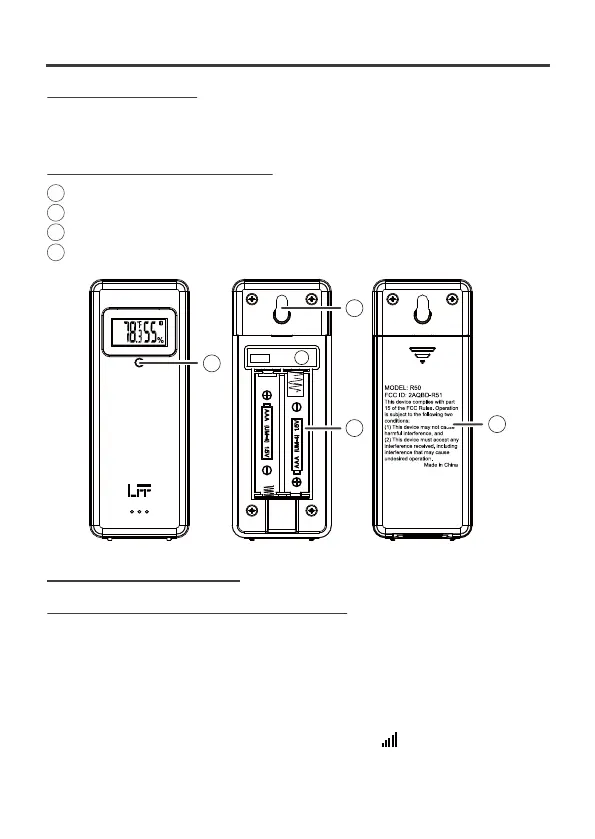
3 OUTDOOR TEMPERATURE & HUMIDITY SENSOR STATION
LED: Flashes when the unit transmits a reading
Wall mount
Battery compartment: Use 2 x AAA batteries
Battery door
4 FIRST TIME TO USE
First of all, it needs to do the pairing between outdoor sensor and weather
station. Please follow below procedure to pair the sensor.
1). Plug the included AC-AC adaptor into the weather station. (optional) insert 3
new “AAA”alkaline batteries for backup.
The screen is turned on. It starts to search sensor and register the received
sensor. During RF pairing, the signal strength icon will animate until the
sensor signal is received or for 5 minutes if no signal available.
1
4
3
2



 To Next Page