12
ENG
ENGLISH
CUSTOMIZING SETTINGS
CustomizingSettings
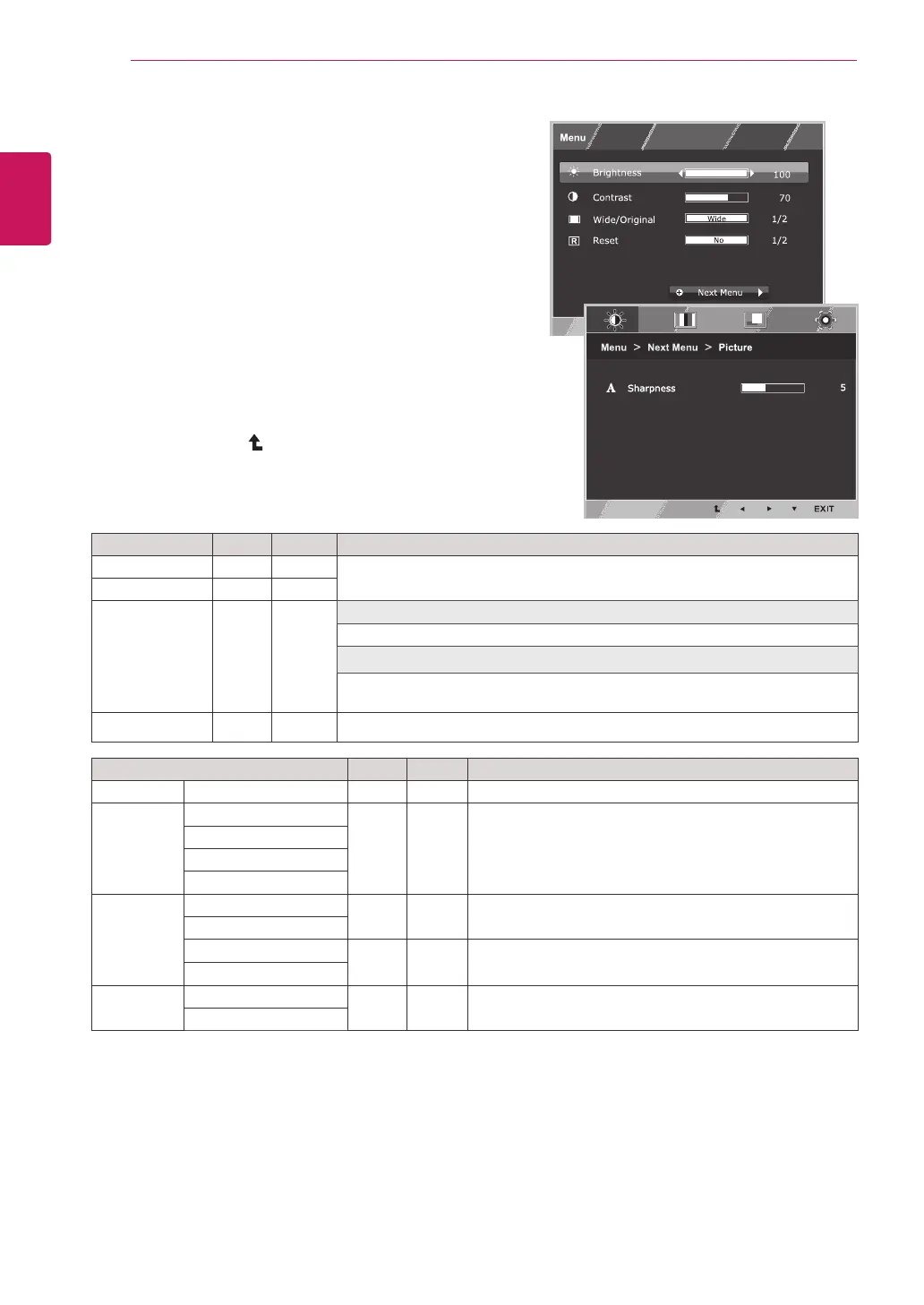
MenuSettings
1
Press
MENU
buttononthebottomoftheMonitorset
todisplaythe
Menu
OSD.
2
Settheoptionsbypressingthe◄or►or▼
buttons.
3
Selectthe"
NextMenu
"buttontoenterthemore
optionsettings.
4
Select
EXIT
toleavetheOSDmenu.
Toreturntotheuppermenuorsetothermenuitems,
usetheuparrow( )button.
Eachoptionisexplainedbelow.
Menu>NextMenu Analog
Digital Description
Picture
Sharpness ● ●
Toadjusttheclearnessofthescreen.
Color Gamma
●
●
Tocustomizethecolorofthescreen
ColorTemp
SixColor
ColorReset
Display Horizontal
●
Toadjustthepositionofthescreen
Vertical
Clock
●
Toimprovetheclarityandstabilityofthescreen
Phase
Others Language
●
●
Tocustomizethescreenstatusforauser'soperating
environment
PowerIndicator
Analog:
D-SUB(Analogsignal)input.
Digital:
DVI-D(Digitalsignal)input.
Menu
Analog Digital Description
Brightness
●
●
Toadjustthebrightness,contrastofthescreen.
Contrast ● ●
Wide/Original
●
●
Wide
Switchtofullscreenmodeaccordingtoinputimagesignal.
Original
Changetheinputimagesignalratiotooriginal.
*ThisfunctionworksonlyifinputresolutionislowerthanMonitorsetratio(16:9).
Reset
●
●
Restoreallfactorydefaultsettings.Pressthe
◄
,
►
buttonstoresetimmediately.


 To Next Page