ENGLISH
18
WATCHING TV
WATCHING TV
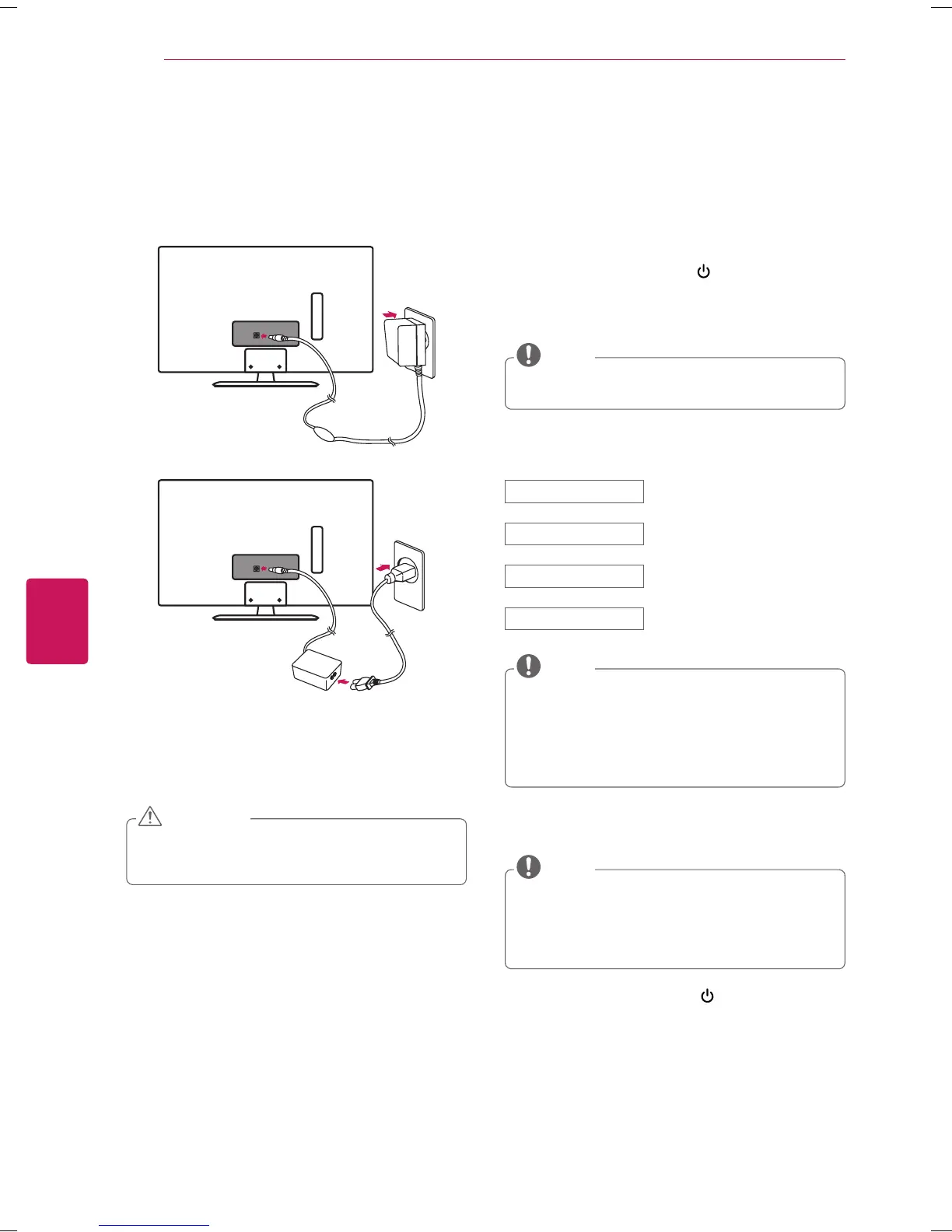
Connecting to the AC/DC adapter
or
1
Connect the AC/DC adapter plug to the power input
jack on the TV.
2
Connect the power cord to the AC/DC adapter first,
then plug the power cord into the wall power outlet.
Please be sure to connect the TV to the AC/DC
power adapter before connecting the TV’s power
plug to a wall power outlet.
CAUTION
Turning the TV on for the first time
When you turn the TV on for the first time, the Initial
setting screen appears. Select a language and customize
the basic settings.
1
Connect the power cord to a power outlet.
2
In Standby mode, press the
(POWER)
button on
the remote control to turn the TV on.
The Initial setting screen appears when you turn the
TV on for the first time.
You can also access
Initial Setting
by accessing
OPTION
in the main menu.
NOTE
3
Follow the on-screen instructions to customize your
TV settings according to your preferences.
Menu Language Selects a language to display.
Mode Setting Selects
Home Use
for the home
environment.
Time Setting Sets the time.
Auto Tuning Scans and saves available channels
automatically.
To display images in the best quality for your home
environment, select
Home Use
.
Store Demo
is suitable for the retail environment.
If you select
Store Demo
, any customized settings
will switch back to the default settings of
Store
Demo
in 5 minutes.
NOTE
4
When the basic settings are complete,
press the
OK
button.
If you do not complete the initial setting, it will
appear whenever the TV turns on.
Disconnect the power cord from the power outlet
when you do not use the TV for a long period of
time.
NOTE
5
To turn the TV off, press the
(POWER)
button on
the remote control.


 To Next Page