EasyManua.ls Logo

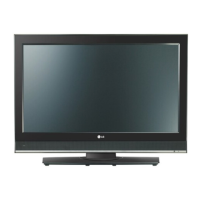
LG 26LX2R - User Manual

LG 26LX2R
64 pages
Print Icon
To Next Page IconTo Next Page
Loading...
LCD TV
Please read this manual carefully before operating your set.
Retain it for future reference.
Record model number and serial number of the set.
See the label attached on the back cover and quote
this information to your dealer
when you require service.
P/NO : 38289U0498D (0512-REV01)
Printed in Korea
OWNER’S MANUAL
MODELS: 26LX2R 32LX2R
Internet Home Page : http://www.lge.com
http://www.lge.com.br

Table of Contents

Questions and Answers

  • V
    vanessasavageAug 18, 2025
    What causes horizontal bars on LG 26LX2R LCD TV screen?
    • F
      fdavisAug 19, 2025
      If you notice horizontal or vertical bars, or picture shaking on your LG LCD TV, check for any local interference from electrical appliances or power tools.
  • J
    John SmithAug 21, 2025
    How do I fix vertical lines on my LG LCD TV screen?
    • P
      Pamela HuffmanAug 21, 2025
      If you are experiencing a vertical bar or stripe on the background, horizontal noise, or an incorrect position on your LG LCD TV, try using the Auto configure function, or manually adjust the clock, phase, or H/V position settings.
  • B
    bentleyjeremyAug 23, 2025
    Why is there no picture and no sound on my LG LCD TV?
    • J
      John ThomasAug 23, 2025
      First, ensure that the TV is turned on. If there's still no picture and sound, try switching to another channel, as the issue might be with the broadcast itself. Also, verify that the power cord is securely plugged into the wall power outlet. Check the direction and location of your antenna. To test the outlet, plug another device into it.
  • R
    robertandersonAug 26, 2025
    How to fix an LG LCD TV remote that's not working?
    • W
      William BrooksAug 26, 2025
      If your LG LCD TV remote control isn't working, make sure there are no obstructions between the remote and the TV. Check if the batteries are installed correctly, matching + to + and - to -. Verify that the remote is set to the correct operating mode (TV, VCR, etc.). If none of these steps work, try installing new batteries.
  • M
    Mr. Randy GreerAug 28, 2025
    What to do if my LG 26LX2R has picture but no sound?
    • P
      Patricia HowardAug 28, 2025
      If you have picture but no sound on your LG LCD TV, first press the VOL or VOLUME button to increase the volume. Check if the sound is muted by pressing the MUTE button. Try switching to another channel in case the broadcast is the problem. Lastly, ensure that the audio cables are properly installed.
  • B
    Brittney LoveAug 30, 2025
    Why does my LG 26LX2R keep turning off by itself?
    • M
      Marc MooreAug 30, 2025
      If your LG LCD TV is suddenly turning off, check if the sleep timer is set. Also, review the power control settings and make sure there are no power interruptions. If you are tuned to a station with no broadcast and Auto off is activated, this could also be the cause.
  • D
    david14Sep 1, 2025
    How to improve poor color quality on my LG 26LX2R LCD TV?
    • C
      Claudia MyersSep 1, 2025
      If you're experiencing poor or no color, or a poor picture quality on your LG LCD TV, start by adjusting the Color settings in the menu. Ensure there's enough distance between the TV and any VCR. Try tuning to another channel to rule out broadcast issues. Check if the video cables are correctly installed. You may also try activating a function to restore the brightness of the picture.
  • B
    Brandon MooreSep 4, 2025
    Why is the reception poor on some channels on my LG 26LX2R?
    • C
      Claire FergusonSep 4, 2025
      If you're experiencing poor reception on some channels with your LG LCD TV, the station or cable product may be having issues, so try tuning to another station. If the station signal is weak, try reorienting the antenna. Also, check for any potential sources of interference.
  • T
    Teresa ScottSep 6, 2025
    Why is the screen color unstable on my LG 26LX2R LCD TV?
    • R
      Rachel HenrySep 6, 2025
      If you are experiencing an unstable or single color on your LG LCD TV screen, check the signal cable. If the issue persists, try reinstalling the PC video card.
  • S
    Susan AndrewsSep 8, 2025
    What does it mean when my LG 26LX2R says signal out of range?
    • M
      mindymorrisSep 8, 2025
      If the signal on your LG LCD TV is out of range, try adjusting the resolution, horizontal frequency, or vertical frequency. Check if the signal cable is properly connected and not loose. Also, verify the input source.

LG 26LX2R Specifications

General IconGeneral
Screen Size26 inches
Display TechnologyLCD
Resolution1366 x 768
Aspect Ratio16:9
Contrast Ratio1200:1
Brightness500 cd/m²
HDMI Ports1
Component Video Inputs1
S-Video Inputs1
Composite Video Inputs1
Viewing Angle178° (H) / 178° (V)
PC Input1 (D-Sub)

Related product manuals