SOUND & LANGUAGE CONTROL
69
3 42
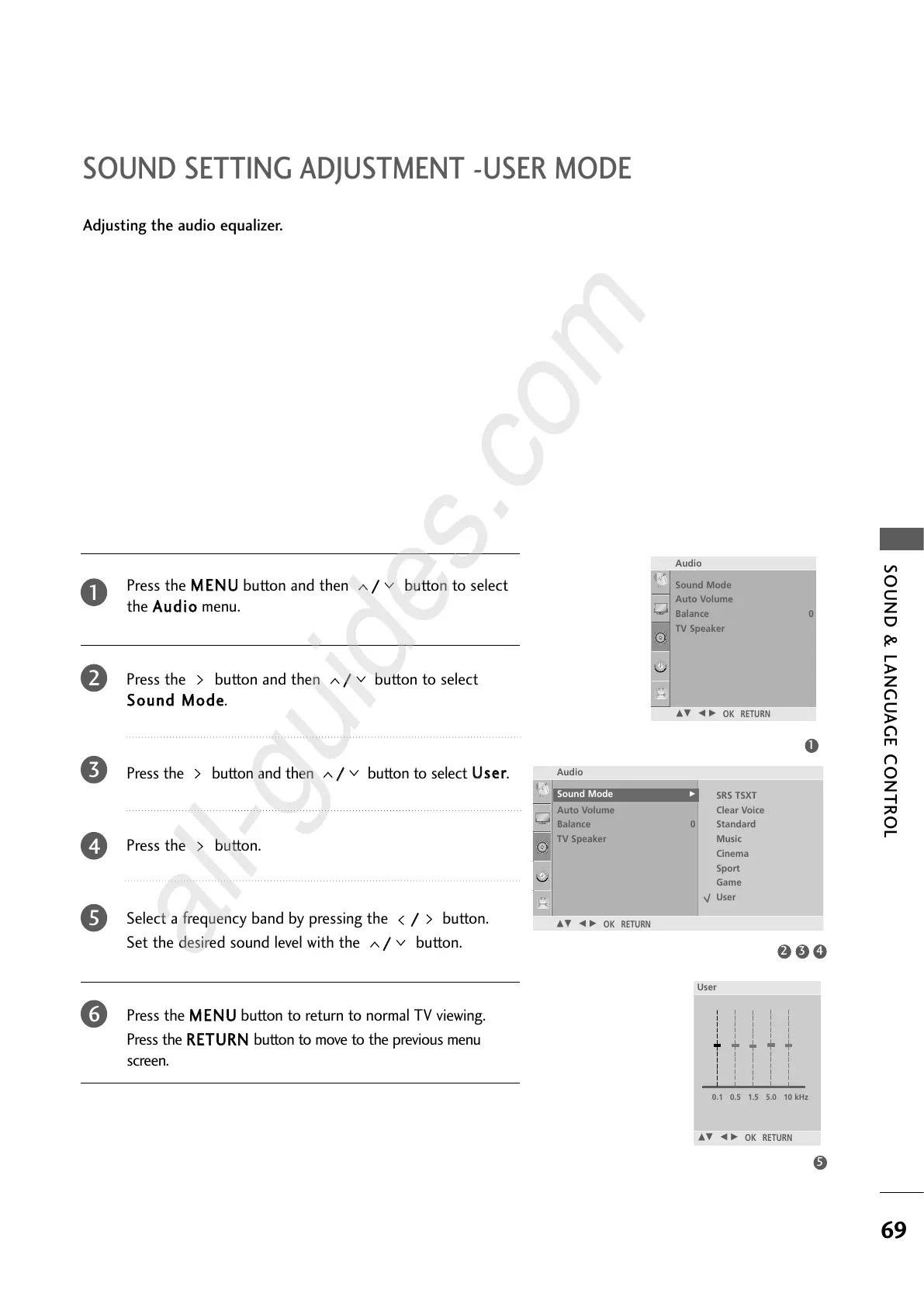
SOUND SETTING ADJUSTMENT -USER MODE
Press the
MMEENNUU
button and then
//
button to select
the
AAuuddiioo
menu.
Press the button and then
//
button to select
SSoouunndd MMooddee
.
Press the button and then
//
button to select
UUsseerr
.
Press the button.
Select a frequency band by pressing the
//
button.
Set the desired sound level with the
//
button.
Press the
MMEENNUU
button to return to normal TV viewing.
Press the
RREETTUURRNN
button to move to the previous menu
screen.
Adjusting the audio equalizer.
1
2
3
4
5
6
5
1
Audio
Sound Mode
Auto Volume
Balance 0
TV Speaker
Sound Mode G
DE F G
OK RETURN
SRS TSXT
Clear Voice
Standard
Music
Cinema
Sport
Game
User
Sound Mode
Auto Volume
Balance 0
TV Speaker
Audio
DE F G
OK RETURN
User
DE F G
OK RETURN
0.1 0.5 1.5 5.0 10 kHz


 To Next Page
 Loading...