1
2
5
6
7
3
4
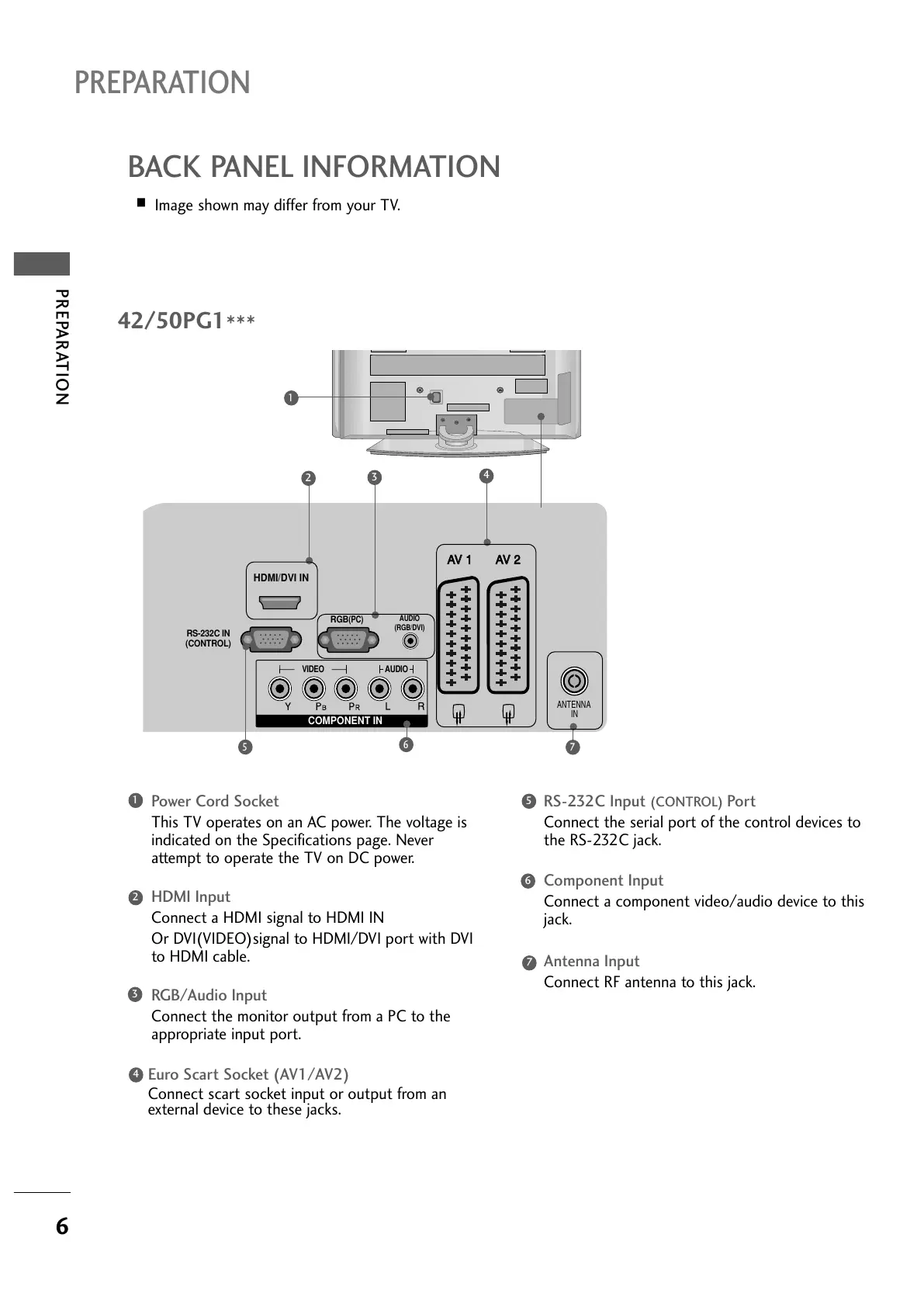
Power Cord Socket
This TV operates on an AC power. The voltage is
indicated on the Specifications page. Never
attempt to operate the TV on DC power.
HDMI Input
Connect a HDMI signal to HDMI IN
Or DVI(VIDEO)signal to HDMI/DVI port with DVI
to HDMI cable.
RGB/Audio Input
Connect the monitor output from a PC to the
appropriate input port.
Euro Scart Socket (AV1/AV2)
Connect scart socket input or output from an
external device to these jacks.
RS-232C Input
(CONTROL) Port
Connect the serial port of the control devices to
the RS-232C jack.
Component Input
Connect a component video/audio device to this
jack.
Antenna Input
Connect RF antenna to this jack.
1
2
3
4
5
6
7
42/50PG1
***


 To Next Page
 Loading...