EasyManua.ls Logo

LG 34BQ650-W.AUB - User Manual

LG 34BQ650-W.AUB
16 pages
Print Icon
To Next Page IconTo Next Page
Loading...
*MBM67516302*
(2308-REV05)
29WQ600
34WQ650
29WQ60A
www.lg.com
34WQ650
34WQ65X
34WQ65X
English
Depending on country /
Français
Selon les pays /
Español
En función del país
LED LCD Monitor (LED Monitor) /
Moniteur ACL À DEL (Moniteur à DEL) /
Monitor LCD LED (Monitor LED)
English - For EPEAT (EPEAT applied model)
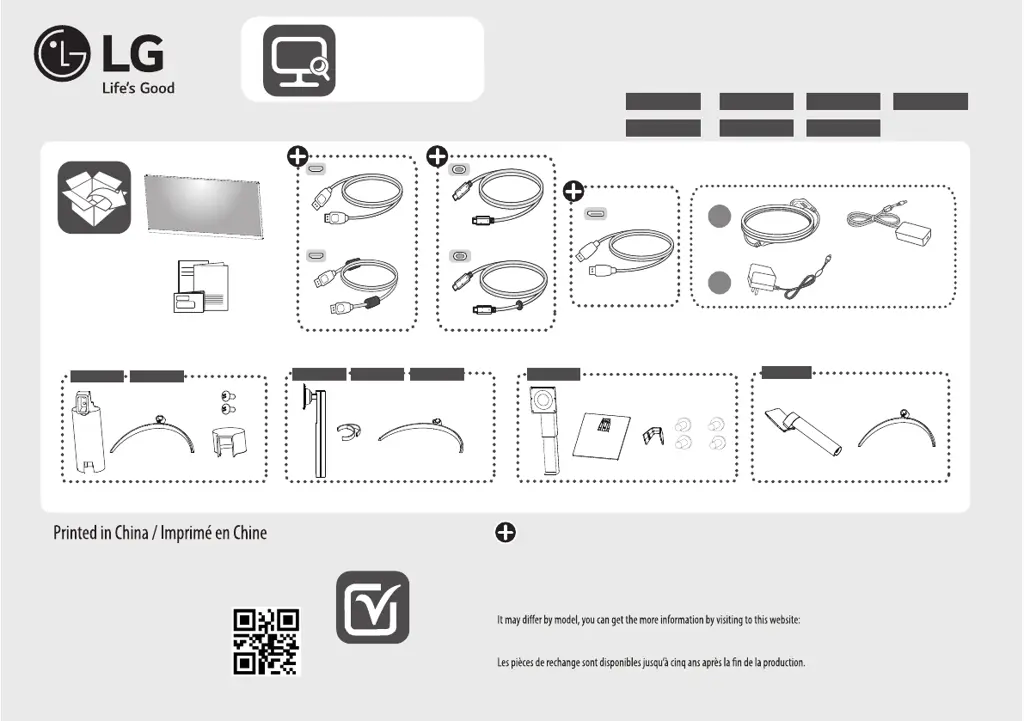
Spare parts are available for 5 years after the end of production.
Spare parts include base assembly, adapter and cables.
https://lgparts.com/
Français - Pour EPEAT (modèles pour lesquels s’applique EPEAT)
Elles comprennent les pièces pour l’assemblage de la base, l’adaptateur et les câbles.
Les pièces de rechange peuvent varier selon le modèle. Vous pouvez obtenir plus de renseignements en visitant le site Web
https://lgparts.com/
34WQ60A 34BQ650
34BQ650 29BQ650
+
a
b
or
ou
o
or
ou
o
or
ou
o
29WQ600
29BQ650
29WQ60A
34WQ60A

Questions and Answers

  • J
    James MorrisAug 19, 2025
    What to do if nothing is displayed on my LG Monitor screen?
    • S
      Steven BradleyAug 19, 2025
      If nothing is displayed on your LG Monitor, first, ensure the power cord is correctly plugged into the outlet. Then, check the power cable connection and press the power button. Verify the connected input is enabled in the monitor's settings. Also, check the signal cable between the PC and the monitor, reconnecting it if necessary. Finally, ensure signals from your PC are within the monitor's frequency range; refer to the manual's Product Specification section to set the appropriate frequency.
  • D
    Douglas HicksAug 21, 2025
    Why is my LG 34BQ650-W.AUB screen display unstable and shaky?
    • T
      thomasjeffreyAug 21, 2025
      If your LG Monitor's screen display is unstable or shaky, or if images leave shadow trails, it could be due to the resolution being set to HDMI 1080i 60/50 Hz (interlaced). Try changing the resolution to 1080p or the recommended resolution. It could also be caused by not setting the graphics card to the recommended (optimal) resolution. This may result in blurred text, a dimmed screen, a truncated display area or misalignment of the display.
  • A
    Andrew BerryAug 23, 2025
    What to do if there is no sound from the headphone port on my LG 34BQ650-W.AUB?
    • C
      Christine WrightAug 23, 2025
      If there is no sound from the headphone port on your LG Monitor, first, ensure that the headphone port connections are properly made. Next, try increasing the volume using the joystick. Finally, set the audio output of your PC to the monitor you are using. Note that the settings may differ depending on your operating system.
  • D
    David BrownAug 26, 2025
    How to fix an LG 34BQ650-W.AUB Monitor when nothing is displayed on the screen?
    • M
      Mario DukeAug 26, 2025
      If nothing is displayed on your LG monitor, ensure the power cord is correctly plugged into the outlet and that the power cable is securely connected. Press the power button. Also, verify that the connected input is enabled in the monitor's settings under the Input section. Check and reconnect the signal cable between your PC and the monitor. Finally, confirm that the signals from your PC's graphics card are within the monitor's horizontal or vertical frequency range, referring to the product specifications for appropriate settings.
  • P
    Parker LittleAug 27, 2025
    What to do if my LG Monitor screen display is unstable and shaky?
    • M
      Maria HaleyAug 27, 2025
      If your LG monitor's screen display is unstable, shaky, or images leave shadow trails, and if the resolution is set to HDMI 1080i 60/50 Hz (interlaced), the screen may be flickering. Try changing the resolution to 1080p or the recommended resolution. Also, ensure that the graphics card is set to the recommended (optimal) resolution to avoid blurred text, a dimmed screen, a truncated display area, or misalignment of the display. Note that setting methods may vary depending on the computer or operating system, and some resolutions may not be available depending on the performance of the graphics card.
  • R
    Raymond WebbAug 29, 2025
    Why is there no sound from the headphone port on my LG 34BQ650-W.AUB?
    • B
      Brett BellAug 29, 2025
      If there is no sound from the headphone port on your LG monitor, first, ensure that the headphone connections are properly made. Then, try increasing the volume using the joystick. Finally, set the audio output of your PC to the monitor you are using. Note that the settings may differ depending on the operating system.
  • H
    Heather WilcoxSep 1, 2025
    How to fix LG Monitor when nothing is displayed on the screen?
    • A
      Austin JonesSep 1, 2025
      If nothing is displayed on your LG Monitor screen, first ensure the power cord is correctly plugged into the power outlet and that the power cable is properly connected. Then, press the power button. Also, verify that the connected input is enabled in the monitor's settings under the Input menu. Check the signal cable between your PC and the monitor to ensure it is properly connected. If the issue persists, your PC's graphics card signals may be outside the monitor's frequency range. Refer to the Product Specification section of this manual to set the appropriate frequency.
  • K
    Kathy MaySep 2, 2025
    Why is my LG Monitor displaying nothing?
    • K
      kathleenwoodsSep 3, 2025
      If your LG Monitor displays nothing, it could be due to a missing or disconnected signal cable between your PC and the monitor. Check the cable and reconnect it securely. Also, the signals transferred from the PC (graphics card) might be out of the horizontal or vertical frequency range of the monitor. Refer to the Product Specification section of this manual to set the appropriate frequency.
  • E
    Eugene ChambersSep 4, 2025
    How to enable disabled features on LG 34BQ650-W.AUB Monitor?
    • D
      Diane SuttonSep 5, 2025
      To enable disabled features on your LG monitor, disable OSD Lock in General settings.
  • W
    Walter TorresSep 6, 2025
    How to fix a blank screen on my LG 34BQ650-W.AUB?
    • R
      Richard PollardSep 7, 2025
      To fix a blank screen on your LG Monitor, start by checking if the power cord is properly connected to the power outlet. Also, check the power cable connection and make sure to press the power button. Verify that the correct input source is selected in the monitor's settings under the 'Input' menu.

LG 34BQ650-W.AUB Specifications

General IconGeneral
Screen Size34 inches
Panel TypeIPS
Refresh Rate75Hz
Aspect Ratio21:9
Brightness300 cd/m²
Contrast Ratio1000:1
VESA Mount100 x 100 mm
Resolution3440 x 1440
Response Time5 ms
ConnectivityHDMI, DisplayPort, USB-C
Viewing Angle178°
Color Gamut99% sRGB

Related product manuals