23
ENGLISH
Connecting Peripherals
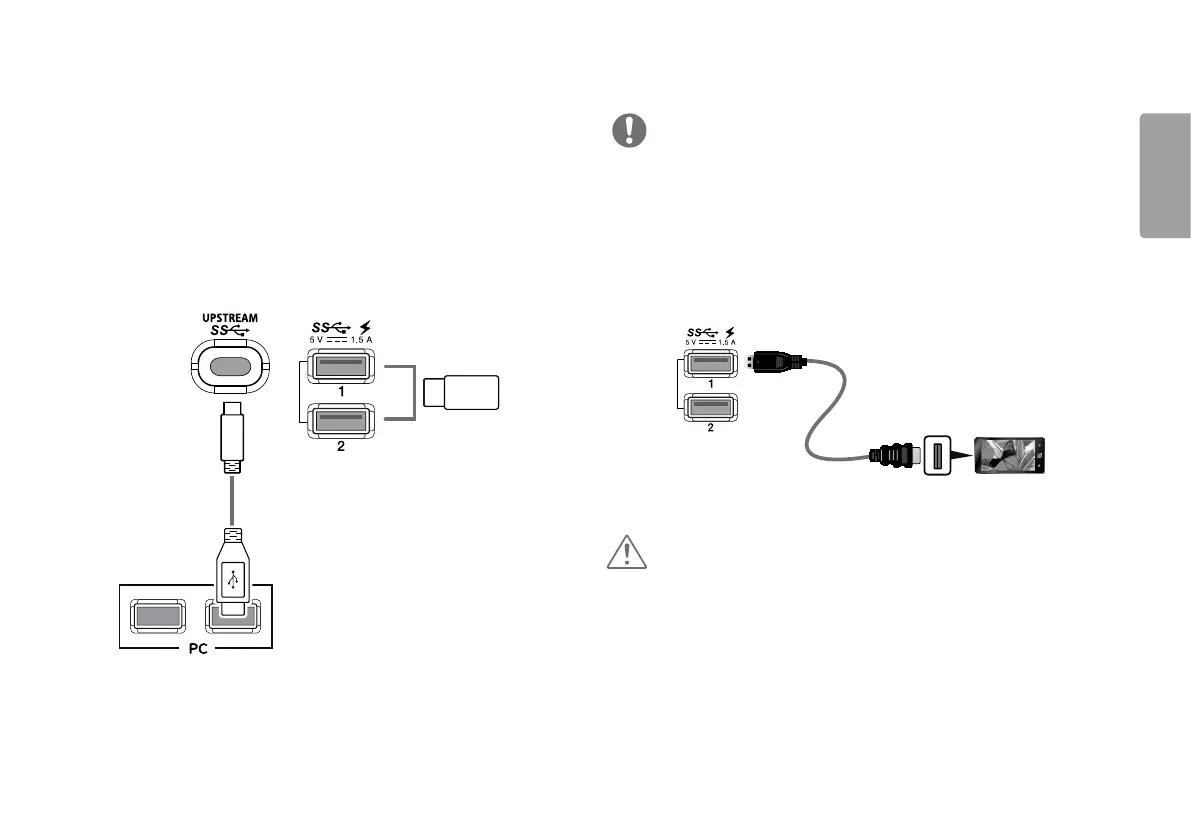
USB Cable connection
The USB port on the product functions as a USB hub.
Please connect the USB C-C cable or USB C-C cable + USB C-A gender to the PC.
To use USB 3.0, connect the USB C-C cable + USB C-A gender of the product to the PC.
Peripheral devices connected to the USB IN port can be controlled from the PC.
(sold separately)
(sold separately)
NOTE
• Make sure to install the most recent Windows OS service pack before using the
product.
• Peripheral devices are sold separately.
• A keyboard, mouse, or USB device can be connected to the USB port.
• Quick Charge is available through the USB1 and USB2 port.
• When the Monitor is gone to Power off, Quick Charge is not available.
• The charging speed may vary depending on the device.
(sold separately)
CAUTION
Cautions When Using a USB Device
• A USB device with an automatic recognition program installed, or that uses its own
driver, may not be recognized.
• Some USB devices may not be supported or may not work properly.
• It is recommended to use a USB hub or hard disk drive with power supplied. (If the
power supply is not adequate, the USB device may not be recognized properly.)



 To Next Page