28
ENG
ENGLISH
Connections
Connecting to a HD receiver, DVD, or VCR player
ConnectaHDreceiver,DVD,orVCRplayertotheTVandselectanappropriateinputmode.
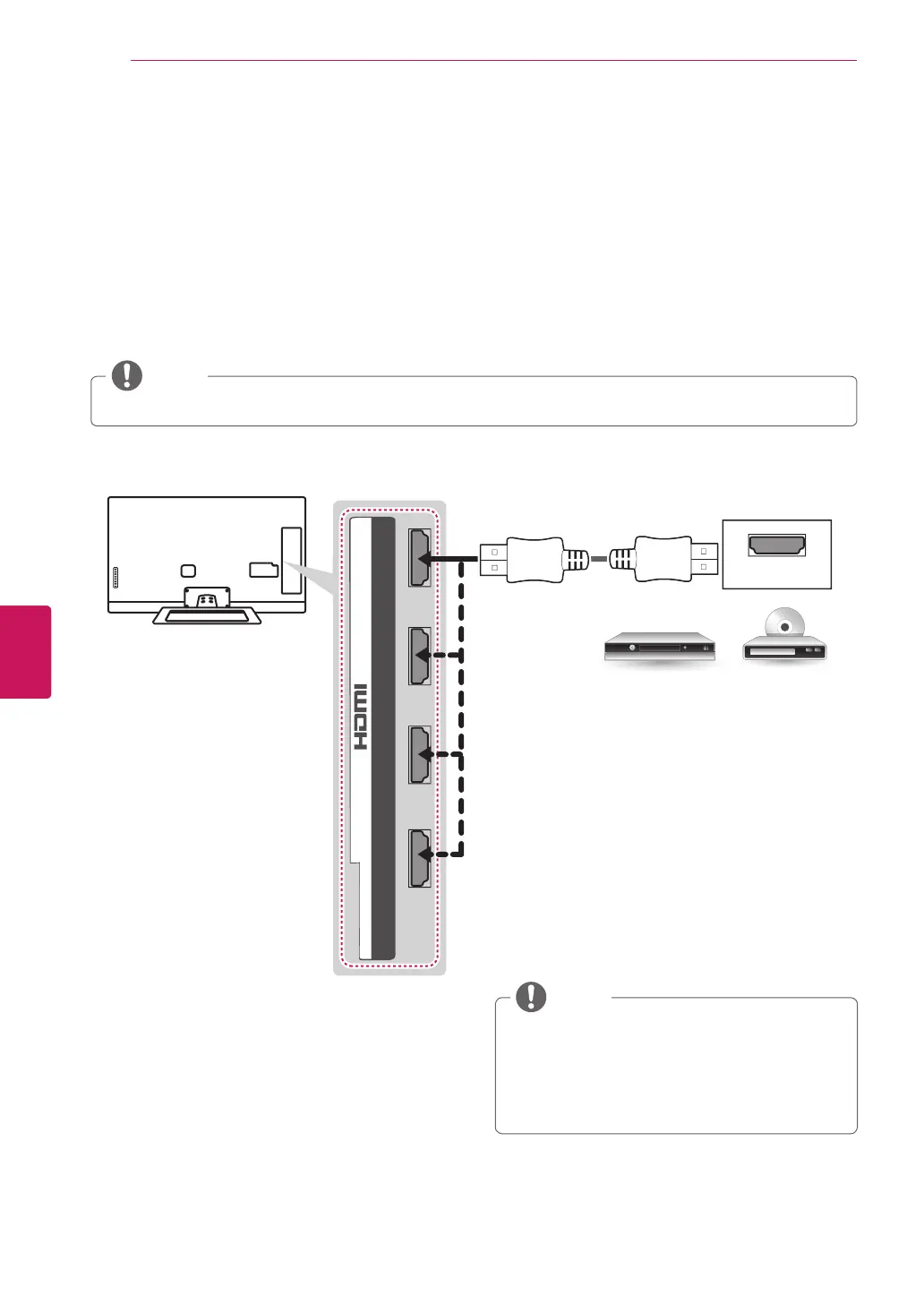
HDMI Connection
HDMI is the best way to connect a device.
TransmitsthedigitalvideoandaudiosignalsfromanexternaldevicetotheTV.Connecttheexternaldevice
andtheTVwiththeHDMIcableasshowninthefollowingillustration.
HDMI
2 3 1
4
/ DVI IN
DVD/ Blu-Ray / HD Cable Box / HD STB
Choose any HDMI input port to connect.
It does not matter which port you use.
(*Not Provided)
DTVAudioSupportedCodec:MPEG,Dolby
Digital
HDMIAudiosupportedFormat:Dolby
Digital,PCM(Upto192KHz,32k/44.1k/48k
/88k/96k/176k/192k)->NotsupportedDTS.
NOTE
HighSpeedHDMI™CablesaretestedtocarryanHDsignalupto1080pandhigher.
NOTE


 To Next Page