32
ENG
ENGLISH
Connections
Connecting to a PC
ItisrecommendedtousetheTVwiththeHDMIconnectionforthebestimagequality.
Dependingonthegraphicscard,DOSmodemaynotworkifaHDMItoDVICableisinuse.
InPCmode,theremaybenoiseassociatedwiththeresolution,verticalpattern,contrastor
brightness.Ifnoiseispresent,changethePCoutputtoanotherresolution,changetherefreshrate
toanotherrateoradjustthebrightnessandcontrastonthePICTUREmenuuntilthepictureisclear.
ThesynchronizationinputformforHorizontalandVerticalfrequenciesisseparate.
Dependingonthegraphicscard,someresolutionsettingsmaynotallowtheimagetobepositioned
onthescreenproperly.
NOTE
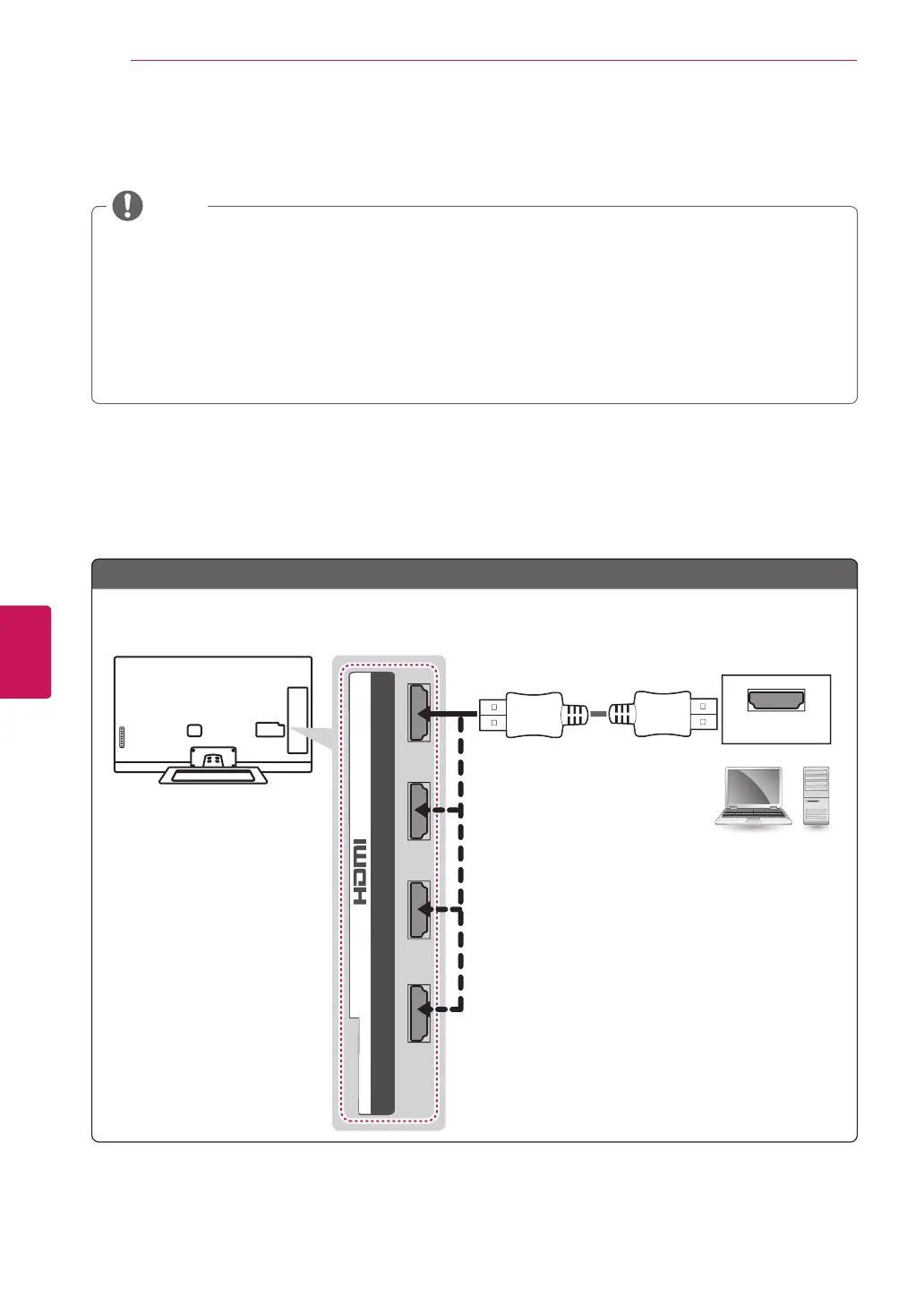
HDMI Connection, DVI to HDMI Connection or RGB Connection
Choose method A, B or C to make connection.
HDMI
2 3 1
4
/ DVI IN
Choose any HDMI input port to connect.
It does not matter which port you use.
(*Not Provided)
SF
Method A: HDMI Connection


 To Next Page