34
ENG
ENGLISH
ENTERTAINMENT
IfyouselectSet Photo View.,youcanmakeadjustmentsasshownbelow:
1 PressthenavigationbuttonstoscrolltoselectSlide Speed, Transition Effect, or BGM.
2 Pressthenavigationbuttonstoscrolltomakeappropriateadjustments.
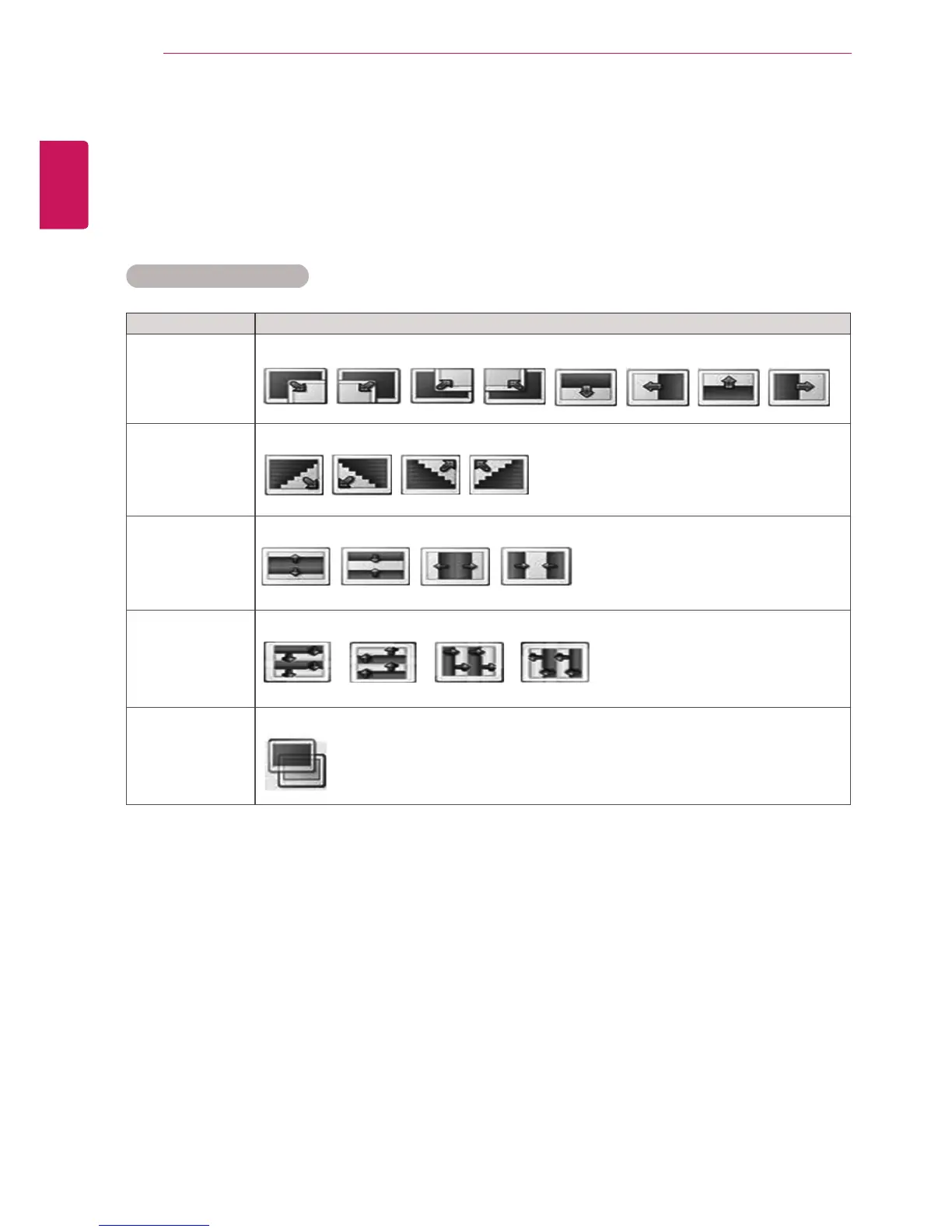
Transition Effect Option
Option Description
Sliding Pushesthecurrentslideoutofviewasitplaystothenextslide.
Stairs Pushesthecurrentslideinastaircaseshapeasitplaystothenextslide.
Door Open
/Close
Pushesthecurrentslidelikeopeningorclosingthedoorasitplaystothenextslide.
Shutter Pushesthecurrentslidelikedrawingorpullingdowntheblindasitplaystothenextslide
Fade In Fadestheslideoutslowlybeforeplayingtothenextslide.
FormoredetailsabouttheSet Video.menu,seetheCUSTOMIZE SETTINGSsection.Seepage42.
FormoredetailsabouttheSet Audio.menu,seetheCUSTOMIZE SETTINGSsection.Seepage45.


 To Next Page