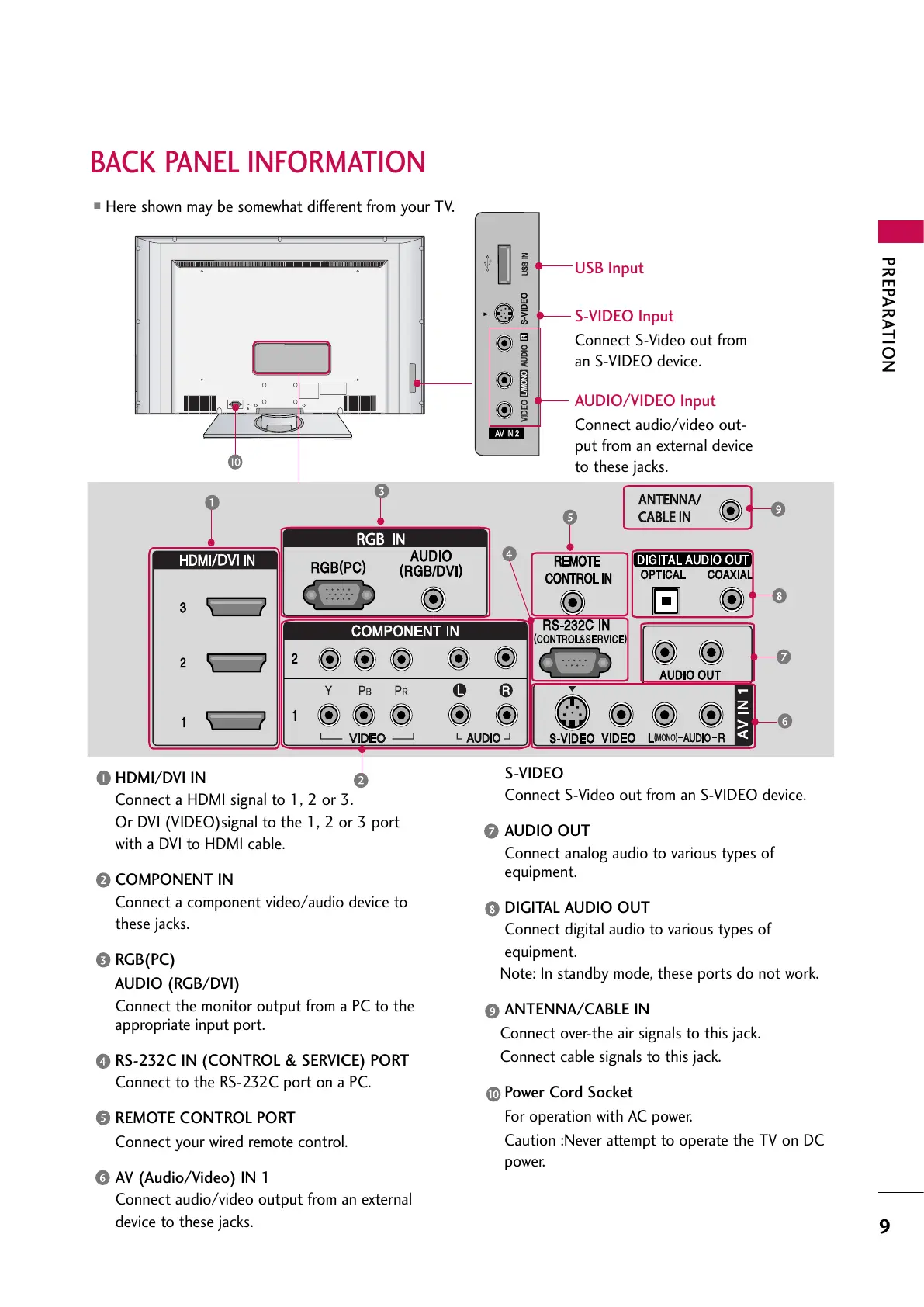
HDMI/DVI IN
Connect a HDMI signal to 1, 2 or 3.
Or DVI (VIDEO)signal to the 1, 2 or 3 port
with a DVI to HDMI cable.
COMPONENT IN
Connect a component video/audio device to
these jacks.
RGB(PC)
AUDIO (RGB/DVI)
Connect the monitor output from a PC to the
appropriate input port.
RS-232C IN (CONTROL & SERVICE) PORT
Connect to the RS-232C port on a PC.
REMOTE CONTROL PORT
Connect your wired remote control.
AV (Audio/Video) IN 1
Connect audio/video output from an external
device to these jacks.
S-VIDEO
Connect S-Video out from an S-VIDEO device.
AUDIO OUT
Connect analog audio to various types of
equipment.
DIGITAL AUDIO OUT
Connect digital audio to various types of
equipment.
Note: In standby mode, these ports do not work.
ANTENNA/CABLE IN
Connect over-the air signals to this jack.
Connect cable signals to this jack.
Power Cord Socket
For operation with AC power.
Caution :Never attempt to operate the TV on DC
power.



 To Next Page