EasyManua.ls Logo

LG 52LY3D - Front Panel Controls

LG 52LY3D
105 pages
Print Icon
To Next Page IconTo Next Page
To Previous Page IconTo Previous Page
Loading...
PREPARATION
8
PREPARATION
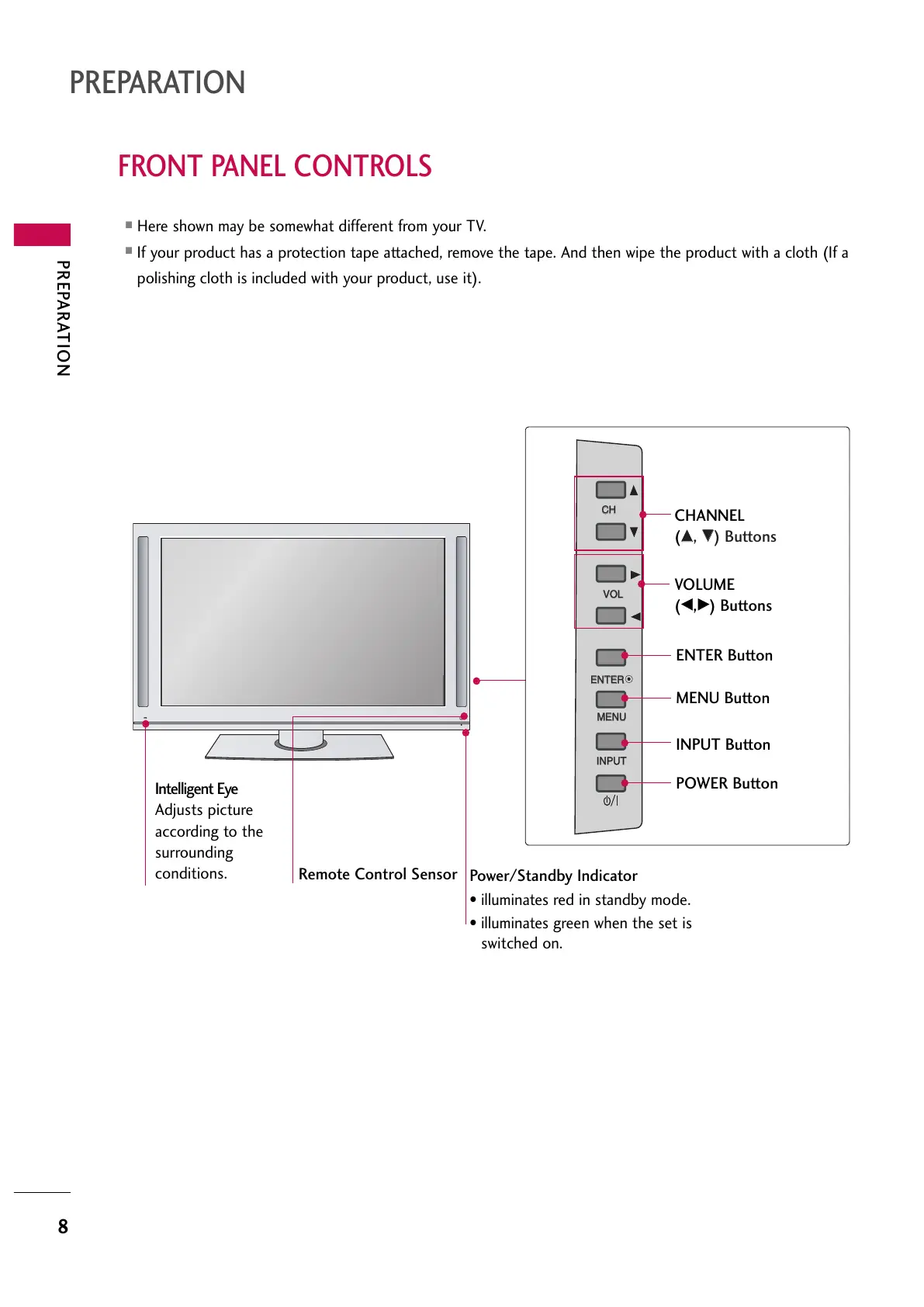
FRONT PANEL CONTROLS
Here shown may be somewhat different from your TV.
If your product has a protection tape attached, remove the tape. And then wipe the product with a cloth (If a
polishing cloth is included with your product, use it).
CH
VOL
ENTER
MENU
INPUT
Remote Control Sensor
Power/Standby Indicator
illuminates red in standby mode.
illuminates green when the set is
switched on.
CH
VOL
ENTER
MENU
INPUT
CHANNEL
(
DD
,
EE
) Buttons
VOLUME
(
FF
,
GG
) Buttons
ENTER Button
MENU Button
INPUT Button
POWER Button
Intelligent Eye
Adjusts picture
according to the
surrounding
conditions.
All manuals and user guides at all-guides.com

Table of Contents

Related product manuals