PARENTAL CONTROL / RATING
80
PARENTAL CONTROL /RATINGS
CHANNEL BLOCKING
Blocks any channels that you do not want to watch or that
you do not want your children to watch.
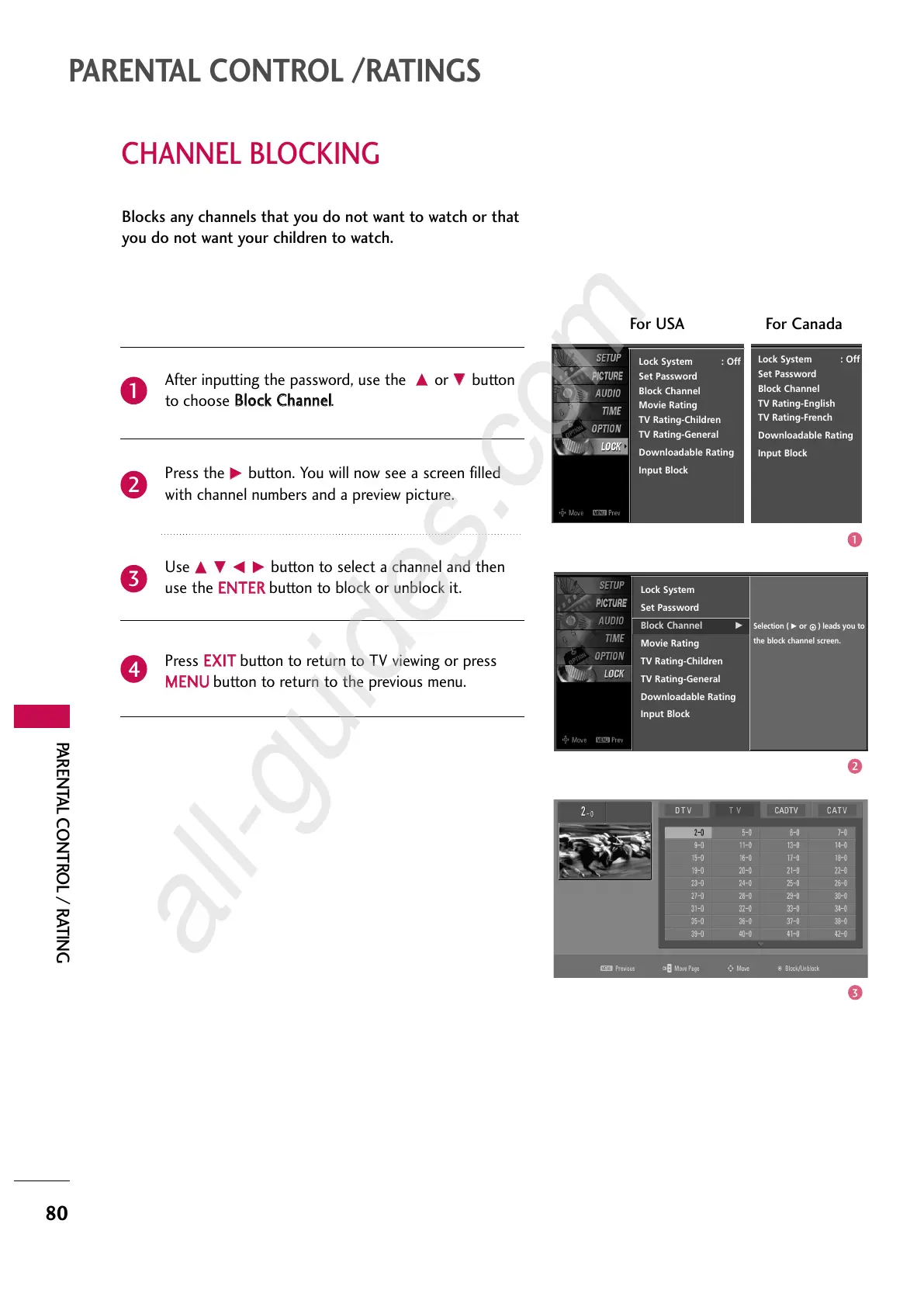
After inputting the password, use the
DD
or
EE
button
to choose
BBlloocckk CChhaannnneell
.
Press the
GG
button. You will now see a screen filled
with channel numbers and a preview picture.
Use
DD EE FF GG
button to select a channel and then
use the
EENNTTEERR
button to block or unblock it.
Press
EEXXIITT
button to return to TV viewing or press
MMEENNUU
button to return to the previous menu.
2
3
4
1
Lock System
Set Password
Block Channel
G
Movie Rating
TV Rating-Children
TV Rating-General
Downloadable Rating
Input Block
Selection (
G
or
) leads you to
the block channel screen.
Lock System : Off
Set Password
Block Channel
Movie Rating
TV Rating-Children
TV Rating-General
Downloadable Rating
Input Block
For USA For Canada
Lock System : Off
Set Password
Block Channel
TV Rating-English
TV Rating-French
Downloadable Rating
Input Block



 To Next Page