VCR SETUP
When connecting with an antenna
■
To avoid picture noise
(
interference
)
, leave an adequate distance between the VCR and TV
■
If the 4:3 picture format is used; the fixed images on the sides of the screen may remain visible
on the screen.
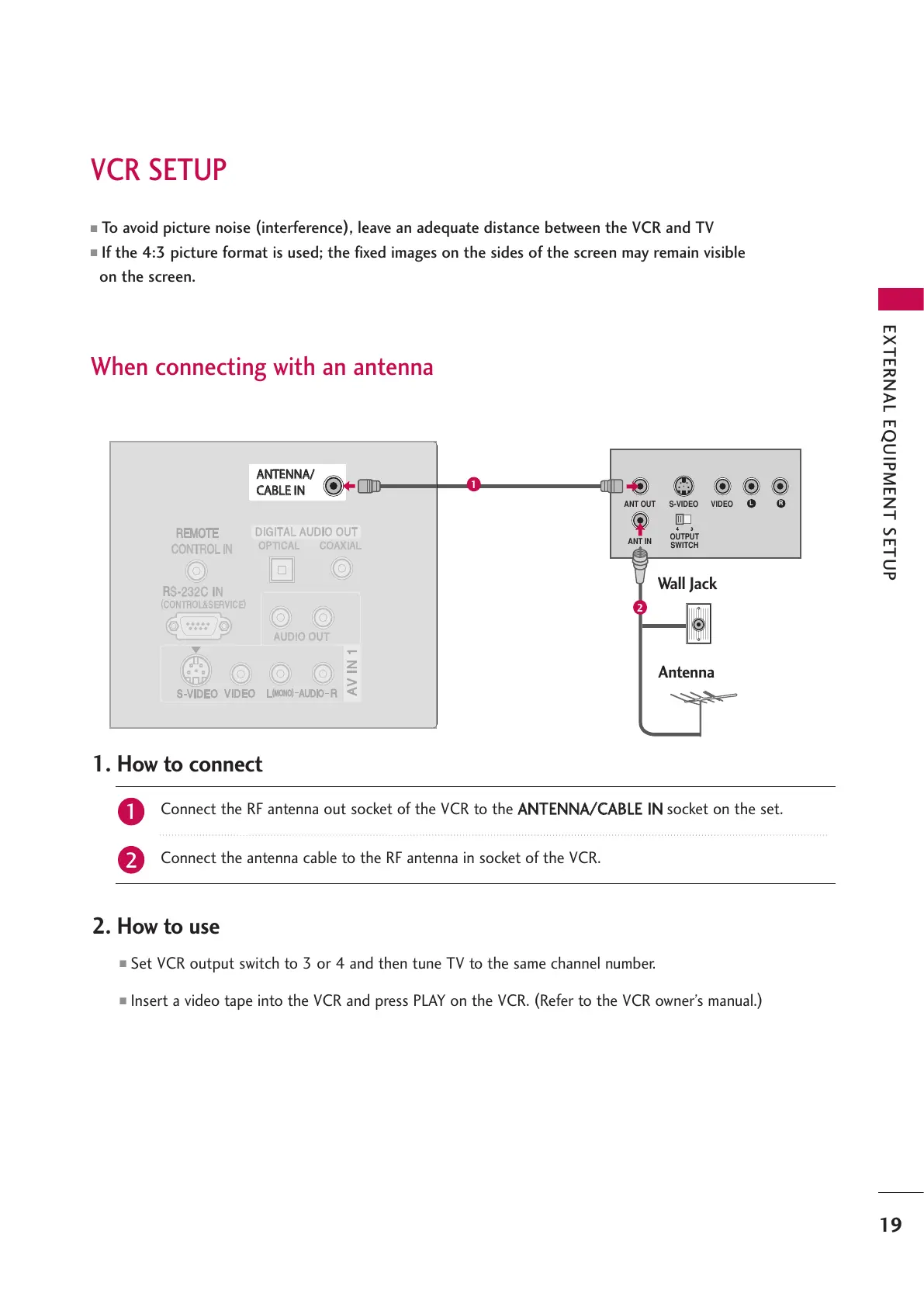
Wall Jack
Antenna
Connect the RF antenna out socket of the VCR to the
AANNTTEENNNNAA//CCAABBLLEE IINN
socket on the set.
Connect the antenna cable to the RF antenna in socket of the VCR.
1. How to connect
■
Set VCR output switch to 3 or 4 and then tune TV to the same channel number.
■
Insert a video tape into the VCR and press PLAY on the VCR.
(
Refer to the VCR owner’s manual.
)
2. How to use
2
1
19
EXTERNAL EQUIPMENT SETUP
1
2



 To Next Page