Installation
- To avoid picture noise (interference), leave an adequate distance between the VCR and TV.
- Typically a frozen still picture from a VCR. if the 4:3 picture format is used; the fixed images on the sides
of the screen may remain visible on the screen.
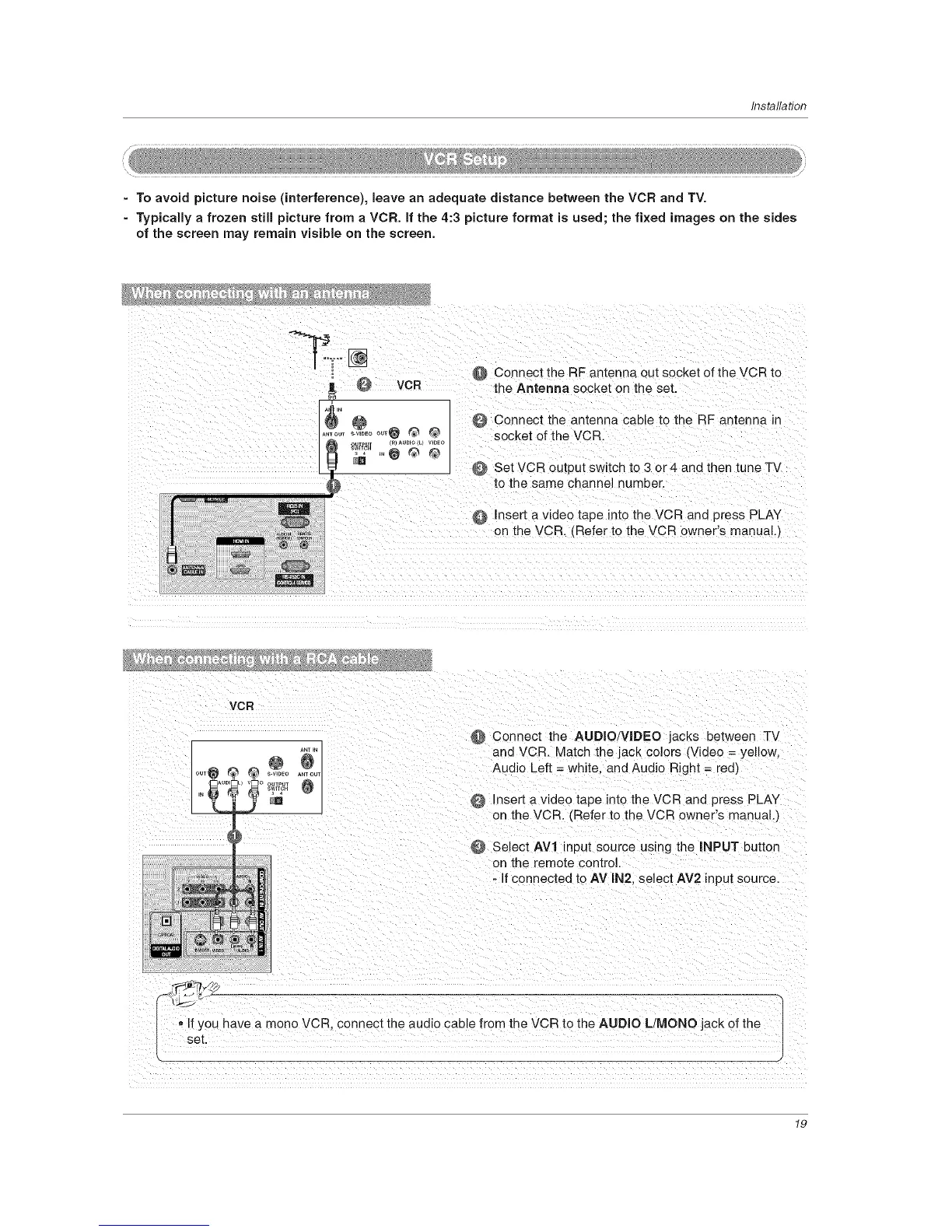
VCR @ Connect the RF antenna out socket of the VCR to
" e the Antenna s0cket on the set
_" @ @ Connect the antenna cable t0the RF antenn a in
.......... @ _ @ socket of the VCR
.£_,[_ /R/AUDioILl WDEO
,.e ® ®
O Set VCR output switch to 3 or 4 and then tune TV
@ Insert a video tape intothe VCR and press PLAY
on the VCR. (Refer t0 the vcR owner's manual,)
VCR
tit
AUD 0 OUTPUT
Connect the AUDIO/VIDEO jacks between TV
and VCR. Match the jack colors (Video = yellow.
Audio Left = white and Audio Right = red/
Insert a video tape into the VCR and press PLAY
on the VCR CRefer to the VCR owner's manual.I
Select AV1 input source using the INPUT button
on the remote control.
- f connected to AV IN2. select AV2 input source.
• If you have a mono VCR. connect me audio cable from the VCR to the AUDIO L/MONO jack of the
set
19



 To Next Page