Operation
Setup Menu Options:
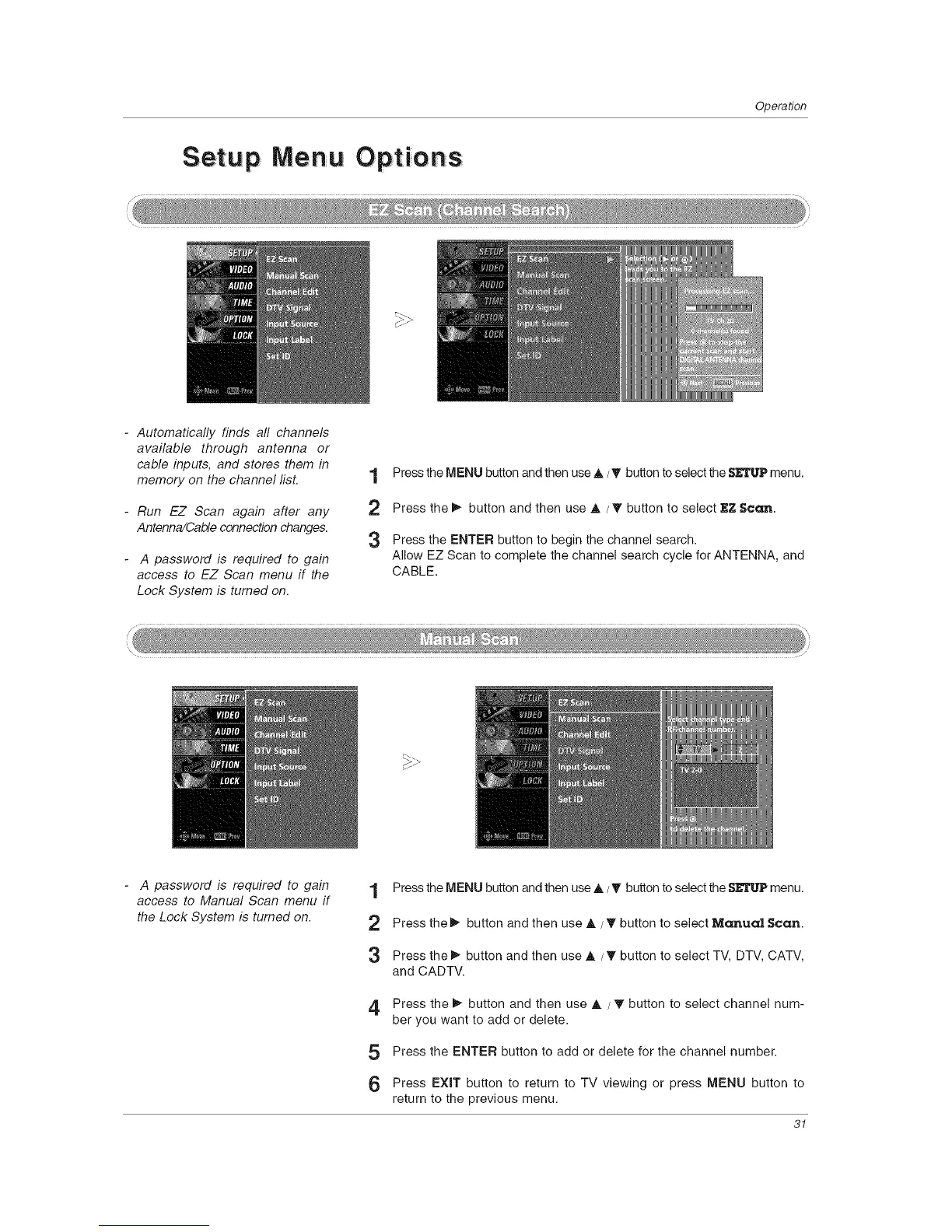
- Automatically finds all channels
available through antenna or
cable inputs, and stores them in
memory on the channel lisL
- Run EZ Scan again after any
Antenna/Cable connection changes.
A password is required to gain
access to EZ Scan menu if the
Lock System is turned on.
1
2
3
Press the MENU button and then use ,&/_' button to select the SETUP menu.
Press the _ button and then use A / T button to select EZ Scan.
Press the ENTER button to begin the channel search.
Allow EZ Scan to complete the channel search cycle for ANTENNA, and
CABLE.
A password is required to gain
access to Manual Scan menu if
the Lock System is turned on.
1 Press the MENU button and then use ,&/_' button to select the SETUP menu.
2 Press the _ button and then use A / T button to select Manual Scan.
3 Press the _ button and then use ,&/T button to select TV, DTV, CATV,
and CADTV.
4 Press the _ button and then use A / T button to select channel num-
ber you want to add or delete.
5 Press the ENTER button to add or delete for the channel number.
6 Press EXIT button to return to TV viewing or press MENU button to
return to the previous menu.
31



 To Next Page