Operation
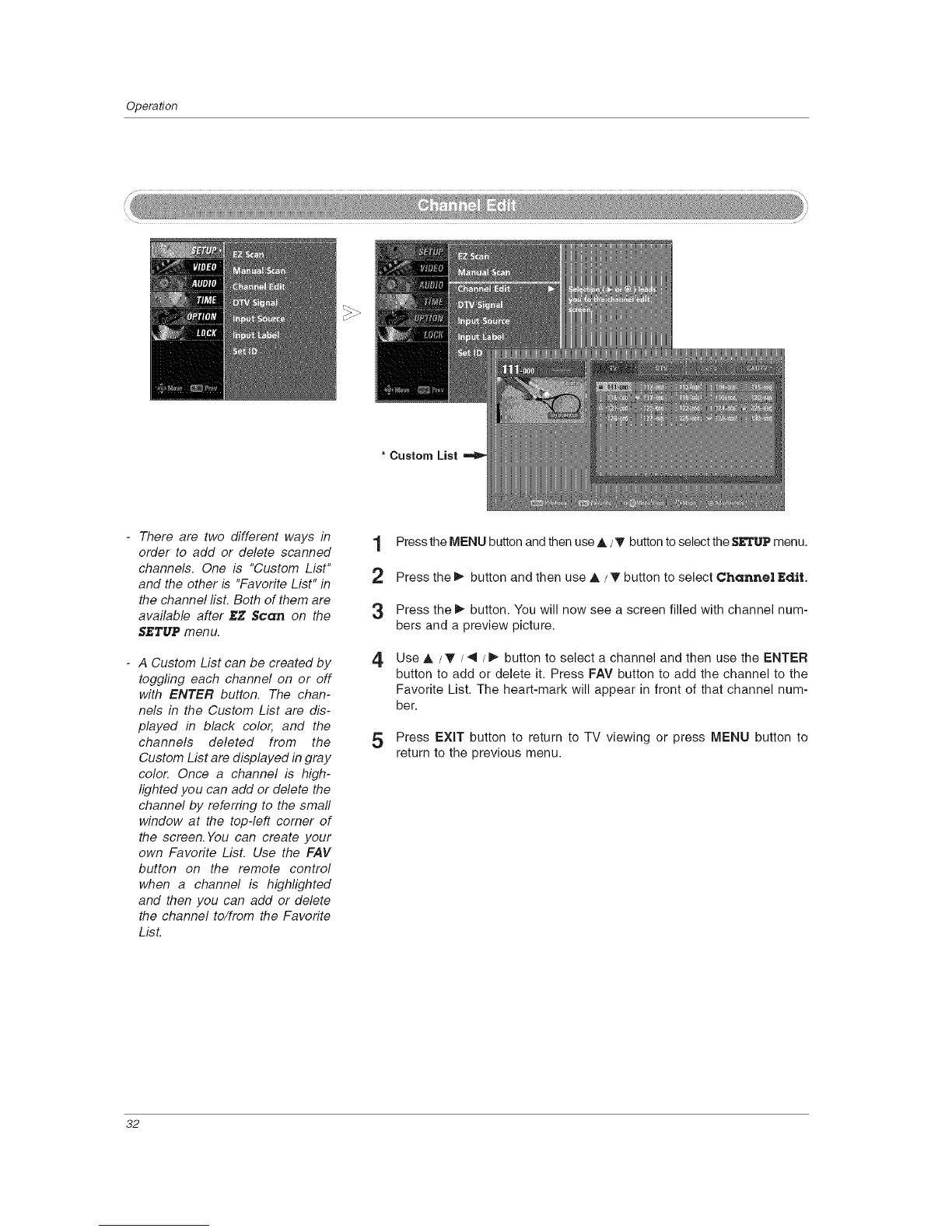
* Custom List
- There are two different ways in t
order to add or delete scanned
I
channels. One is "Custom List"
,r_
and the other is "Favorite List" in
the channel list. Both of them are
available after _Z Scan on the
SJ_TUPmenu.
- A Custom List can be created by
toggling each channel on or off
with ENTER button. The chan-
nels in the Custom List are dis-
played in black color, and the
channels deleted from the
Custom List are displayed in gray
colo_ Once a channel is high-
lighted you can add or delete the
channel by referring to the small
window at the top-left corner of
the screen. You can create your
own Favorite List. Use the FAV
button on the remote control
when a channel is highlighted
and then you can add or delete
the channel to/from the Favorite
LisL
4
Press the MENU button and then use A /_' button to select the gETUP menu.
Press the _ button and then use A / T button to select Channel Edit.
Press the _ button. You will now see a screen filled with channel num-
bers and a preview picture.
Use A / T / _l/1_ button to select a channel and then use the ENTER
button to add or delete it. Press FAV button to add the channel to the
Favorite List. The heart-mark will appear in front of that channel num-
ber.
5 Press EXiT button to return to TV viewing or press MENU button to
return to the previous menu.
32



 To Next Page