19
ENG
ENGLISH
CUSTOMIZING SETTINGS
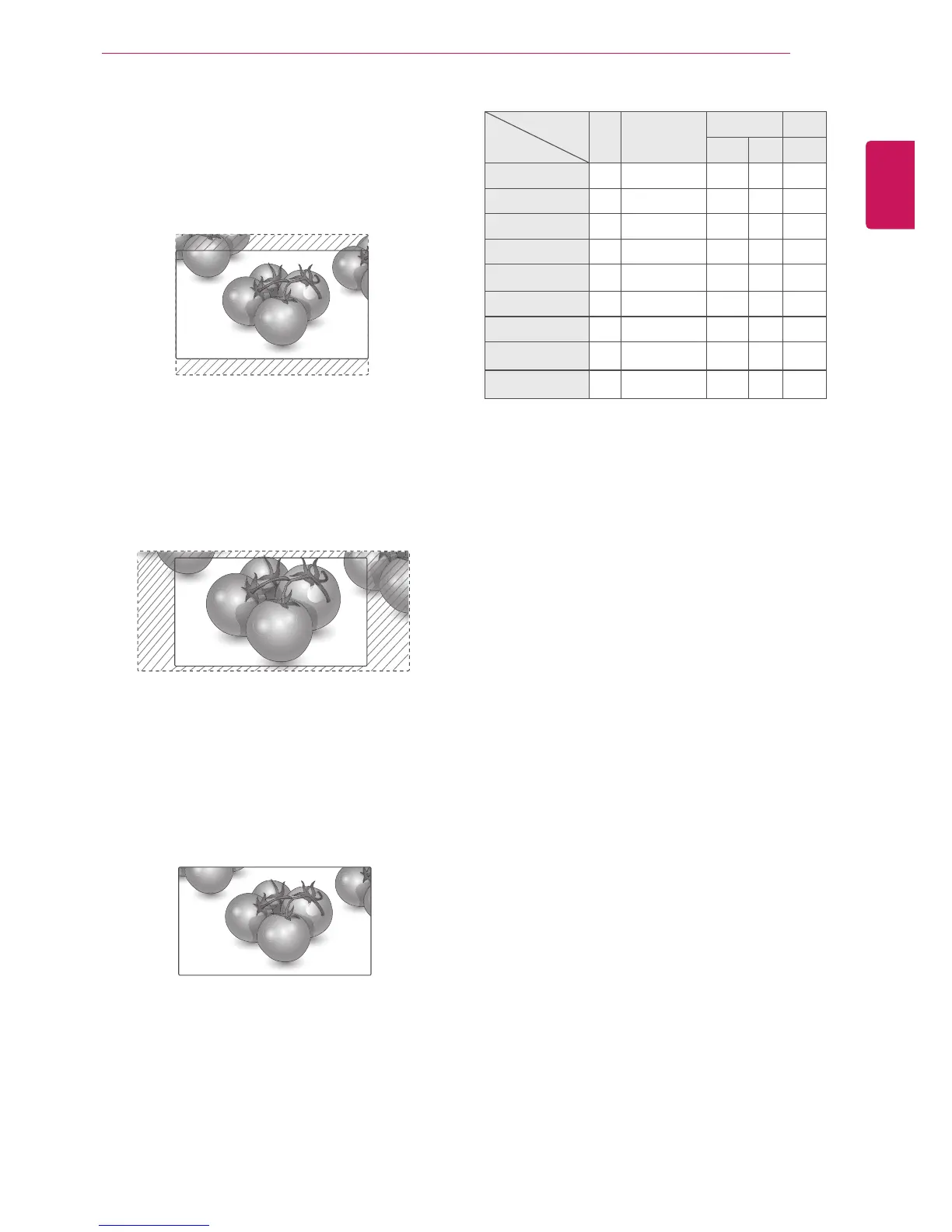
- Zoom : The following selection will allow you
to view the picture without any alteration, while
filling the entire screen. However, the top and
bottom of the picture will be cropped.
- Cinema Zoom 1 : Choose Cinema Zoom
when you want to enlarge the picture in correct
proportion. Note: When enlarging or reducing
the picture, the image may become distorted.
- Full Wide : When Monitor set receives the wide
screen signal,it will lead you to adjust the picture
horizontally or vertically, in a linear proportion,to
fill the entire screen fully.
Full Wide
MODE
ARC
AV Component HDMI/DVI RGB
DTV PC PC
16:9 o o o o o
Just Scan x o o x x
Original o x x x x
4:3 o o o o o
1:1 x x x o o
14:9 o o o x x
Zoom o o o x x
Cinema Zoom 1 o o o x x
Full Wide o x x x x








 To Next Page