18
INSTALLATION
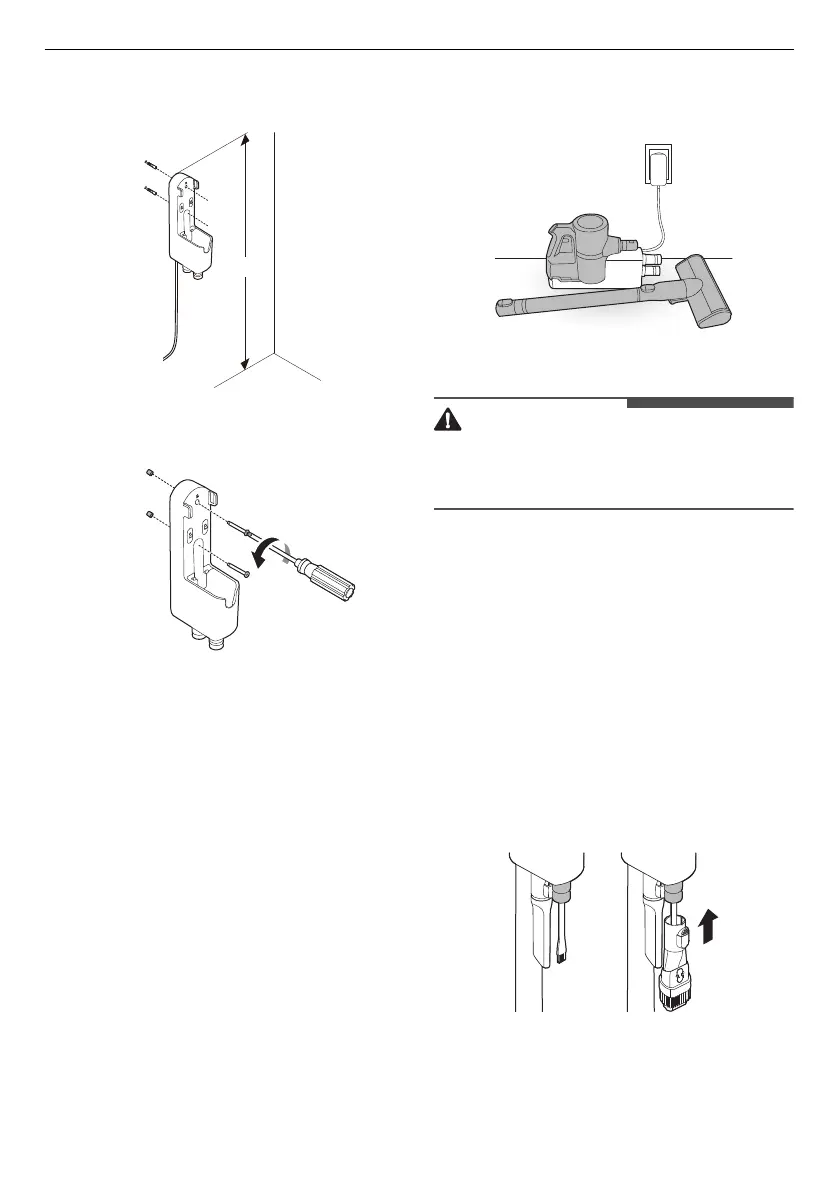
• If screwing into drywall, use the drywall
anchors.
3
Attach the charging station to the wall with the
wall anchoring screws.
4
Plug the power cord into the power outlet.
Compact Installation
For safety and convenience, install the charging
station using the self-standing or wall-mounted
installation methods. If you choose not to install
the charging station, place it on a level floor for
charging or storage.
1
Connect the power adapter to the port on the
back of the charging station.
2
Place the charging station on a hard and level
floor.
3
Separate the extension pipe and nozzle from
the product body before charging or storing
the appliance.
4
Plug the power cord into the power outlet.
• Leaving the appliance on a level floor for a long
time with the extension pipe and nozzle attached
may damage the appliance.
Storing the Accessories
Storing the Tools
Store the frequently used tools such as the
combination tool, crevice tool and cleaning brush
at the bottom of the charging station.
• Slide the cleaning brush up into the tool holder.
• Slide the combination tool over the cleaning
brush and onto the tool holder.
• To remove a tool, press the release button at the
front of the tool.


 To Next Page
 Loading...