13
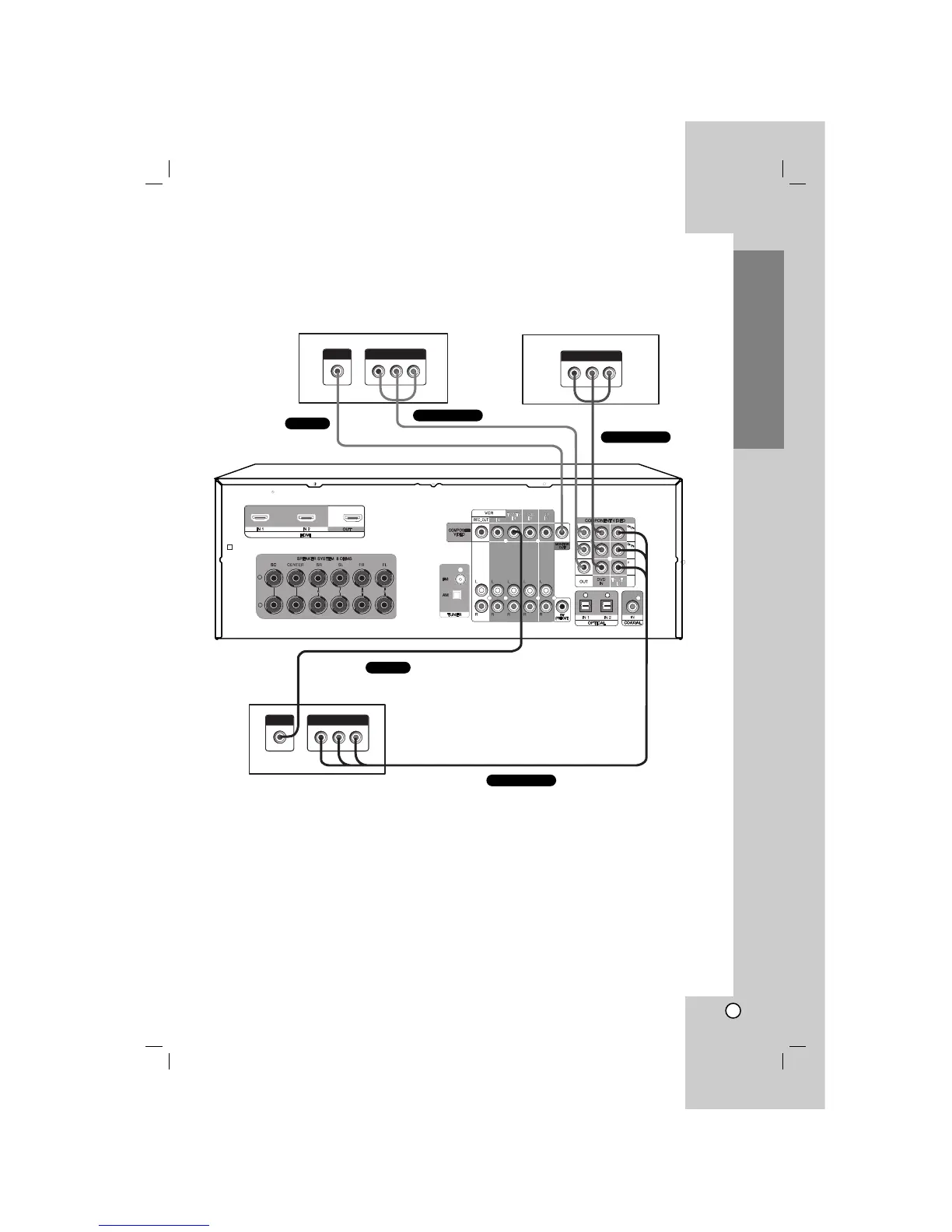
2. Connect the video jacks.
For details of the required cables, see the page 4.
The following illustration shows how to connect a TV or satellite tuner (Set top box, etc) and a DVD player
with COMPONENT VIDEO (Y, C
B/PB, CR/PR) output jacks.
3. Select the input source to play the component.
For details, see the page 25.
Note
Connect to either the COMPOSITE VIDEO OUT or COMPONENT VIDEO OUT jacks.
Installation
DVD player (or Digital device)
Satellite tuner (or Set top box, etc)
VIDEO OUT
COMPONENT VIDEO OUT
COMPONENT VIDEO OUT
VIDEO OUT
COMPONENT VIDEO OUT
TV monitor
VIDEO INPUT
COMPONENT VIDEO INPUT
+
-


 To Next Page