16
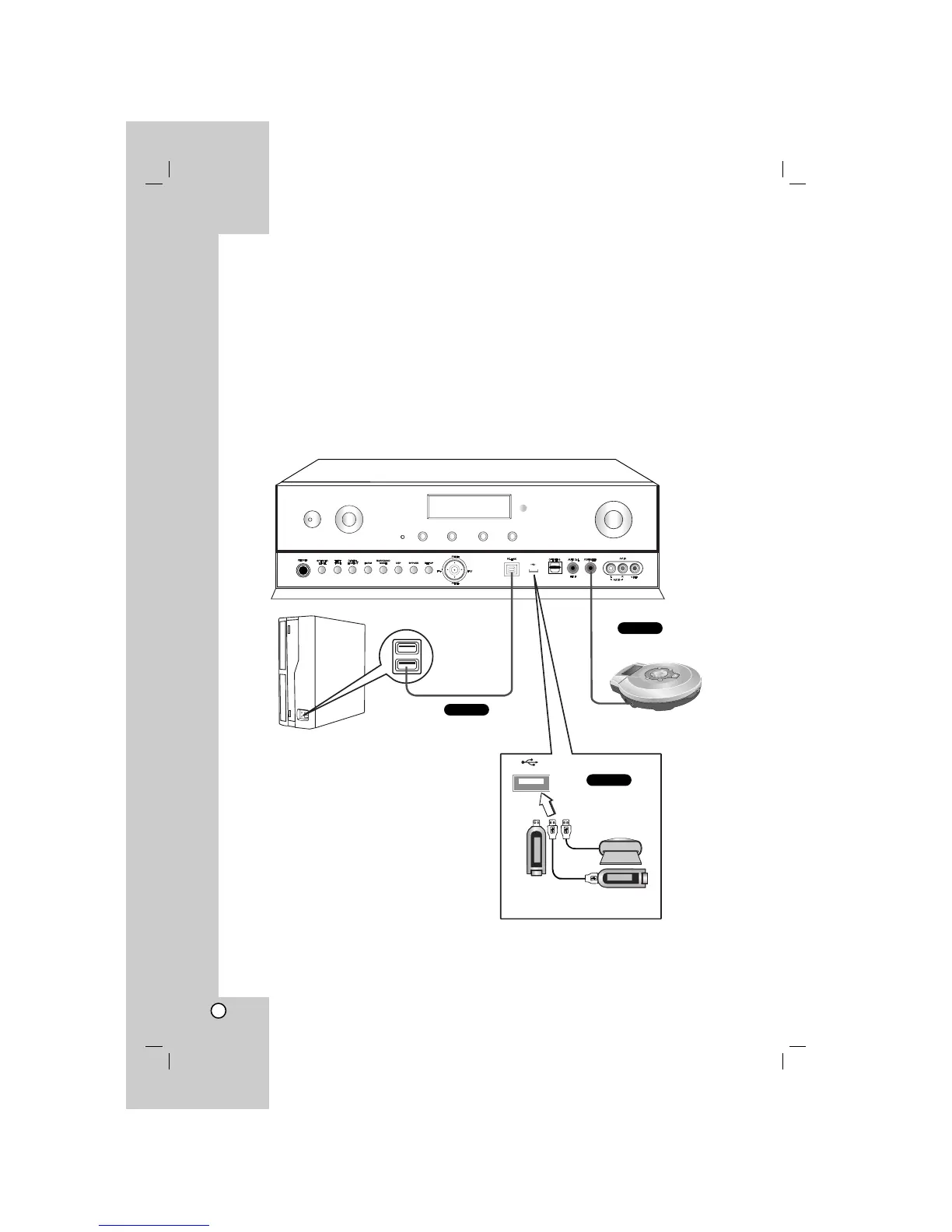
Connecting PC, Portable device, or USB device
For details of the required cables, see the page 4.
Select the input source to play the component after connecting.
- For details, see the page 25.
PC-LINK Connection (P)
Connect the unit’s PC-LINK jack to the corresponding jack of PC with USB cable.
Portable device Connection (L)
Connect the unit’s PORTABLE-IN jack to the corresponding jack of portable device with mini stereo (3.5mm)
cable.
USB connection (U)
Connect the unit’s USB port to the USB port of USB Memory (or MP3 player, etc.).
/
l
INPUT
SELECT
DISPLAY
2EQ
M1 M2 M3
MASTER VOLUME
PC
Portable device
USB Memory, MP3 Player (or
Memory Card Reader, etc.)


 To Next Page