19
Installation
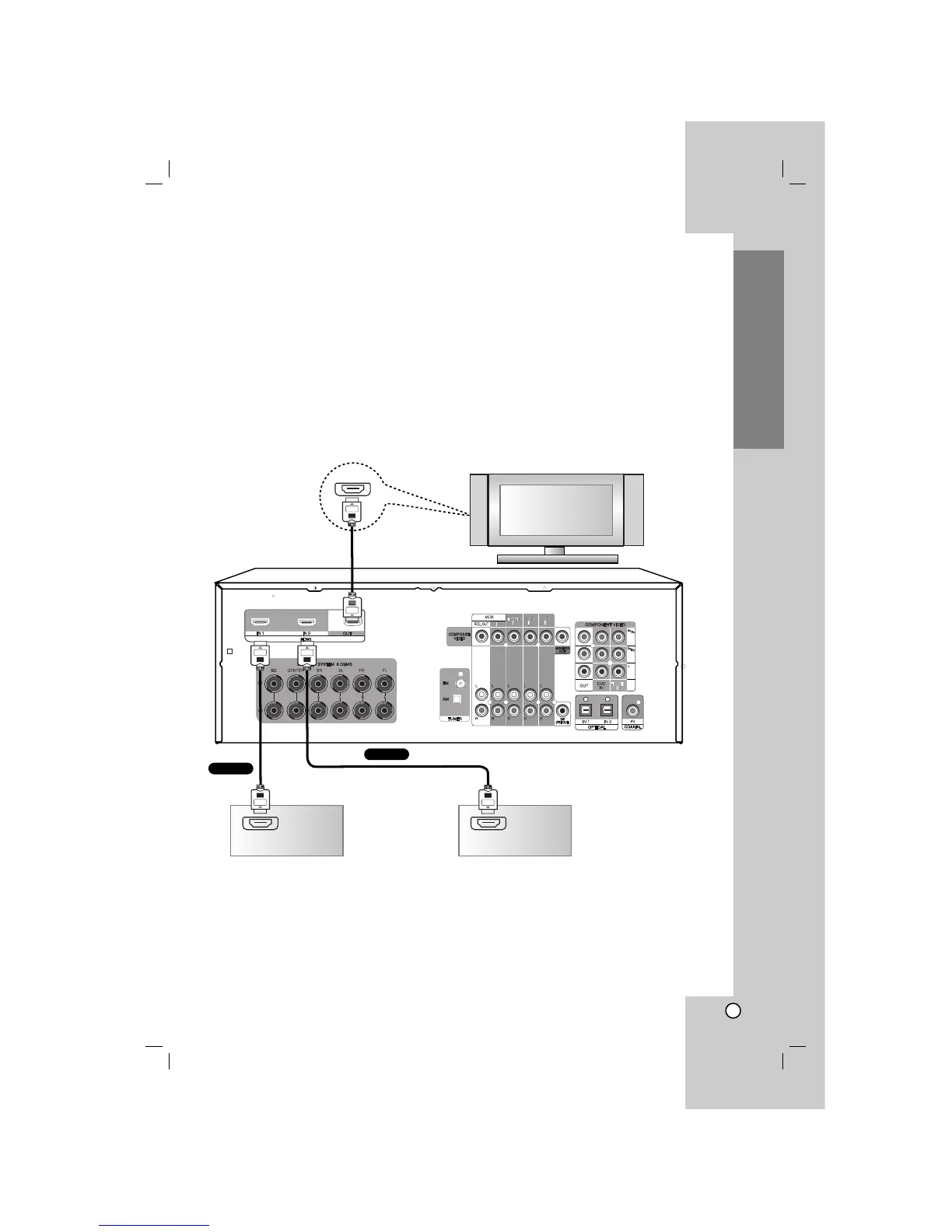
Connecting TV or components with HDMI jack
HDMI (High Definition Multimedia Interface) supports both video and audio on a single digital connection for an easy
all- digital output to an HDMI or DVI-equipped TV.
Connection to an HDMI TV requires an HDMI cable while connection a DVI-equipped TV requires a DVI adapter
besides a HDMI cable.
HDMI has the capability to support standard, enhanced, or high-definition video plus standard to multi-channel
surround-sound audio, HDMI features include uncompressed digital video, a bandwidth of up to 5 gigabyte per
second, one connector (instead of several cables and connector), and communication between the AV source and
AV devices such as DTVs.
HDMI, the HDMI logo and High-Definition Multimedia Interface are trademarks or registered trademarks of HDMI
licensing LLC.
If you have a HDMI TV or monitor, you can connect it to this unit with a HDMI cable.
Notes
• The arrow on the cable connector body should face up for correct alignment with the connector on the unit.
• Don’t connect a TV or MONITOR to HDMI 1/2 jacks. The unit may malfunction.
•When the multi channel input is used, the real output may be different from the speaker indicators that appear
in display window. (Multi channel : A mode that can be inputted and outputted up to 6.1ch.)


 To Next Page