15
Connecting to an
Amplifier
Since many factors aect the type of audio output,
see “Audio Output Specications” for details (page
54).
About Digital Multi-channel sound
A digital multi-channel connection provides the
best sound quality. For this, you need a multi-
channel Audio/Video Receiver that supports one
or more of the audio formats supported by your
player. Check the logos on the front of the Audio/
Video receiver and the manual. (PCM Stereo, PCM
Multi-Ch, Dolby Digital, Dolby Digital Plus, Dolby
TrueHD, DTS and/or DTS-HD)
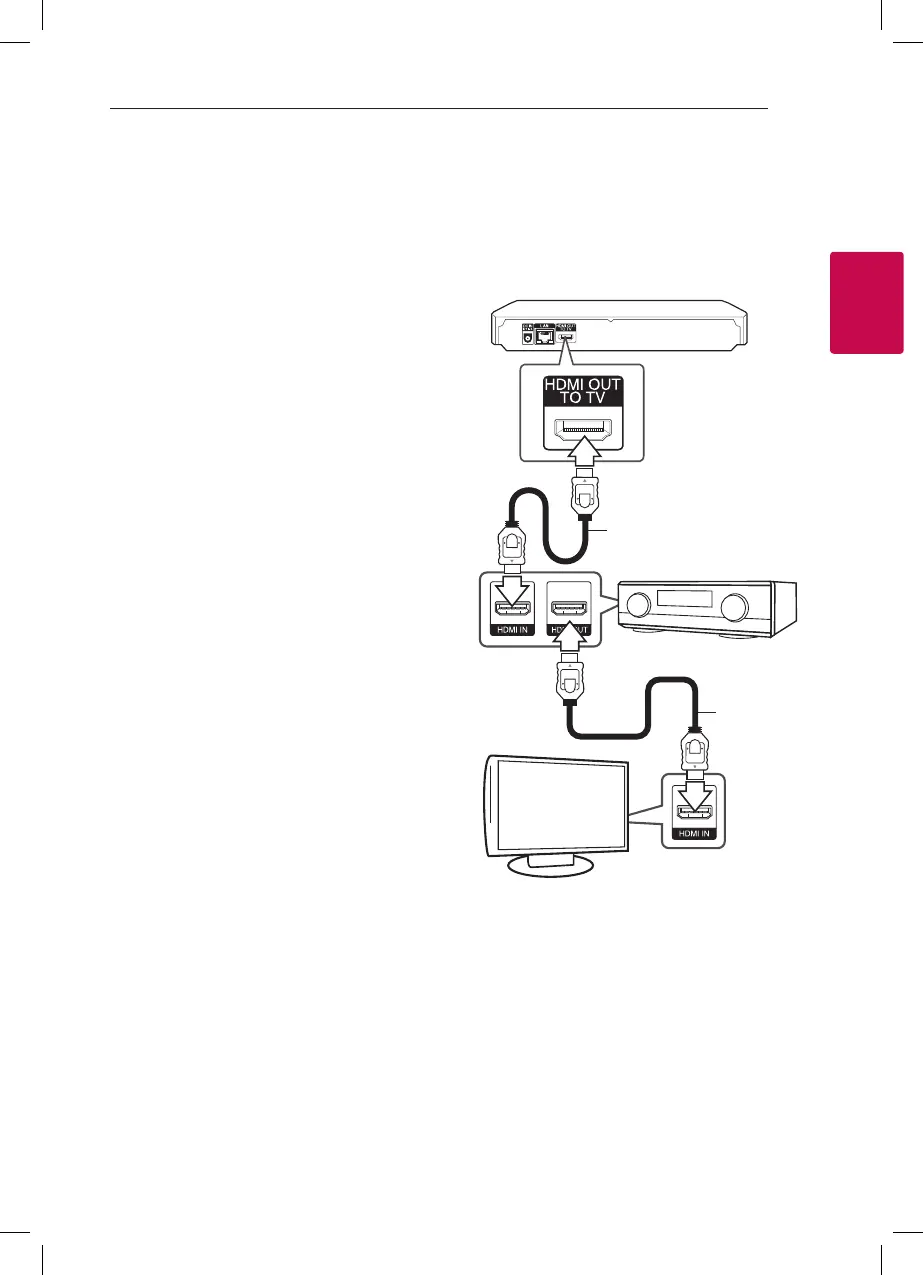
Connecting to an amplifier via
HDMI Output
Connect the player’s HDMI OUT jack to the
corresponding in jack on your amplier using an
HDMI cable.
HDMI cable
HDMI cable
TV
Receiver/Amplier
Rear of the unit
Connect the amplier’s HDMI output jack to HDMI
input jack on your TV using an HDMI cable if your
amplier has HDMI output jack. (Refer to amplier’s
owner’s manual)
You will need to activate the player’s digital output.
(See “[AUDIO] Menu” on page 23)



 To Next Page