26
d
[Digital CC]
(When [CC Type] is selected to [Digital])
The language option of the online content
can be selected here. (but language option
will be supported fully or partially according
to contents)
e
[CC Mode]
(When [CC Type] is selected to [Digital])
Selects the closed caption mode between
[Custom] and [Auto].
f
[Digital Option]
(When [CC Mode] is selected to [Custom])
You can adjust detail settings of closed
caption.
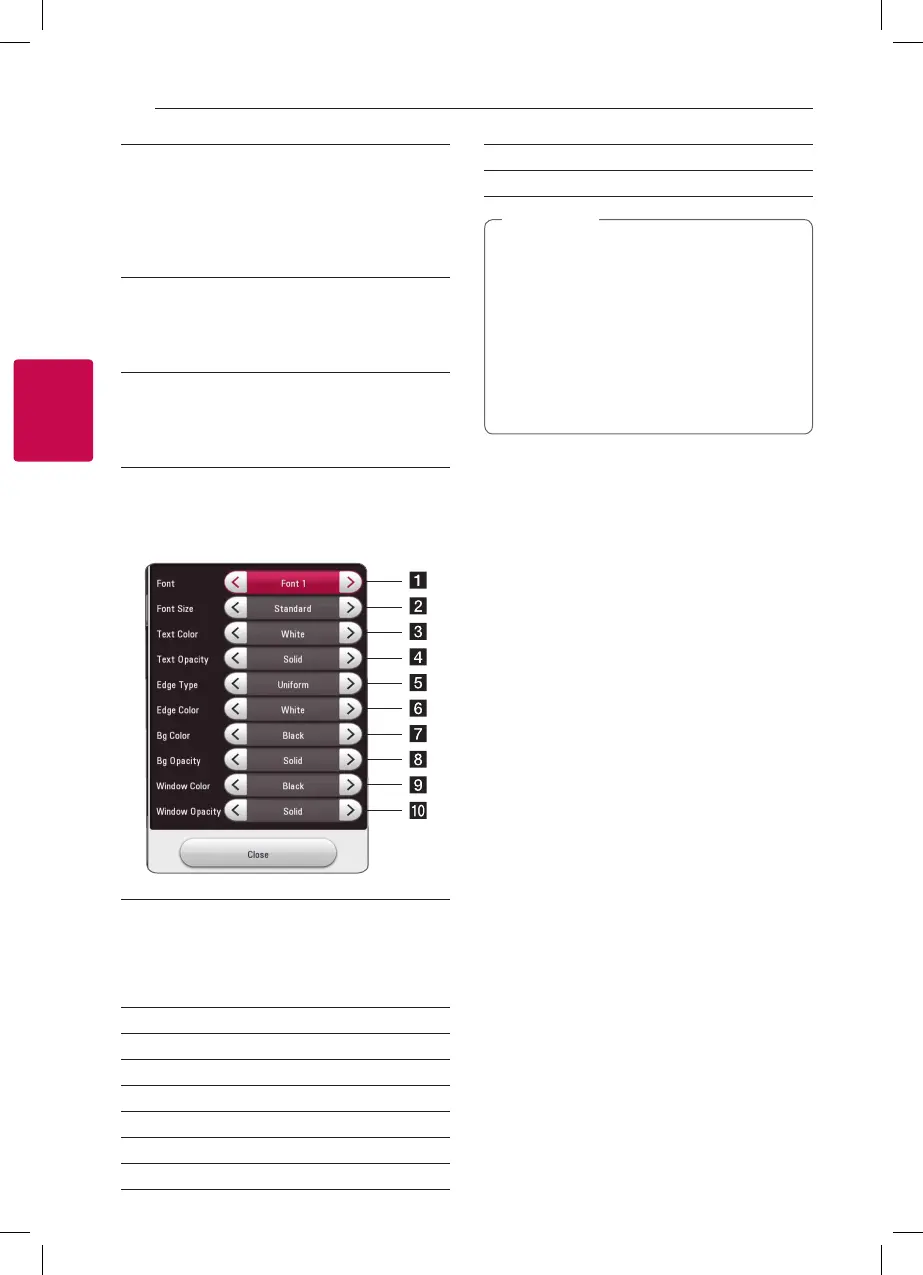
Adjusting the [Digital Option]
When [CC Mode] is selected to [Custom], you can
adjust detail settings of closed caption.
a
Selects a typeface for the text.
Font1 : Default / Font2 : Courier
Font3 : TimesNewRoman / Font4 : Helvetica
Font5 : Arial / Font6 : Casual
Font7 : Cursive / Font8 : SmallCapital
b
Selects the font size.
c
Selects a color for the text.
d
Adjusts the opacity for the text color.
e
Selects an edge type.
f
Selects a color for the edges.
g
Selects a background color.
h
Adjusts the opacity for the background color.
i
Selects a window color.
j
Adjusts the opacity for the window color.
y
On disc jacket or description page, a CC
logo will appear if closed captioning is
supported.
y
If online contents include closed caption of
its own, this setting may not work.
y
Some disc and online content support
closed caption function, if you want to use
closed caption, go to [Settings] > [OTHERS]
> [Closed Caption].
,
Note
Terms of Service
Privacy Policy for Blu-ray Disc™ Player is displayed.
To use the Premium Service and SW Updates, select
[Agree].



 To Next Page