7
ENG
ENGLISH
ASSEMBLING AND PREPARING
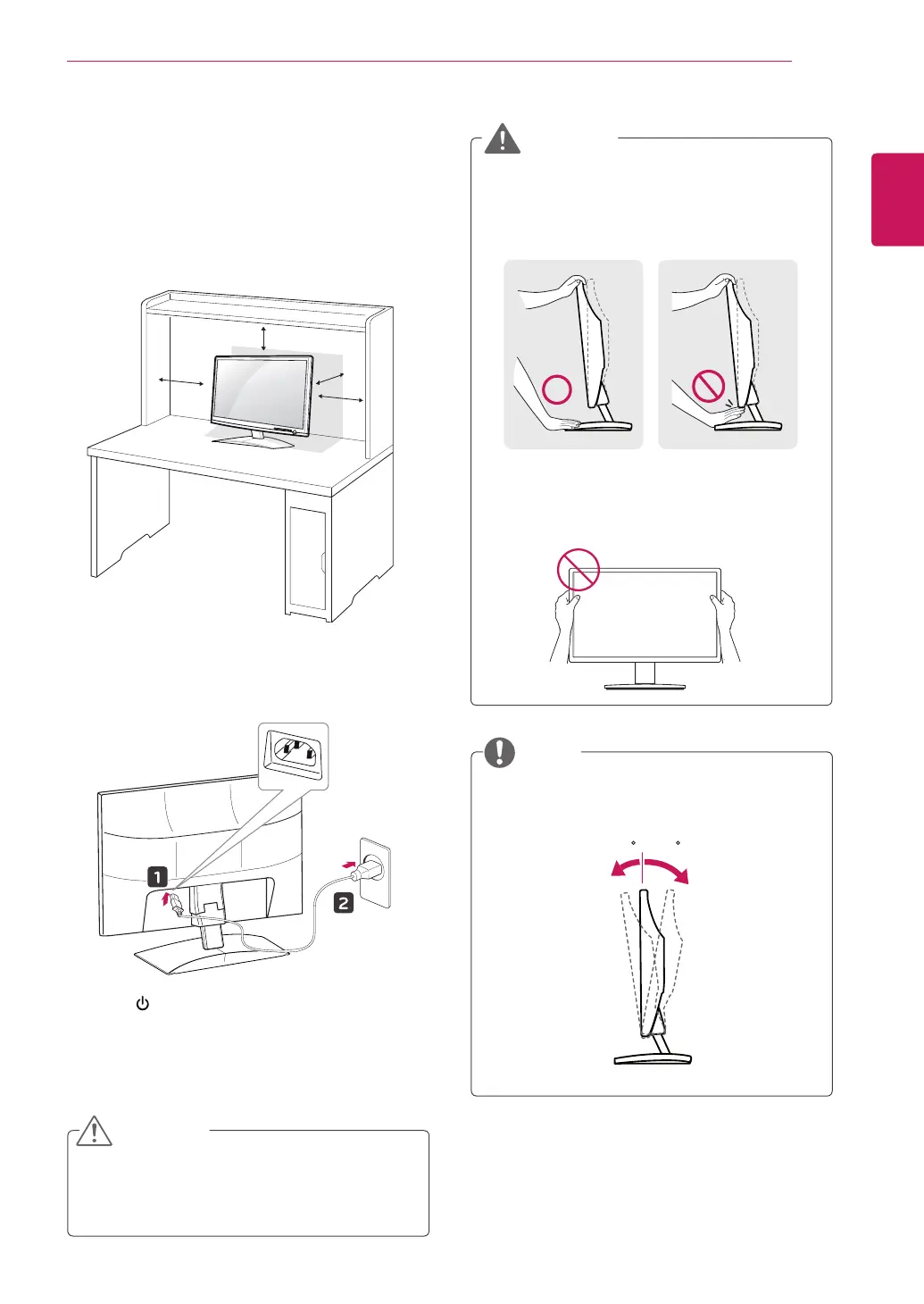
Mounting on a table
1
LiftandtilttheMonitorsetintoitsupright
positiononatable.
Leavea10cm(minimum)spacefromthewall
forproperventilation.
2
ConnectthePower Cordtoawalloutlet.
3
Press (Power)buttononthefrontswitch
paneltoturnthepoweron.
10 cm
10 cm
10 cm
10 cm
Whenyouadjusttheangle,donotholdthe
bottomoftheMonitorsetframeasshownon
thefollowingillustration,asmayinjureyour
fingers.
Donottouchorpressthescreenwhen
adjustingtheangleofthemonitor.
WARNING
Unplugthepowercordbeforemovingthe
Monitortoanotherlocation.Otherwiseelectric
shockmayoccur.
Tiltfrom+15to-5degreesupordowntoadjust
theangleoftheMonitorsettosuityourview.
CAUTION
NOTE
Front Rear
15- 5
ENG.indd 7 2011-04-05 �� 1:20:36


 To Next Page