EasyManua.ls Logo

LG GHD30 - 3.2 Control Parts Disassembly

LG GHD30
25 pages
Print Icon
To Next Page IconTo Next Page
To Previous Page IconTo Previous Page
Loading...
3.2
CONTROL
PARTS
3.2.1
POWER
CORD
ASSEMBLY
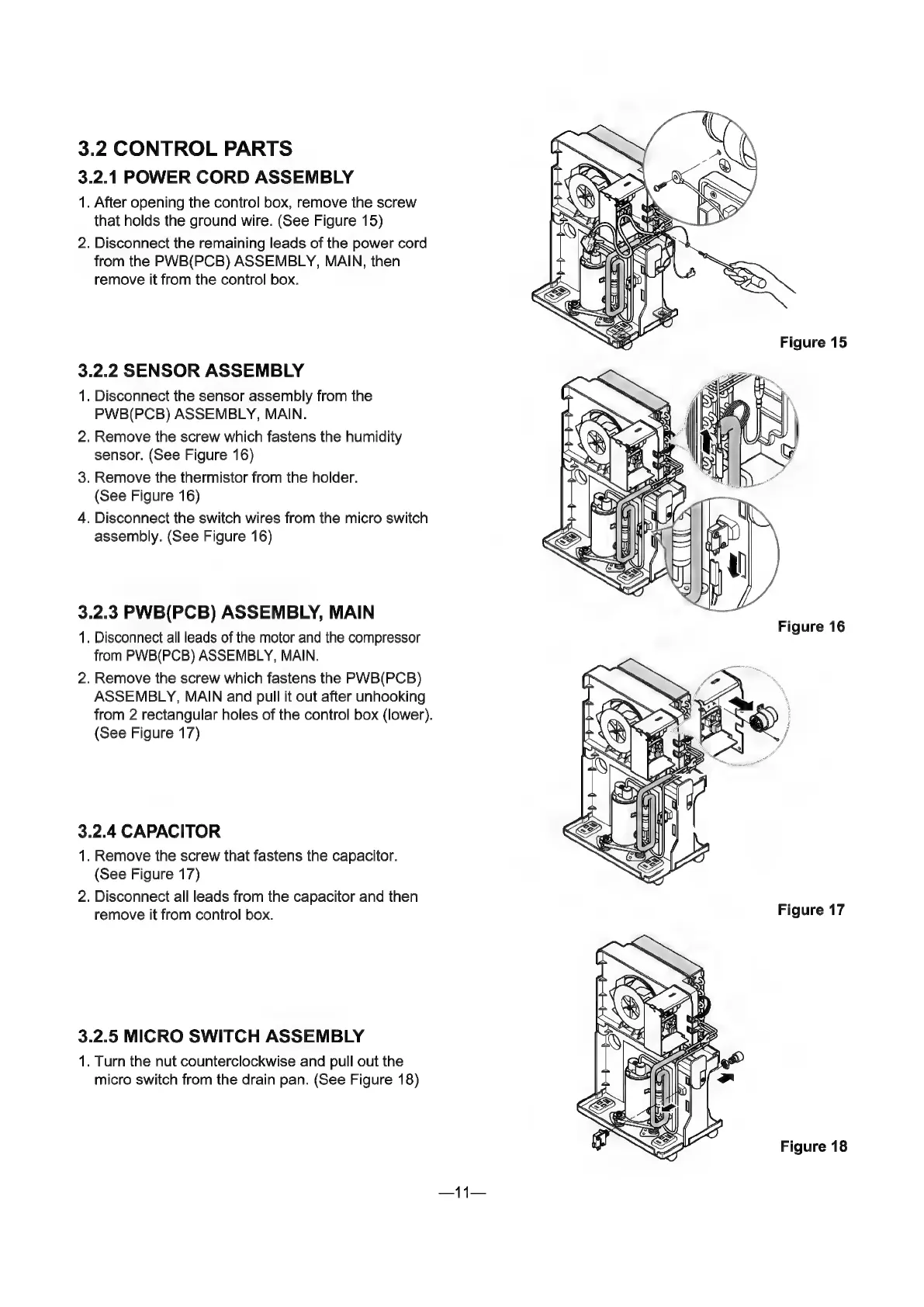
1.
After
opening
the
control
box,
remove
the
screw
that
holds
the
ground
wire.
(See
Figure
15)
2.
Disconnect
the
remaining
leads
of
the
power
cord
from
the
PWB(PCB)
ASSEMBLY,
MAIN,
then
remove
it
from
the
control
box.
3.2.2
SENSOR
ASSEMBLY
1.
Disconnect
the
sensor
assembly
from
the
PWB(PCB)
ASSEMBLY,
MAIN.
2.
Remove
the
screw
which
fastens
the
humidity
sensor.
(See
Figure
16)
3.
Remove
the
thermistor
from
the
holder.
(See
Figure
16)
4.
Disconnect
the
switch
wires
from
the
micro
switch
assembly.
(See
Figure
16)
3.2.3
PWB(PCB)
ASSEMBLY,
MAIN
1.
Disconnect
all
leads
of
the
motor
and
the
compressor
from
PWB(PCB)
ASSEMBLY,
MAIN.
2.
Remove
the
screw
which
fastens
the
PWB(PCB)
ASSEMBLY,
MAIN
and
pull
it
out
after
unhooking
from
2
rectangular
holes
of
the
control
box
(lower).
(See
Figure
17)
3.2.4
CAPACITOR
1.
Remove
the
screw
that
fastens
the
capacitor.
(See
Figure
17)
2.
Disconnect
all
leads
from
the
capacitor
and
then
remove
it
from
control
box.
3.2.5
MICRO
SWITCH
ASSEMBLY
1.
Turn
the
nut
counterclockwise
and
pull
out
the
micro
switch
from
the
drain
pan.
(See
Figure
18)
11
Figure
16
Figure
17
Figure
18

Related product manuals