EasyManua.ls Logo

LG GHD30 - Coil Assembly, Solenoid; Control Panel

LG GHD30
25 pages
Print Icon
To Next Page IconTo Next Page
To Previous Page IconTo Previous Page
Loading...
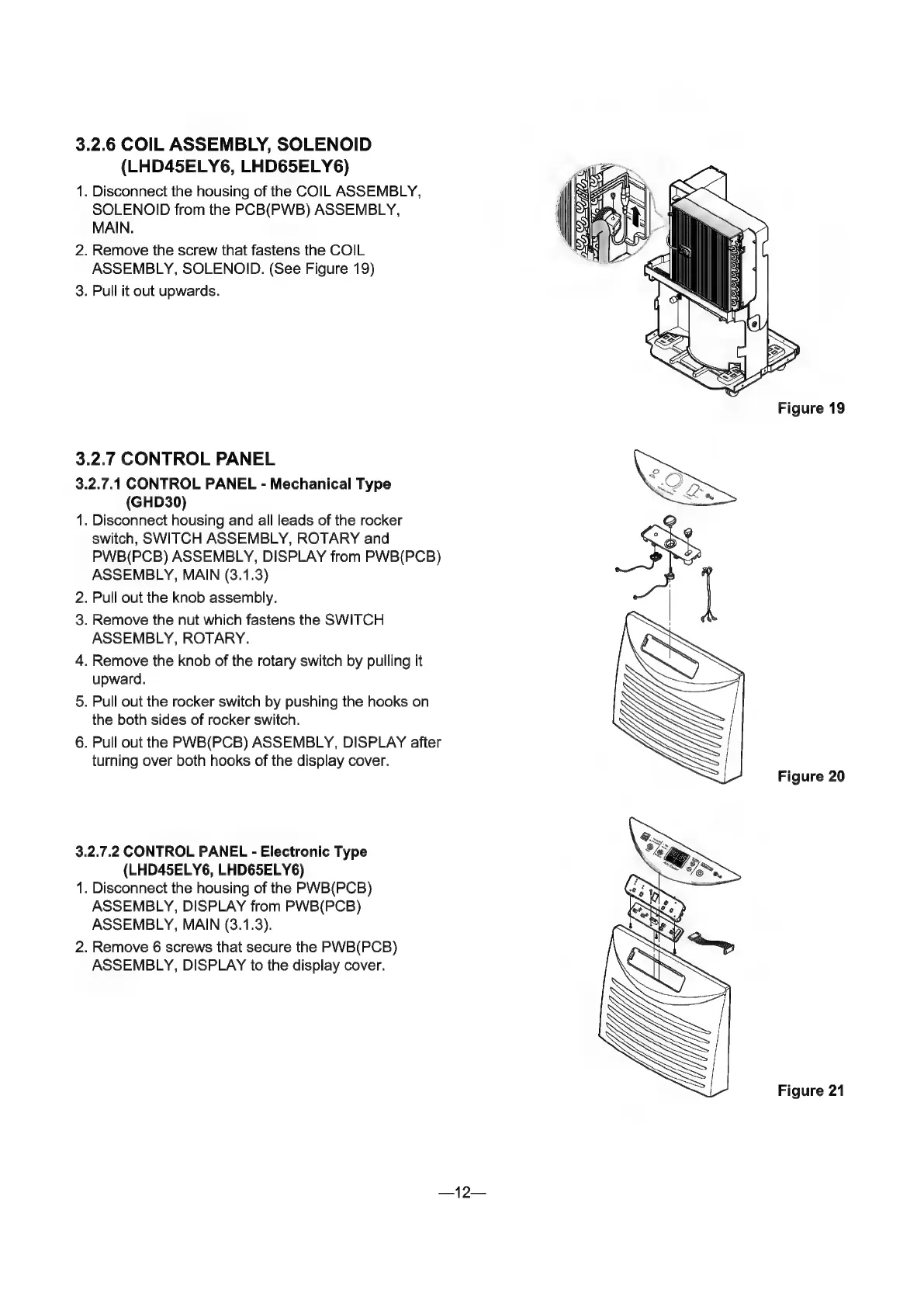
3.2.6
COIL
ASSEMBLY,
SOLENOID
(LHD45ELY6,
LHD65ELY6)
1.
Disconnect
the
housing
of
the
COIL
ASSEMBLY,
SOLENOID
from
the
PCB(PWB)
ASSEMBLY,
MAIN.
2.
Remove
the
screw
that
fastens
the
COIL
ASSEMBLY,
SOLENOID.
(See
Figure
19)
3.
Pull
it
out
upwards.
3.2.7
CONTROL
PANEL
3.2.7.1
CONTROL
PANEL
-
Mechanical
Type
(GHD30)
1.
Disconnect
housing
and
all
leads
of
the
rocker
switch,
SWITCH
ASSEMBLY,
ROTARY
and
PWB(PCB)
ASSEMBLY,
DISPLAY
from
PWB(PCB)
ASSEMBLY,
MAIN
(3.1.3)
2.
Pull
out
the
knob
assembly.
.
Remove
the
nut
which
fastens
the
SWITCH
ASSEMBLY,
ROTARY.
4.
Remove
the
knob
of
the
rotary
switch
by
pulling
it
upward.
Pull
out
the
rocker
switch
by
pushing
the
hooks
on
the
both
sides
of
rocker
switch.
6.
Pull
out
the
PWB(PCB)
ASSEMBLY,
DISPLAY
after
turning
over
both
hooks
of
the
display
cover.
CD
о
3.2.7.2
CONTROL
PANEL
-
Electronic
Туре
(LHD45ELY6,
LHD65ELY6)
1.
Disconnect
the
housing
of
the
PWB(PCB)
ASSEMBLY,
DISPLAY
from
PWB(PCB)
ASSEMBLY,
MAIN
(3.1.3).
2.
Remove
6
screws
that
secure
the
PWB(PCB)
ASSEMBLY,
DISPLAY
to
the
display
cover.
(5
Figure
20
Figure
21

Related product manuals