EasyManua.ls Logo

LG GHD30 - Page 18

LG GHD30
25 pages
Print Icon
To Next Page IconTo Next Page
To Previous Page IconTo Previous Page
Loading...
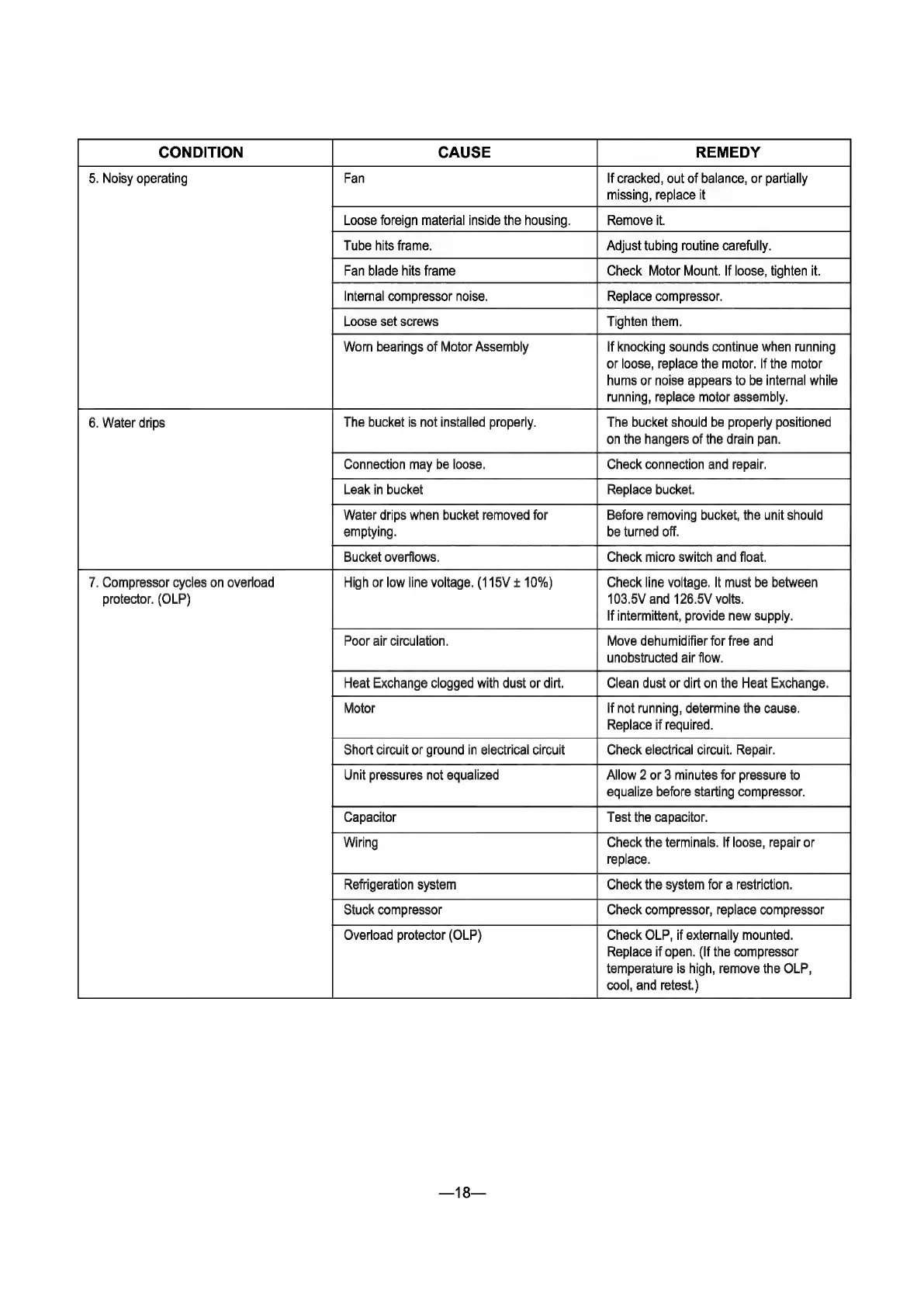
CONDITION
CAUSE
REMEDY
missing,
replace
it
Worn
bearings
of
Motor
Assembly
If
knocking
sounds
continue
when
running
or
loose,
replace
the
motor.
If
the
motor
hums
or
noise
appears
to
be
internal
while
running,
replace
motor
assembly.
6.
Water
drips
The
bucket
is
not
installed
properly.
The
bucket should
be
properly
positioned
on
the
hangers
of
the
drain
pan.
Connection
may
be
loose.
Check
connection
and
repair.
Leak
in
bucket
Replace
bucket.
Water
drips
when
bucket
removed
for
Before
removing
bucket,
the
unit
should
emptying.
be
turned
off.
Bucket
overflows.
Check
micro
switch
and
float.
7.
Compressor
cycles
on
overload
High
or
low
line
voltage.
(115V
+
10%)
Check
line
voltage.
It
must
be
between
protector.
(OLP)
103.5V
and
126.5V
volts.
If
intermittent,
provide
new
supply.
Poor
air
circulation.
Move
dehumidifier
for
free
and
unobstructed
air
flow.
Heat
Exchange
clogged
with
dust
or
dirt.
Clean
dust
or
dirt
on
the
Heat
Exchange.
Motor
If
not
running,
determine
the
cause.
Replace
if
required.
Short
circuit
or
ground
in
electrical
circuit
Check
electrical
circuit.
Repair.
Unit
pressures
not
equalized
Allow
2
or
3
minutes
for
pressure
to
equalize
before
starting
compressor.
Wiring
Check
the
terminals.
If
loose,
repair
or
replace.
Refrigeration
system
Check
the
system
for
a
restriction.
Stuck
compressor
Check
compressor,
replace
compressor
Overload
protector
(OLP)
Check
OLP,
if
externally
mounted.
Replace
if
open.
(If
the
compressor
temperature
is
high,
remove
the
OLP,
cool,
and
retest.)

Related product manuals