EasyManua.ls Logo

LG GHD30 - 1.4 Control Type

LG GHD30
25 pages
Print Icon
To Next Page IconTo Next Page
To Previous Page IconTo Previous Page
Loading...
1.4
CONTROL
ТҮРЕ
1.4.1
Mechanical
type
1
Auto
Shut-Off
Off
Max
Humidity
Control
High
Goldstar
=Low
Fan
Speed
Figure
2
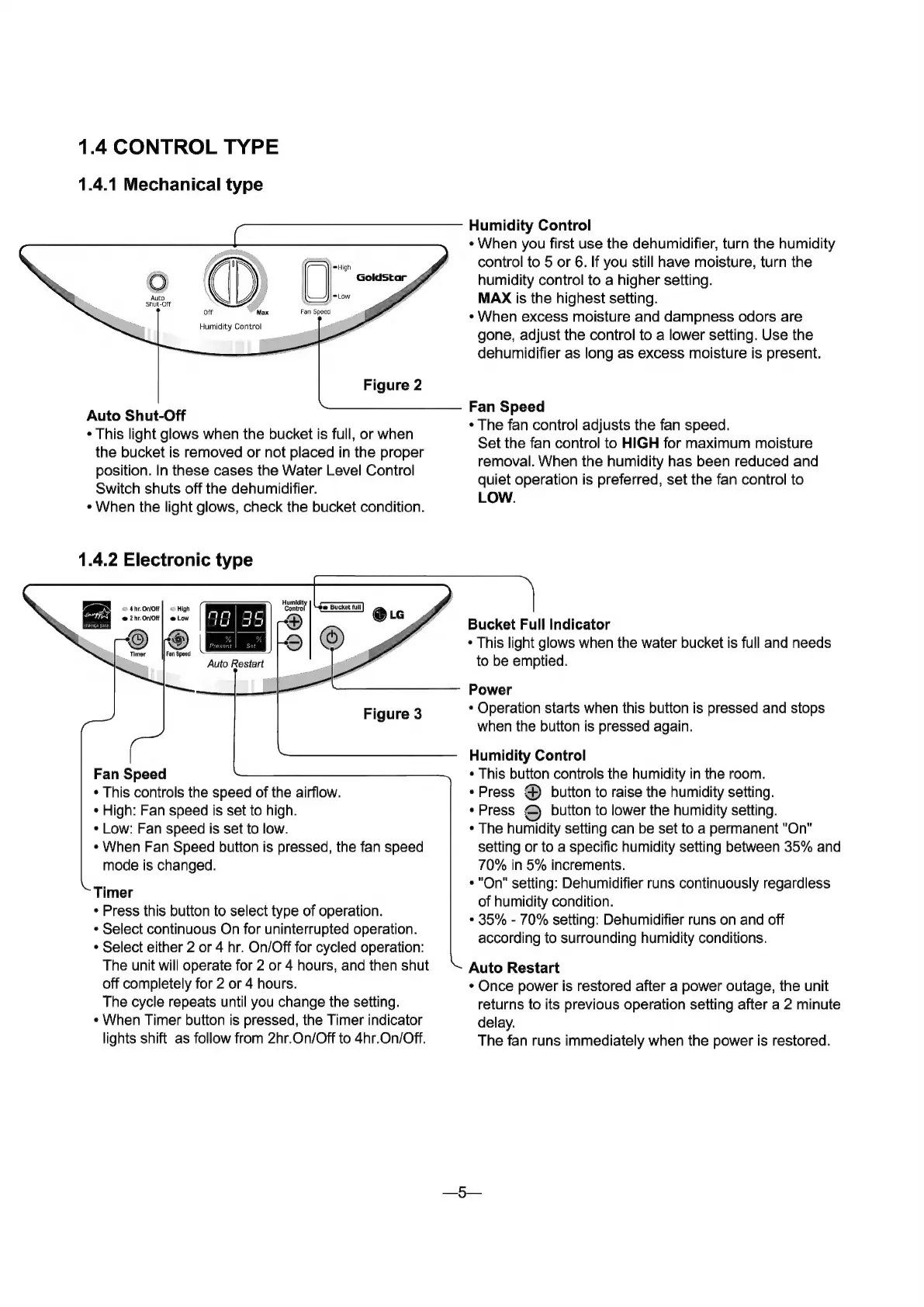
Humidity
Control
*
When
you
first
use
the
dehumidifier,
turn
the
humidity
control
to
5
or
6.
If
you
still
have
moisture,
turn
the
humidity
control
to
a
higher
setting.
MAX
is
the
highest
setting.
*
When
excess
moisture
and
dampness
odors
аге
gone,
adjust
the
control
to
a
lower
setting.
Use
the
dehumidifier
as
long
as
excess
moisture
is
present.
Auto
Shut-Off
*
This
light
glows
when
the
bucket
is
full,
or
when
the
bucket
is
removed
or
not
placed
in
the
proper
position.
In
these
cases
the
Water
Level
Control
Switch
shuts
off
the
dehumidifier.
*
When
the
light
glows,
check
the
bucket
condition.
1.4.2
Electronic
type
Fan
Speed
“Тһе
fan
control
adjusts
the
fan
speed.
Set
the
fan
control
to
HIGH
for
maximum
moisture
removal.
When
the
humidity
has
been
reduced
and
quiet
operation
is
preferred,
set
the
fan
control
to
LOW.
Humlatty
Control
658527
Puo
о
|
9
Auto
Restart
Figure
3
Fan
Speed
*
This
controls
the
speed
of
the
airflow.
High:
Fan
speed
is
set
to
high.
*
Low:
Fan
speed
is
set
to
low.
*
When
Fan
Speed
button
is
pressed,
the
fan
speed
mode
is
changed.
Timer
*
Press
this
button
to
select
type
of
operation.
*
Select
continuous
On
for
uninterrupted
operation.
*
Select
either
2
or
4
hr.
On/Off
for
cycled
operation:
The
unit
will
operate
for
2
or
4
hours,
and
then
shut
off
completely
for
2
or
4
hours.
The
cycle
repeats
until
you
change
the
setting.
“When
Timer
button
is
pressed,
the
Timer
indicator
lights
shift
as
follow
from
2hr.On/Off
to
4hr.On/Off.
`
Bucket
Full
Indicator
This
light
glows
when
the
water
bucket
is
full
and
needs
to
be
emptied.
Power
*
Operation
starts
when
this
button
is
pressed
and
stops
when
the
button
is
pressed
again.
Humidity
Control
This
button
controls
the
humidity
in
the
room.
*
Press
@
button
to
raise
the
humidity
setting.
“Press
©)
button
to
lower
the
humidity
setting.
“Тһе
humidity
setting
can
be
set
to
a
permanent
"On"
setting
or
to
a
specific
humidity
setting
between
35%
and
70%
in
5%
increments.
"Оп"
setting:
Dehumidifier
runs
continuously
regardless
of
humidity
condition.
"
35%
-
70%
setting:
Dehumidifier
runs
on
and
off
according
to
surrounding
humidity
conditions.
Auto
Restart
Once
power
is
restored
after
a
power
outage,
the
unit
returns
to
its
previous
operation
setting
after
a
2
minute
delay.
The
fan
runs
immediately
when
the
power
is
restored.
5

Related product manuals