32
ENGLISH
Music
Playing Music
You can listen to music by using the Music app.
1 Press the button on your remote control.
2 Launch the Music application.
3 Select your desired storage device.
You can select your desired songs from all of your storage devices and add
them to MY PLAYLIST.
4 Select your desired music content and enjoy it.
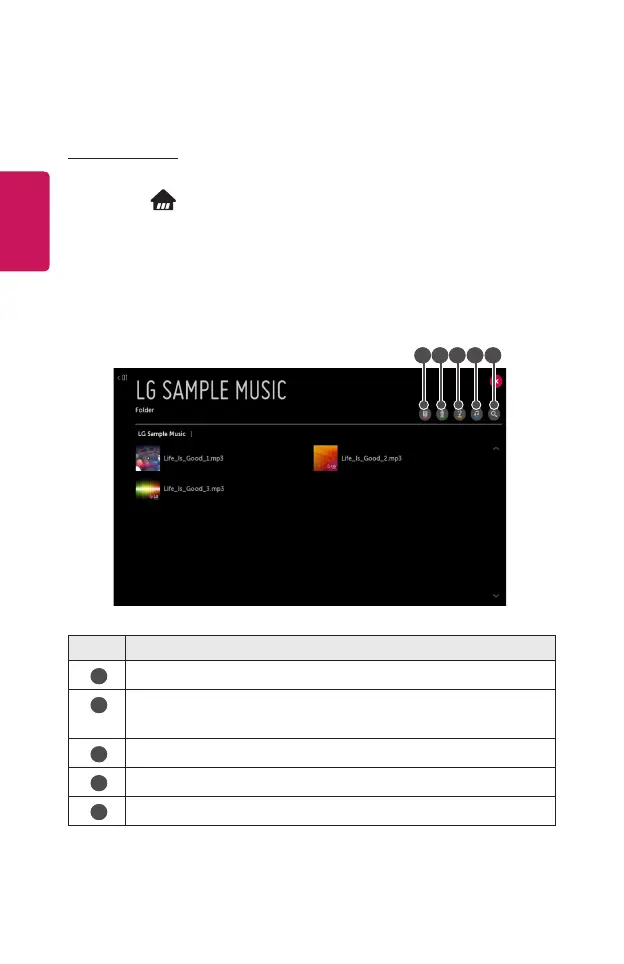
1 2 3 4 5
Description
1
Select the desired type of content list.
2
Select and delete content.
(Files shared from other devices cannot be deleted.)
3
Select content and add it to MY PLAYLIST.
4
Open the music player.
5
Launch SEARCH.
• If the number of all content is more than 5,000, some content may not be listed
up.



 To Next Page