EasyManua.ls Logo

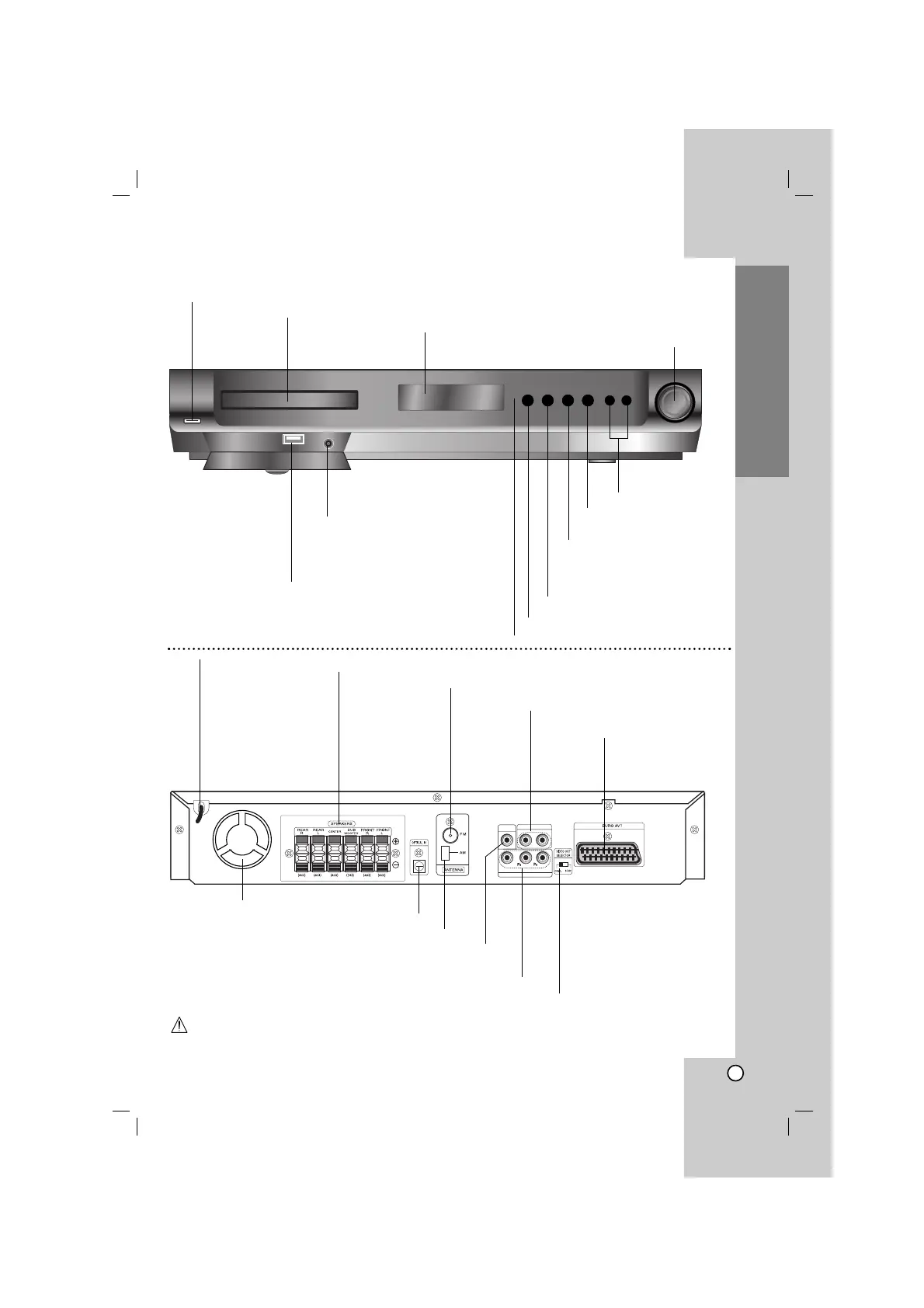
LG HT502PH-D0 - Front Panel;Rear Panel

LG HT502PH-D0
26 pages
Print Icon
To Next Page IconTo Next Page
To Previous Page IconTo Previous Page
Loading...
5
Introduction
Do not touch the inner pins of the jacks on the rear panel. Electrostatic discharge may cause permanent
damage to the unit.
OPEN/CLOSE button
TUNING(-/+)/ SKIP
SEARCH(
..
/
>>
)
Remote sensor
AUDIO IN connector
VOLUME controller
POWER
DISPLAY Window
DISC Tray
USB port
Connect to a USB port of a memory
device (USB memory etc.)
FUNC.(-)/PLAY(B)
Press and hold down this button
about 3 seconds, then press
repeatedly to select other function.
PAUSE (
XX
)/
MONO/STEREO (ST.)
STOP (x)
OUT PUT
INPUT
L - AUX - R
MONITOR
Y
COMPONENT VIDEO (PROGRESSIVE SCAN)
FM Antenna connector
AM Loop Antenna connectors
SPEAKER connectors
Power Cord
MONITOR OUT connector
COMPONENT VIDEO OUT terminals
Connect to a TV with Y P
B PR inputs.
Front Panel/Rear Panel
OUTPUT (TO TV)
EURO AV socket
Connect to a TV with
SCART jack.
Cooling fan
OPTICAL IN connector
AUX AUDIO Input
(L/R) connector
VIDEO OUT SELECTOR switch

Related product manuals