ENGLISH
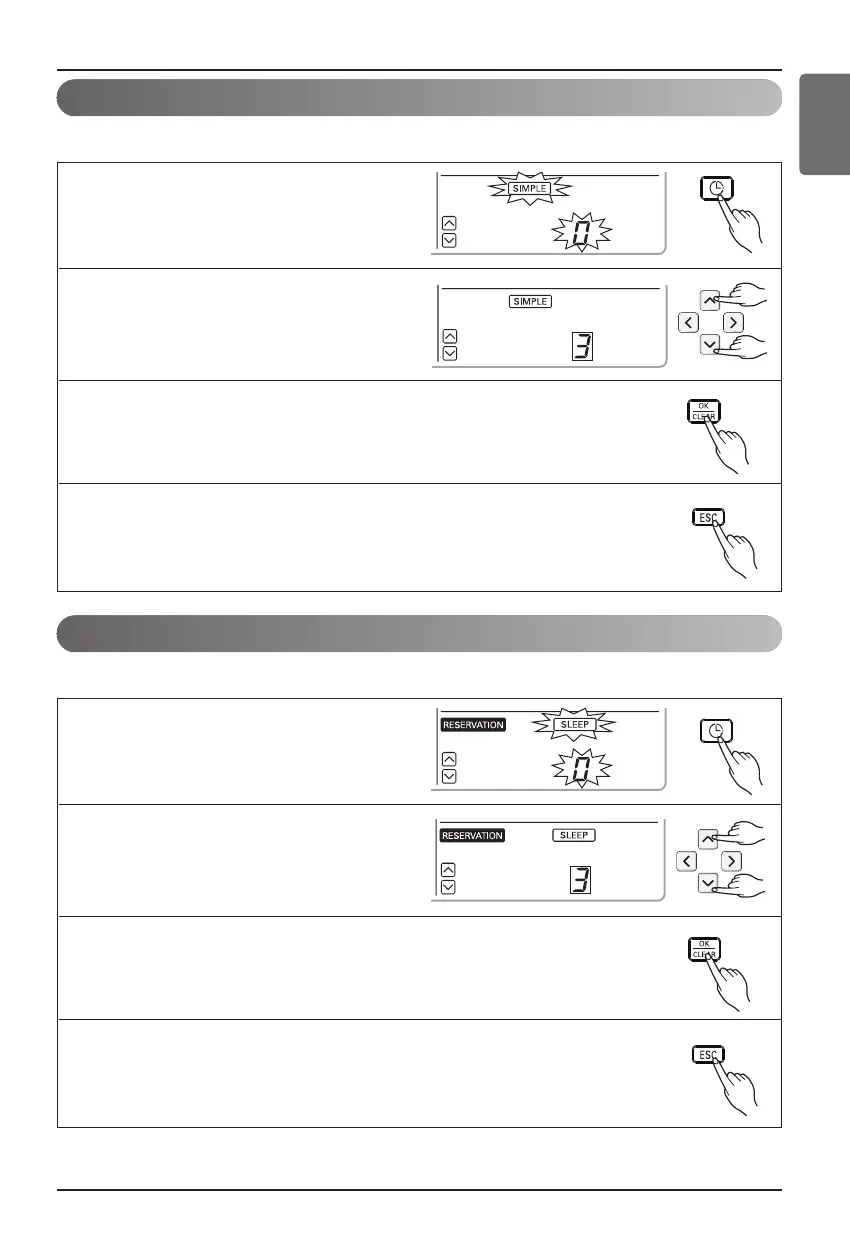
Programming : Setting Simple Reservation
You can easily turn-on reservation.(ONLY enable when unit is stand-by.)
1
Press programming button to enter the
Programming mode. (the segment will be
flashed)
2
Press up, down button to adjust the
reservation time.
3
If you finish the setting, press setting/cancel button to complete
programming
4
Press exit button to exit or system will automatically release without any
input after 25 seconds.
1
Press programming button to enter the
Programming mode. Press Programming
button repeatedly to select [sleep
reservation]. (the segment flashing)
2
Press up, down button to adjust the
reservation time.
3
If you finish the setting, press setting/cancel button to complete
programming.
4
Press exit button to exit or system will automatically release without any
input after 25 seconds.
Programming : Setting Sleep Reservation
You can easily turn-off(sleep) reservation.(ONLY enable when unit is operating.)





 To Next Page