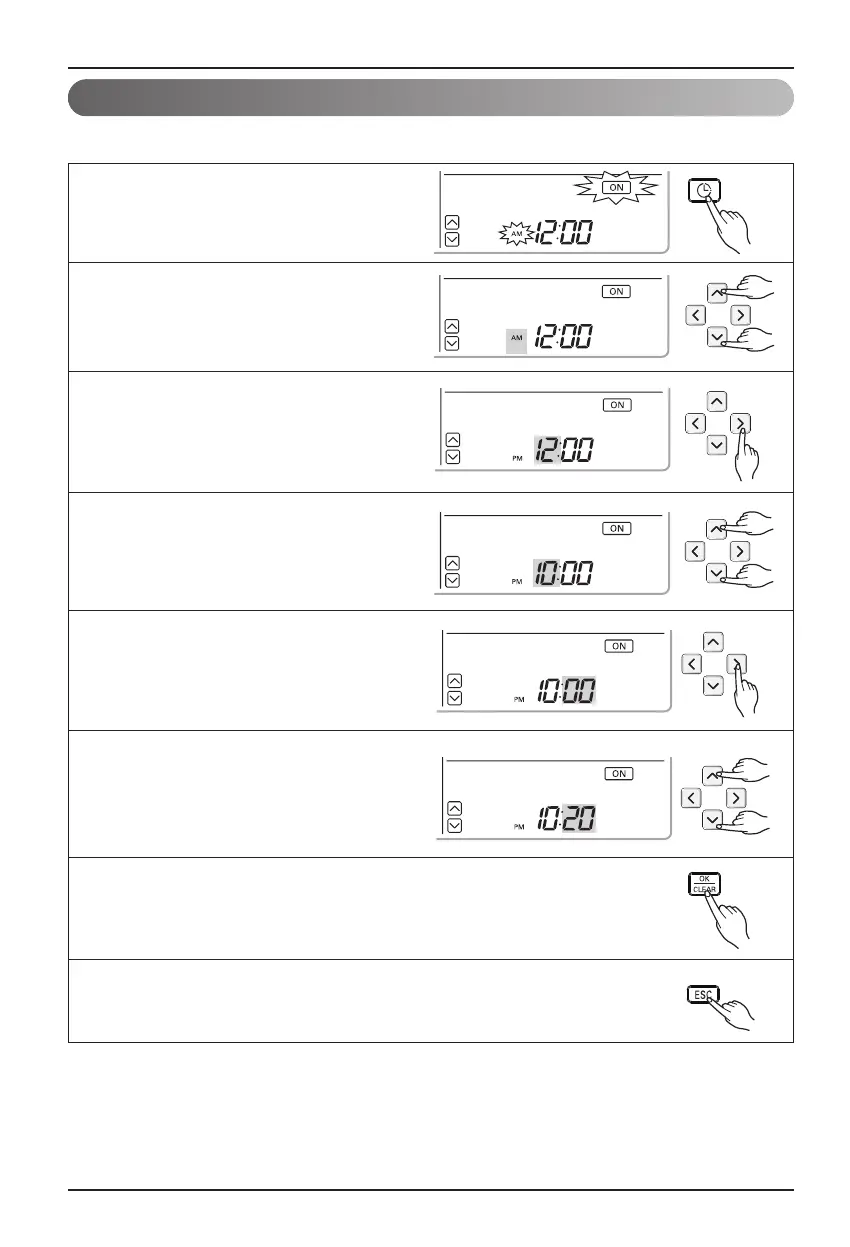
Programming : Setting ON Reservation
This function is able to turn-on after a setting time.
1
Press programming button to enter the
Programming mode. Press Programming
button repeatedly to select [on reservation].
(the segment flashing)
2
Press up, down button to adjust AM/PM.
3
Press right button to move to "Hour"
part. (the "Hour" segment will be
flashed)
4
Press up, down button to adjust the
Hour.
6
Press up, down button to adjust the
Minute.
7
If you finish the setting, press setting/cancel button to complete
programming.
8
Press exit button to exit or system will automatically release
without any input after 25 seconds.
5
Press right button to move "Minute" part.
(the "Minute" segment will be flashed)
Owner's instruction
16 Hydro Kit





 To Next Page