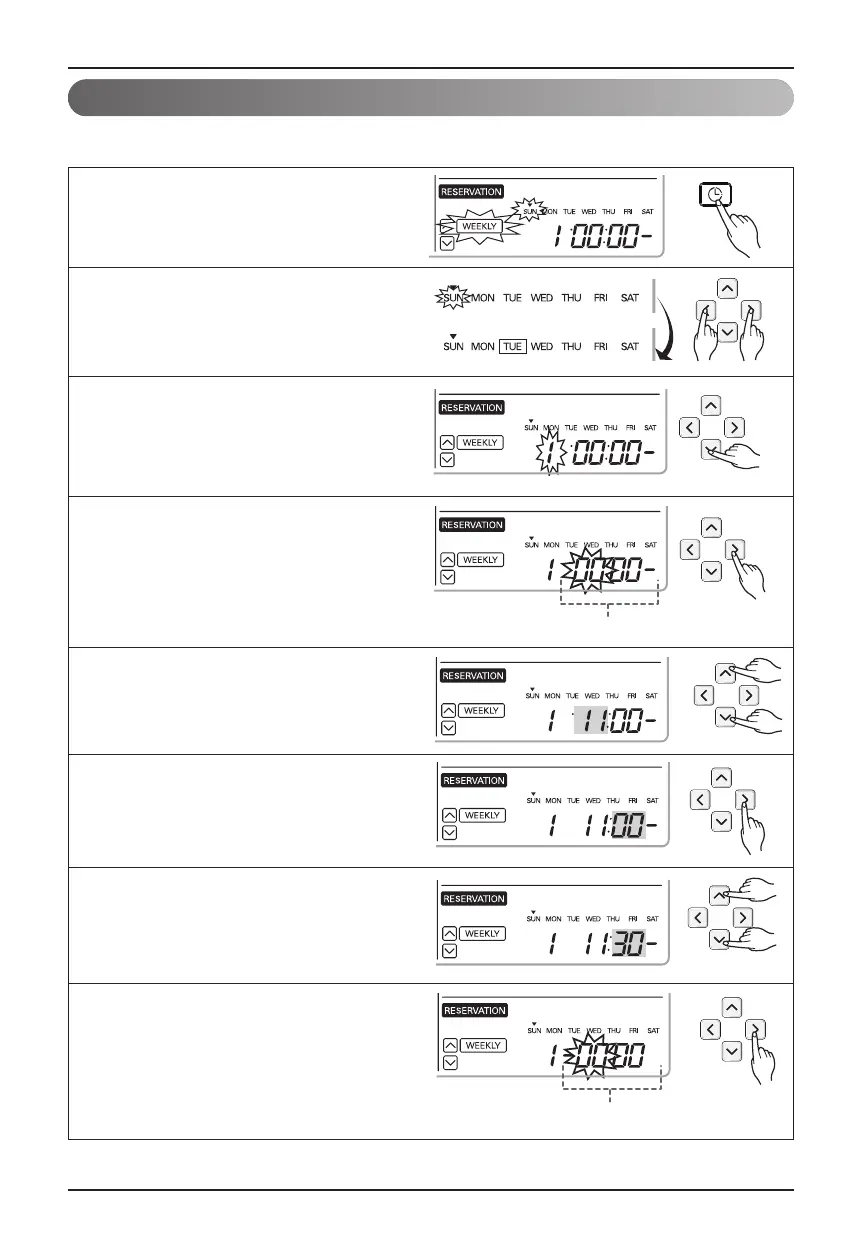
Programming : Weekly Reservation
The weekly reservation is active after setting current time.
1
Press programming button to enter the
Programming mode. Press Programming
button repeatedly to select [Weekly
reservation]. (the segment flashing)
2
Press left, right button to adjust the
current day.
3
Press up, down button to adjust the
action number.
4
Press right button to move to "Hour"
part on ON Time section.
(The "Hour" segment will be flashed)
6
Press right button to move to "Minute"
part on Start Time section.
(The "Minute" segment will be flashed)
7
Press up, down button to adjust the
Minute on Start Time section.
8
Press right button to move to "Hour" part
on OFF Time section.
(The "Hour" segment will be flashed)
5
Press up, down button to adjust the
Hour on Start Time section.










 To Next Page